
Vandaag of morgen in huis

Kwaliteit gegarandeerd

Welkomstaanbiedingen ontgrendelen: GRATIS bezorging | Tot 80% korting | Gratis 30 dagen JoyPlus-proefperiode
Download de app
Choosing a new Apple laptop can feel like navigating a maze of specs and marketing jargon. Especially with the arrival of the new 2026 MacBook models, it's easy to overpay for features you won't use, or skimp on a component you'll regret later. If you're considering buying an Apple MacBook Neo, it's important to look past the hype. We'll outline the most common pitfalls and show you what really matters.
Before you pull out your wallet, it's wise to consider two common mistakes. These often lead to users choosing the wrong laptop for their needs.
To make the right choice, let's focus on the specifications that truly matter for you. Let's take a closer look at the key components of the 13-inch MacBook Neo.
The engine of the new MacBook Neo is the A18 Pro chip. Instead of focusing on technical benchmarks, it's more practical to consider what this means for you. According to Apple, this chip is specifically designed for efficiency and AI tasks (Apple Intelligence). In practice, this translates to a laptop that feels fast during everyday activities, switches smoothly between apps, and, perhaps most importantly, has a long battery life. For a student laptop, this is a crucial advantage: you can get through a full day of classes without bringing your charger.
The MacBook Neo is available with different storage capacities, typically 256 GB or 512 GB.
To help you make the right choice, we've matched several models to specific user profiles.

Why This Fits Their Persona: Ideal for writing papers, online research, and relaxing with a show. The 256GB of storage is a smart, budget-friendly start for those who work extensively in the cloud.
You avoid paying for 'Pro' power you don't need, and the 256GB of storage strikes a sensible balance between price and functionality for studying.
Long battery life (up to 16 hours, according to Apple) and a lightweight (1.23 kg) design, perfect for carrying to campus all day.
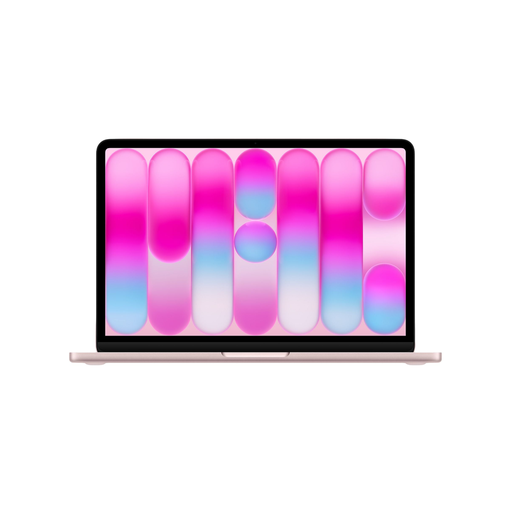
Why This Fits Their Persona: Perfect for managing household admin, storing vacation photos, and smoothly running various apps. The 512GB of storage offers long-term peace of mind.
It avoids the pitfall of insufficient storage. With 512GB, you won't need to invest in external drives or more expensive cloud subscriptions anytime soon.
Ample storage for a worry-free experience and a crisp 13-inch Liquid Retina display that's easy on the eyes during extended use.
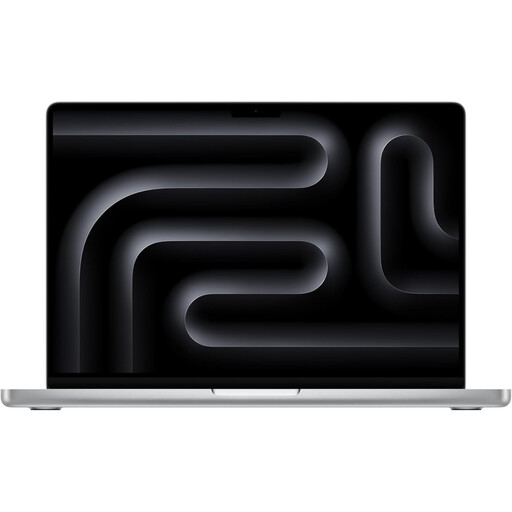
Why This Fits Their Persona: For those who do more than just the basics. Think hobbyist photo editing, programming, or running more demanding software. This model provides the extra power and superior screen for it.
This is for the user who would actually make a bad purchase with an entry-level model. It prevents performance bottlenecks during more intensive use.
The M5 chip, 16GB of RAM, and the Liquid Retina XDR display offer significantly better performance for creative and technical tasks. Includes an HDMI port and SD card slot.
Besides the right laptop, the rest of your setup is also important for a pleasant work experience.
We have compiled a complete, up-to-date list of products that fully meet these strict selection criteria and relevant safety standards.
For most fields of study, where you primarily work with documents, presentations, and online resources, 256 GB is often sufficient. If you work with large files for graphic design or video projects, or if you want to store a lot of media locally, then 512 GB is a safer choice that offers more breathing room for the future.
Yes, the A18 Pro chip is designed for efficiency and performance for the tasks most people use their laptops for. For studying, admin, browsing, and entertainment, this chip is more than capable. Thanks to Apple's regular software updates, you can expect the laptop to remain smooth and secure for years to come.
The Apple MacBook Neo comes with a USB-C to USB-C charging cable. Please note: a power adapter (the 'brick' that plugs into the wall) is not included. To charge the laptop, you will need a separate USB-C adapter that provides at least 20 watts of power.
