
Vandaag of morgen in huis

Kwaliteit gegarandeerd

Welkomstaanbiedingen ontgrendelen: GRATIS bezorging | Tot 80% korting | Gratis 30 dagen JoyPlus-proefperiode
Download de app
For many, a workday consists of hours spent behind a computer. A mouse is an indispensable tool in this setup. A model that doesn't suit you can lead to discomfort and reduced productivity. Finding the right Logitech wireless mouse can be a daunting task due to the vast number of specifications and models.
This guide is designed to help you. As a Joybuy Product Recommendation Officer, I've filtered the information to present a curated selection of popular Logitech mice. The goal is to provide you with clear, practical information so you can choose a model that aligns with your work and preferences.
Before making a choice, it's useful to consider a few key features. These determine how the mouse performs and feels during daily use.
The shape of the mouse is crucial for comfort. A Logitech ergonomic mouse is designed to support the hand, wrist, and arm in a more natural posture. This can help reduce muscle strain. Pay attention to the shape and size of the mouse and whether it is suitable for your hand. For those who want to take it a step further, a trackball mouse is an interesting option. With this, you move the cursor with your thumb instead of your entire arm, which minimises movement.
A Logitech wireless mouse typically connects in two ways: via a USB receiver or directly via Bluetooth.
Modern mice offer more than just clicking and scrolling. A professional mouse distinguishes itself with extra features that can speed up your workflow. Think of programmable buttons, a high DPI (Dots Per Inch) value for precise cursor movement, and a silent mouse with muted clicks, which is pleasant in an open office space.
Based on specifications and functionalities, we have highlighted a number of models suitable for different users and work situations.
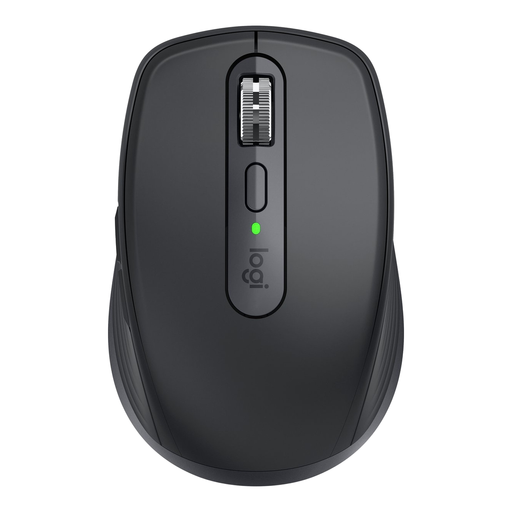
Why This Model Stands Out The MX Anywhere 3S is a compact powerhouse. With an 8000 DPI sensor, this mouse works on virtually any surface, even glass. The quiet click technology reduces distractions, while the MagSpeed scroll wheel ensures fast and precise navigation through long documents.
Advantages
Who Is This Model For? Ideal for professionals who are often on the move, such as consultants or IT staff. Also a great choice for those who want a compact yet powerful mouse for a flexible workspace.
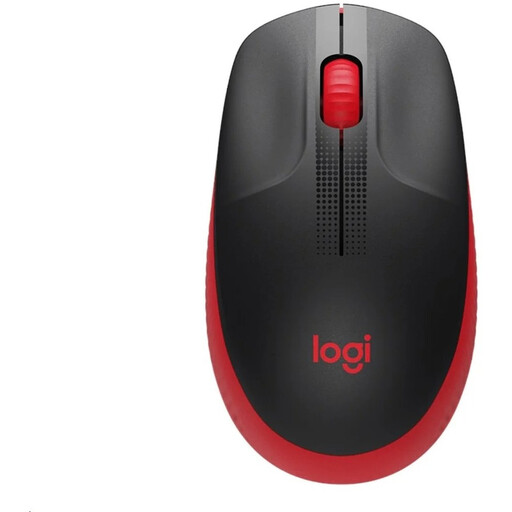
Why This Model Stands Out The M190 is a full-size wireless mouse that focuses on the essentials: comfort and reliability. Its contoured design follows the natural curve of the hand. The battery life is a strong point; according to Logitech, the included AA battery lasts up to 18 months.
Advantages
Who Is This Model For? An excellent choice for home users and office workers who need a simple, reliable, and affordable mouse for daily tasks.
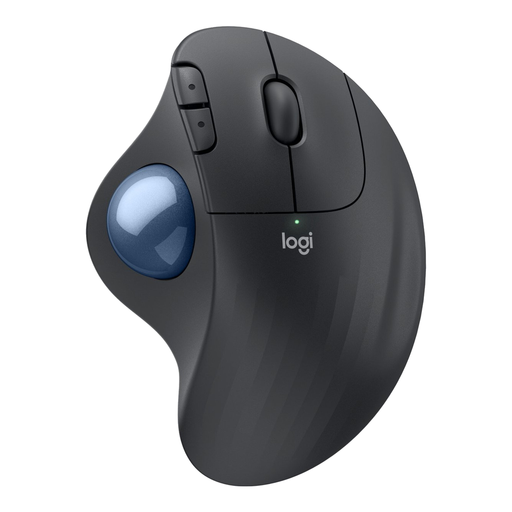
Why This Model Stands Out The Ergo M575 is a trackball mouse that offers a different approach to ergonomics. Instead of moving the mouse, you control the cursor with your thumb. This keeps your arm and wrist still, which can reduce muscle activity. The sculpted housing provides good support for the hand.
Advantages
Who Is This Model For? Users looking for a solution to reduce wrist and arm strain, or for those working at a small desk with limited space.

Why This Model Stands Out The Logitech MX Master series is known as a go-to choice for demanding professionals. The MX Master 4 for Business builds on this with an 8K DPI sensor, quiet click technology, and the MagSpeed scroll wheel. The ergonomic shape is designed for right-handed users and offers a thumb rest and an extra scroll wheel for horizontal navigation.
Advantages
Who Is This Model For? Creators, programmers, analysts, and other professionals who work with a mouse all day and require precision, comfort, and advanced customisation options.
This selection represents some of the popular choices, but Logitech offers a wide range of models. If you are looking for different specifications or another type of wireless mouse, it is worth exploring further.
Check out our full range of RF mouse for more options.
Logi Bolt is Logitech's newer wireless technology. It is designed for a more secure (encrypted) and robust connection in crowded wireless environments, such as large offices. Unifying is the older standard. An important point is that Bolt devices are not compatible with Unifying receivers, and vice versa.
Pairing a bluetooth mouse is usually straightforward:
A Logitech ergonomic mouse is designed to place the hand in a more natural, relaxed position. Models like a vertical mouse or a trackball mouse reduce forearm rotation and wrist movement. While this can help reduce muscle strain, it is not a medical device. It is one of the factors that can contribute to a more comfortable workspace, along with good posture and taking regular breaks.
