
Vandaag of morgen in huis

Kwaliteit gegarandeerd

Welkomstaanbiedingen ontgrendelen: GRATIS bezorging | Tot 80% korting | Gratis 30 dagen JoyPlus-proefperiode
Download de app
A stylus pen for iPad can completely transform the way you take notes, draw, or work. The Apple Pencil is a popular choice, but its premium price point can be a barrier. Fortunately, excellent alternatives exist, such as the Logitech Crayon. But the search for the right digital pen for iPad is full of pitfalls. Many pens promise the world but deliver frustration in practice.
Before you consider buying a Logitech Crayon or choosing another pen, it's crucial to know the most common mistakes:
To avoid wasting your money, there are a few technical specifications you should always check. These determine whether a pen will be a useful tool or a source of annoyance.
This is the most important check. Not every stylus works with every iPad. The Logitech Crayon, for example, is designed to work with all iPad models released in 2018 or later, provided they are running iOS 12.2 or higher. Always check your iPad's model number and software version before making a purchase. This prevents the disappointment of a pen that won't connect.
A good drawing pen for iPad should feel like a real pen. Two features are indispensable for this:
How you charge and connect the pen determines how pleasant it is to use daily. The Logitech Crayon has some clear advantages here. It connects to your iPad instantly when you turn it on, so you don't need to pair it via Bluetooth. Charging is done via a standard USB-C port, the same cable used by many modern devices, including newer iPads. This is far more practical than pens with an outdated connector or a clumsy charging method.
Based on these criteria, we have selected a few pens that suit different user profiles.

Why This Fits Their Persona: Ideal for long lectures or meetings. This pen is a reliable and affordable alternative to the Apple Pencil, focused on productivity. Its flat shape prevents it from rolling off your desk, and the robust design can withstand the bumps of a full backpack.
This pen uses Apple Pencil technology, which guarantees compatibility and precision. The built-in palm rejection and sturdy design directly address the most common frustrations of cheaper pens.
Instant connection without pairing; charges via a universal USB-C cable. According to Logitech, the battery lasts up to 6.5 hours.
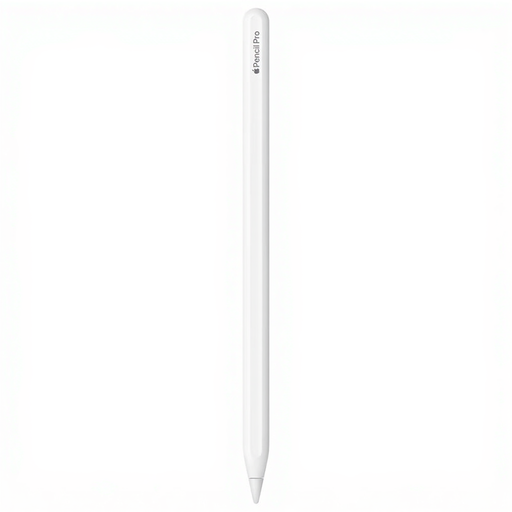
Why This Fits Their Persona: For digital artists, designers, and anyone seeking the most advanced features. If budget is no object and you have the latest iPad Pro or Air, this model offers features that other pens don't.
This is Apple's own reference product, so compatibility and performance are guaranteed. It avoids the pitfall of buying a cheaper pen that ultimately fails to meet professional demands.
Offers pressure sensitivity, haptic feedback, and unique squeeze and barrel roll gestures. Charges wirelessly via the magnetic side of the iPad.
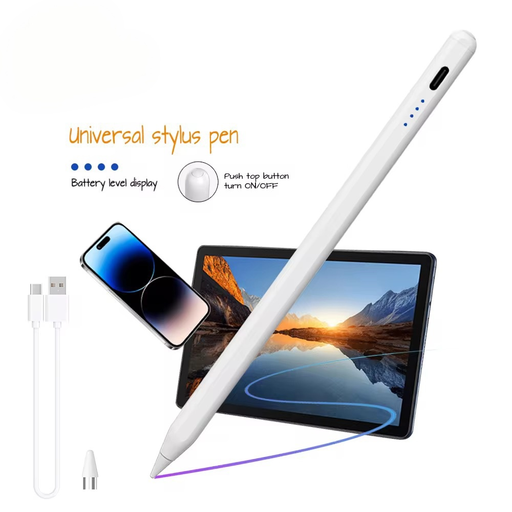
Why This Fits Their Persona: For those who use an Android tablet or another device with a capacitive screen in addition to an iPad. This pen is designed for broad compatibility, so you don't need to buy a separate stylus for each device.
It bypasses the pitfall of platform-specific accessories. While it may not offer all the advanced features of a Crayon or Apple Pencil on an iPad, it delivers the core functionalities across multiple systems.
Universal compatibility with capacitive screens (iOS and Android). According to the manufacturer VoxorAI, the pen has zero lag and a continuous touch function.
We have curated a complete, up-to-date list of products that fully meet these strict selection criteria.
No, the Logitech Crayon is specifically designed for iPad models released in 2018 or later that are running at least iOS 12.2. This includes most recent models of the iPad, iPad Air, iPad mini, and iPad Pro. Always check Logitech's compatibility list before purchasing to ensure your model is supported.
That's the beauty of the Crayon: you don't need to pair it via Bluetooth. Just make sure the pen is charged, slide the power button up, and you can immediately start writing or drawing in supported apps. The connection is established automatically and instantly.
For a large group of users, the answer is yes. The Crayon offers many of the core features that make the Apple Pencil so popular, such as high precision, zero lag, and tilt sensitivity for varying line thickness. The main difference is the lack of pressure sensitivity. If you're a professional digital artist who needs this feature, the Apple Pencil (Pro) might be a better choice. For students, note-takers, and hobbyists, the Logitech Crayon is often a more than capable and budget-friendly alternative.
