Don’t rush into buying a new router. First, check your internet speed using a wired connection at your broadband socket, then test the Wi-Fi where you take your lessons. If the connection is good at the socket, your choice will mainly depend on how you get the signal to the loft: use a wired access point if you can run an Ethernet cable, or a well-positioned mesh point if you can’t. Also check that the model you choose works with your provider’s equipment, what power supply it needs and whether it meets the applicable EU requirements.
Who is this relevant to?
Student with poor Wi-Fi in the loft
If lessons run smoothly elsewhere in the house but drop out in a converted loft, the key things to consider are usable Wi-Fi coverage where you study and where to place an extra access point. The Consumers’ Association of the Netherlands (Consumentenbond) points out that placement affects the connection.
Someone taking live language lessons
For lessons where you speak and listen at the same time, your upload connection matters too. Check whether you can run an Ethernet cable to the loft, and test the connection where you take part in the lesson.
User who wants to keep their provider’s equipment
If you don’t want to replace your existing equipment unnecessarily, compare an additional Wi-Fi access point with the connections and features of your current setup. ACM ConsuWijzer explains the conditions for using your own modem or router.
What should you look for when buying?
First, test the connection at the broadband socket and in the loft. Then choose the Wi-Fi setup that’s right for getting a signal to where you take your lessons.
| What to consider |
What should you check? |
Who is this important for? |
| Coverage in the loft |
Test the Wi-Fi where you take lessons and where you might place an extra access point. If you’re considering a mesh kit, check how many units are included. |
If the connection is good downstairs but drops out where I take lessons, I want to know whether an access point there can provide usable coverage. Around 36% of consumers prioritise coverage where they take lessons. |
| Live video and audio |
For an interactive lesson, test both download and upload speeds. Check whether an Ethernet cable and the required power supply are an option. |
If I’m speaking and listening live, I want to avoid interruptions that disrupt my lesson. Around 29% of consumers prioritise taking part in lessons without interruptions. |
| Existing equipment |
Make a note of the available connections and check what settings are needed to use your own router or an additional Wi-Fi system. |
If you want to keep your provider’s current equipment, look for an add-on that works with its connections. This is the top concern for around 21% of consumers. |
| Power and aftercare |
Check whether your chosen setup needs a cable, a suitable PoE power supply or extra units, and who the seller is. |
If I want to avoid unexpected installation requirements, I compare the complete setup and aftercare in advance. Around 14% of consumers put total costs and support first. |
Wireless equipment sold in the EU must meet the applicable conformity and CE requirements. According to the Dutch Authority for Digital Infrastructure, stricter digital security requirements have also applied since 1 August 2025. So check the specific model and configuration: the model name alone doesn’t establish whether that particular version meets all applicable requirements.
Common buying mistakes
-
Assuming a higher Wi-Fi speed means better coverage in the loft
A stated speed or coverage area doesn’t measure how well the signal travels through your floors and insulation. The Wi-Fi generation alone doesn’t determine the reception you’ll get either.
First, test the connection at the broadband socket and where you take lessons. Then choose a solution based on the connection needed between those two points.
This helps you avoid replacing a working router when the problem lies elsewhere.
-
Putting a wireless repeater where there’s no reception
An extra wireless access point still needs to connect to the main network. So if there’s almost no signal, its connection may be weak too.
Try a spot in between where the signal is still usable. If that doesn’t work, see whether a wired connection is possible.
An unsuitable setup may still mean repositioning the access point, adding another one or running a cable.
-
Confusing a wired access point with a complete router kit
An access point such as the Ubiquiti UniFi U6+ won’t replace your modem or router on its own, and it needs a suitable PoE power supply.
Before buying, check whether you can run an Ethernet cable to the loft and how the access point will be powered.
Installation may require cabling and a suitable PoE power supply.
Relevant brands to consider
TP-Link
The Deco X50 range is worth considering if you want to extend Wi-Fi coverage to several areas. Kits may include different numbers of units.
- TP-Link lists three Gigabit ports per unit for the Deco X50, as well as app-based setup.
- Stated coverage depends on the specific kit and doesn’t tell you how the signal will perform in an insulated loft.
ASUS
The ZenWiFi XD5 is a mesh option for extending coverage to several areas.
- ASUS lists Wi-Fi 6 and kits with multiple units.
- The stated speed and coverage area are manufacturer specifications, not a measurement of the signal where you take lessons.
FRITZ!
The FRITZ!Repeater 1200 AX is worth considering if you want to extend your current router’s coverage rather than replace it with a complete kit.
- The manufacturer lists a Gigabit LAN connection and compatibility with a FRITZ!Box or another router.
- Check which features are available with your existing router.
Ubiquiti
The UniFi U6+ is a wired access point for setups with an Ethernet cable running to the loft.
- Ubiquiti lists one Gigabit network port and a maximum power consumption of 9 W.
- The access point needs a suitable PoE power supply and won’t replace your router on its own.
Joybuy products for Wi-Fi in the loft
This selection includes a router to replace your existing one, wired access points and mesh kits for adding a Wi-Fi access point along the route to the loft.
 No image available
ASUS RT-AX52 AX1800 AiMesh router
A good fit if you want to replace your router and may add compatible ASUS AiMesh devices later.
Dual-band Wi-Fi 6 (2.4 GHz / 5 GHz); Gigabit Ethernet; AiMesh support.
Check the settings required to connect it to your provider’s equipment.
Joybuy
 No image available
TP-Link TL-WA801N
A good fit if you want to extend an existing wireless network or can run a wired connection to an access point.
2.4 GHz band; stated maximum wireless data rate of 300 Mbit/s; two antennas; Passive PoE.
This version lists the 2.4 GHz band only. Its maximum data rate doesn’t tell you how good reception will be in the loft.
Joybuy
 No image available
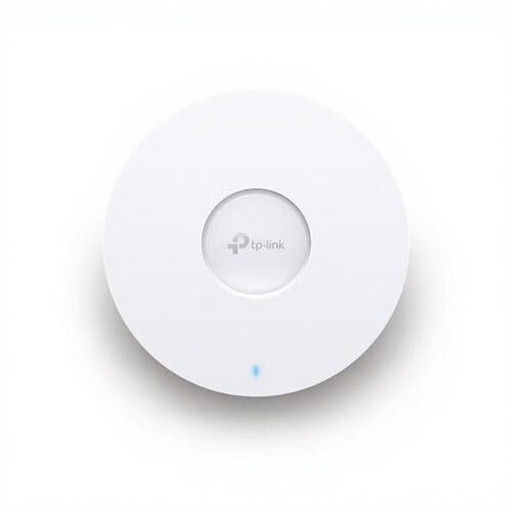
TP-Link Omada EAP670
A good fit if you can run an Ethernet cable to the loft and want to install a wired Wi-Fi access point there.
Wi-Fi 6; 2.5 Gbps Ethernet port; PoE support; ceiling or wall mounting.
Check which PoE power supply your setup needs.
Joybuy
 No image available
TP-Link Deco X50-PoE (3-pack)
A good fit if you want to combine several mesh points with a wired setup.
Three units; dual-band Wi-Fi 6 (2.4 GHz / 5 GHz); two Ethernet ports per unit; PoE support.
Check where to place the units and what power supply your chosen setup needs.
Joybuy
 No image available
TP-Link Deco X50 (2-pack)
A good fit if you want to use two mesh units and keep the option of a wired connection between them.
Dual-band Wi-Fi 6 (2.4 GHz / 5 GHz); two units; three Gigabit Ethernet ports per unit; Ethernet backhaul supported.
Performance in the loft will depend in part on where the units are placed and how they connect to each other.
Joybuy
Frequently asked questions
Should you buy a new router if your language lesson keeps dropping out in the loft?
Not straight away. First, test the connection using a wired connection at the broadband socket, then compare it with the Wi-Fi where you take lessons. This can help you work out whether the issue is with your broadband connection or your home Wi-Fi.
Where should you put an extra wireless Wi-Fi access point?
Don’t automatically put it where the signal is weakest. A wireless access point still needs to connect to the main network, so try an in-between spot before settling on its position.
Can you connect your own router in the Netherlands?
According to ACM ConsuWijzer, you can choose your own modem or router as long as it meets the applicable requirements. Your provider can give you the settings you need and may refuse to support an unsafe device.
Which rules and rights should you know about when buying?
Wireless equipment sold in the EU must meet the applicable conformity and CE requirements. Stricter digital security requirements have also applied since 1 August 2025. According to ACM ConsuWijzer, when you make an ordinary online consumer purchase, you generally have 14 days from delivery to change your mind. Your statutory guarantee is separate from any manufacturer’s warranty. Check that the specific version being offered meets the applicable requirements.


