
Student with weak Wi-Fi in the loft
You download course files in your converted loft and want to know whether an extender can still connect to the router when placed somewhere suitable.


For a converted loft where you need to download course materials, a wireless extender is a sensible option only if it can still receive a usable signal from the router from an intermediate location. If you can run a cable upstairs, you could consider a wired access point. The Dutch Consumers' Association tests coverage and speed in different locations, so the advertised Wi-Fi speed alone won't tell you what to expect in the loft. If you also need better coverage in other rooms, compare mesh systems and check router compatibility, the number of units and how they connect to one another.
You download course files in your converted loft and want to know whether an extender can still connect to the router when placed somewhere suitable.
You can run a network cable to the loft and are looking for a device that explicitly supports access point mode or LAN bridge mode.
You want to improve coverage in other rooms as well as the loft, and weigh up whether a mesh system with multiple units suits your home and set-up.
Choose this option: if there is a spot between the router and the loft where the extender can still receive a usable signal from the router.
Bear in mind: placement is crucial; an extender can't fix a weak connection to the router by itself.
Choose this option: if you can run an ethernet cable to the loft and the device has a suitable access point or LAN bridge mode.
Bear in mind: you'll need to run a cable and check the operating mode of the exact model.
Choose this option: if you need better coverage not just in the loft, but in other rooms too.
Bear in mind: you'll need multiple devices, and wireless mesh units still need a suitable connection to one another.
| Buying priority | What should you look for? | Who is this important to? |
|---|---|---|
| Wi-Fi in the loft | Check for a suitable spot between the router and the loft, then assess the download speed in the loft itself. | If I'm mainly downloading course files in the loft, I want to know whether the extra unit can still maintain a good connection to the router. Consumers who prioritise loft coverage make up around 36% of those looking for a Wi-Fi solution for this loft scenario. |
| Wired connection | Check whether you can run a cable and whether the exact model has access point or LAN bridge mode; an ethernet port alone doesn't confirm this. | If I can run a cable to the loft, I want to know whether a wired option is suitable when wireless coverage falls short. Consumers who prioritise a reliable wired connection make up around 29% of those looking for a Wi-Fi solution for this loft scenario. |
| Coverage in more rooms | Compare a single extra unit with a mesh system, and check how many units are included and how they connect. | If other rooms also have poor coverage, I want to know how many units the chosen system includes and where to place them. Consumers who prioritise coverage in several rooms make up around 21% of those looking for a Wi-Fi solution for this loft scenario. |
| Router compatibility and usage | Check the features against your exact router model and how many devices you'll need; also consider power consumption. | If I want to keep using my current router and avoid unnecessary extra devices, I'll check in advance which features work together. Consumers who prioritise compatibility and total cost make up around 14% of those looking for a Wi-Fi solution for this loft scenario. |
A wireless extender receives the existing signal over Wi-Fi. If you put it somewhere with a weak connection to the router, that link will remain a bottleneck.
First, check possible locations between the router and the loft. NETGEAR recommends placing its extenders roughly halfway between the router and the room with poor coverage; then test the connection in the loft.
TP-Link's OneMesh feature on the RE505X requires a compatible OneMesh router. This is a specific feature and is separate from whether a device can work as a standard extender.
Check your exact router model and which features are available with it. If you specifically want to use OneMesh, you may need a compatible router.
If your current router isn't compatible with the mesh feature you want, you'll also need to factor in the cost of other network equipment.
The TP-Link Deco X10 is available in different pack sizes. NETGEAR specifically states that no further firmware updates are planned for the EX7300; this information doesn't automatically apply to other models.
Before buying, check how many units are in the pack you've chosen and read the support information for the exact model.
A mesh system with multiple units requires more devices to place and connect than a single extra unit.
TP-Link offers products including the standalone RE505X extender and Deco X10 mesh systems. These ranges let you compare an extra unit with a system that includes multiple units.
The FRITZ!Repeater 1200 AX is worth considering if you use a compatible FRITZ!Box or are looking at a LAN bridge.
NETGEAR provides guidance on both wireless extending and using a compatible extender as a wired access point.
The RP-AX58 is a technical comparison option if you're considering extender or access point mode.
These picks focus on mesh systems for better coverage in several rooms, and a wired access point for the loft. An access point is suitable for this option if you can run an ethernet connection to the location.
 Image unavailable
This three-unit mesh system is suited to situations where other rooms need coverage as well as the loft.
The title specifies Wi-Fi 6 and dual-band 2.4 GHz and 5 GHz. The product description lists three Gigabit Ethernet ports per unit.
 Image unavailable
This access point suits a wired connection to the loft; it needs an ethernet cable to connect to the network.
The product description lists Wi-Fi 6, PoE+ support and wall or ceiling mounting. PoE+ is listed as a power option.
 Image unavailable
A three-unit mesh system to consider if you need coverage in other areas as well as the loft.
The product title specifies tri-band Wi-Fi 6E and the 2.4 GHz, 5 GHz and 6 GHz bands.
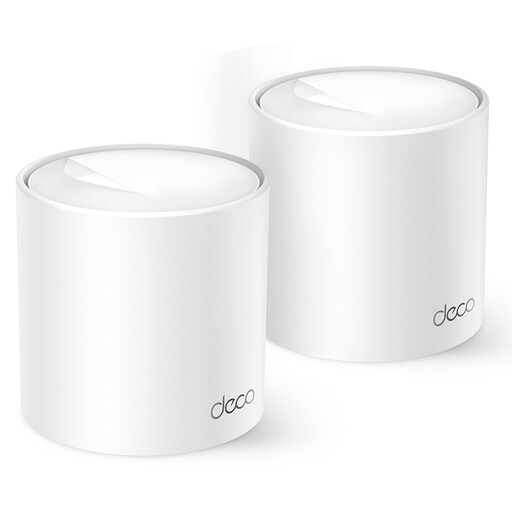 Image unavailable
This mesh option is worth considering if you want a single network for use across several rooms.
The product title specifies dual-band Wi-Fi 6 on 2.4 GHz and 5 GHz. The product description mentions management via the Deco app and roaming within the mesh network.
 Image unavailable
A mesh option to compare if you need coverage in several areas of your home.
The product title specifies tri-band mesh Wi-Fi 6E on the 2.4 GHz, 5 GHz and 6 GHz bands.
Place the extender somewhere it can still receive a good signal from the router, rather than automatically putting it where coverage is worst. NETGEAR recommends placing its extenders roughly halfway between the router and the room with poor Wi-Fi; then check the connection in the loft.
That depends on the operating mode of the exact model; an ethernet port alone doesn't confirm it. TP-Link lists an access point mode for the RE505X, while FRITZ! provides separate LAN bridge instructions for the FRITZ!Repeater 1200 AX.
No. The advertised speed isn't a measurement of your connection in the loft. The Dutch Consumers' Association tests coverage and speed in different locations; after installation, also check whether the limiting factor is the Wi-Fi or the internet connection itself.
For a standard online purchase as a consumer, you generally have a statutory 14-day cooling-off period after delivery, subject to legal exceptions. ACM's consumer advice service also explains that the statutory guarantee period isn't simply set at two years for every device; what you can reasonably expect from its lifespan also matters.
Radio equipment sold in Europe must meet European product requirements and carry a CE mark. The Netherlands Authority for Digital Infrastructure lists Wi-Fi as an example of licence-exempt frequency use that doesn't require notification or registration; check that the version is suitable for the Dutch market and follow the instructions provided.