Who needs better Wi-Fi coverage in the loft?

A student with one weak spot in the loft

You want to take online lessons in a converted loft without replacing your entire home network. It’s important to find a suitable spot where the repeater can still pick up the router’s signal. KPN recommends placing it between the modem and the area where you need better Wi-Fi.

A student with an Ethernet cable running to the loft

You can connect to your study area via Ethernet and want Wi-Fi in the loft without a wireless connection between the router and access point. Check that your chosen device supports access point mode.

A household with weak Wi-Fi on several floors

You need coverage elsewhere as well as in your study area. When choosing a solution, take your existing router, any mesh compatibility requirements and the number of Wi-Fi points you need into account.

What should you look for in Wi-Fi for online lessons in the loft?

Wireless repeater

Choose this if: you mainly need coverage in one study area and there’s still usable Wi-Fi between the router and the loft.

Bear in mind: the wireless connection still depends on where you place it and any obstacles in the way.

Wired access point

Choose this if: there’s an Ethernet connection to the loft or you can run a cable there.

Bear in mind: you’ll need a cable route, and the device must support access point mode.

Mesh system

Choose this if: you need coverage in several areas and want the points to work together as part of a compatible system.

Bear in mind: a complete set includes more equipment than a single repeater. Wireless mesh points also need a suitable connection of their own.

Powerline with Wi-Fi

Choose this if: you can’t run a network cable and the wireless connection to the loft isn’t good enough.

Bear in mind: performance depends on your electrical wiring, so don’t assume it’s a guaranteed replacement for Ethernet.

What to consider What to look for when buying Who should consider this?
Signal in the study area Find an intermediate spot with usable reception and test the connection in the loft. If I mainly need coverage in one study area, I’ll look for a spot for the repeater where the router’s signal still comes through clearly. Around 36% of consumers prioritise reception in that one area.
Connection to the loft Check whether Ethernet is available and whether the device has access point mode. If I can run a cable to the loft, I want to avoid the access point having to connect to the router wirelessly. Around 29% of consumers prioritise this type of connection.
Router and coverage elsewhere Check your router model and mesh compatibility, then work out how many areas need better coverage. If other floors also have weak Wi-Fi, I want to know whether the solution is compatible with my router and can provide coverage in several areas. Around 21% of consumers prioritise this combination.
Cost and use Compare a single device with a set, and check firmware support and the number of Wi-Fi points. If I want to use the equipment for a long time, I’ll consider the number of points and the support available. Around 14% of consumers prioritise the purchase and long-term use.

What mistakes should you avoid when extending Wi-Fi coverage?

  • Putting a repeater in a Wi-Fi dead zone

    A repeater can only pass on the signal it receives. If Wi-Fi has already dropped out at that spot, it won’t be able to pick up a usable signal from the router.

    First, find an intermediate spot with reception. You could use a placement indicator or set-up app, then test the connection in your study area.

  • Assuming an Ethernet port means the device has access point mode

    A port for connecting a device such as a laptop by cable doesn’t automatically mean the device can provide Wi-Fi through a wired connection to the router.

    Check the documentation for the exact model to see whether access point mode is available and how to set it up.

  • Assuming all mesh devices work together

    Mesh features can depend on the router, product range or hardware version. A repeater that also works as a standard Wi-Fi extender won’t necessarily offer the same mesh functionality with every router.

    Compare your router’s full model name and hardware version with the manufacturer’s compatibility information.

  • Treating powerline as a guaranteed replacement for Ethernet

    Powerline performance depends on your electrical wiring and doesn’t automatically provide a usable connection for online lessons.

    Test the connection in the actual study area. Don’t judge it solely by its advertised speed.

Which brands are worth considering?

TP-Link

Worth considering if you’re looking at a standalone RE705X or a Deco X50 mesh set.

  • TP-Link lists a gigabit port and access point mode for the RE705X.
  • If you want mesh, check the hardware version and router: the Dutch product page mentions OneMesh, while the RE705X(EU) version 2.0 data sheet mentions EasyMesh.

FRITZ!

The FRITZ!Repeater 1200 AX is worth considering if you’re looking for a standalone repeater, especially if you already have a FRITZ!Box.

  • FRITZ! lists Wi-Fi 6 and one gigabit LAN connection for the 1200 AX.
  • The integrated mesh functionality described for FRITZ! requires a compatible FRITZ!Box. Using it with another router doesn’t guarantee the same mesh functionality.

devolo

The WiFi 6 Repeater 3000 is worth considering as a standalone repeater which, according to devolo, can also be used as an access point.

  • devolo lists a gigabit LAN connection, access point mode and mesh functionality with other devolo Wi-Fi products.
  • An advertised data transfer speed isn’t a measurement of the connection during an online lesson in the loft.

NETGEAR

The EAX15 is a plug-in extender worth considering for extending an existing Wi-Fi network.

  • NETGEAR lists a gigabit port and the option to use your existing Wi-Fi name.
  • Check the exact model and connection route. Claims about video calls aren’t an independent measurement of performance in your loft.

KPN

SuperWifi is a provider-specific option worth considering if you’re a KPN customer and are looking at multiple Wi-Fi points or support from your provider.

  • KPN describes its own mesh points and lists the FRITZ!Repeater 1200 AX as an option with a FRITZ!Box.
  • Rental and provider support depend on the relevant customer and subscription terms. KPN’s coverage claims aren’t based on independent testing in a loft.

Joybuy products for Wi-Fi in the loft

These product options include mesh systems with multiple Wi-Fi points, a wired access point for a loft with Ethernet, and a standalone wireless repeater.

TP-Link Deco X50 (3-pack) dual-band Wi-Fi 6 mesh system

TP-Link Deco X50 (3-pack) Dual-Band Wi-Fi 6

A mesh set worth considering if you want to extend Wi-Fi coverage to several areas of your home.

3 Wi-Fi points; Wi-Fi 6; three Ethernet ports per point.

A set with three points includes more equipment than a single standalone repeater. Check that it’s compatible with your router and has the CE marking.

View at Joybuy

TP-Link Omada EAP653 Wi-Fi 6 access point

TP-Link Omada EAP653

A wired access point worth considering if you have an Ethernet connection to the loft and want to provide Wi-Fi there.

Wi-Fi 6; gigabit Ethernet port; PoE or DC power; suitable for ceiling or wall mounting.

This set-up requires a network cable to the loft. Check that the device has the CE marking before you buy.

View at Joybuy

TP-Link Deco XE75 Pro (3-pack) tri-band Wi-Fi 6E mesh system

TP-Link Deco XE75 Pro (3-pack) Tri-Band Wi-Fi 6E

A mesh set to consider if you need several Wi-Fi points for different areas.

3-pack; tri-band with 2.4, 5 and 6 GHz; Ethernet ports on each Deco unit.

A set with three points includes more equipment than a single standalone repeater. Check that it’s compatible with your router and has the CE marking.

View at Joybuy
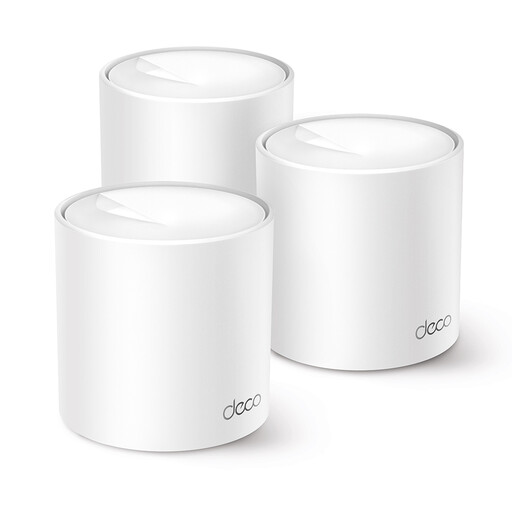
TP-Link Deco X10 dual-band Wi-Fi 6 mesh system with two points

TP-Link Deco X10 Dual-Band Wi-Fi 6 (2 points)

A two-point mesh system worth considering if you want to improve coverage in more than one area.

Wi-Fi 6; dual-band at 2.4 and 5 GHz; two mesh points.

This is still a multi-point solution rather than a single standalone repeater. Check that it’s compatible with your router and has the CE marking.

View at Joybuy

TP-Link TL-WA850RE wireless Wi-Fi range extender

TP-Link TL-WA850RE 300 Mbps

A standalone repeater worth considering if you want to extend one existing wireless connection and can find a spot where the router’s signal is still available.

Wi-Fi 4 (802.11n); up to 300 Mbps; Ethernet port.

Reception in the loft still depends on where you place it and the signal the repeater itself receives. Check that the device has the CE marking.

View at Joybuy

Frequently asked questions

Where should I put a wireless extender for lessons in the loft?

Place it somewhere between the router and the loft where it can still receive a usable signal from the router, rather than automatically putting it next to your laptop in the loft. A placement indicator or set-up app can help you find a suitable spot. Test the connection before your lesson.

Is the Ethernet port useful if the repeater connects to the router wirelessly?

With a suitable model, an Ethernet port lets you connect a device to the repeater by cable, but the connection between the repeater and router will still be wireless. If you want a wired connection, check whether the device supports access point mode and whether you can run a cable to the loft.

Do I need to buy Wi-Fi 7 for online lessons?

Not just because it has a higher version number. The Consumentenbond generally considers Wi-Fi 6 a better-value choice for most people. The Wi-Fi version alone doesn’t determine how well the connection will work in your loft.

What can I expect from the warranty if a product develops a fault?

As well as any manufacturer’s warranty, you have statutory rights against the retailer in the Netherlands if the product doesn’t work as you could reasonably expect under normal use. ACM ConsuWijzer states that there isn’t one fixed statutory warranty period that automatically applies to every device.

Can I use a Wi-Fi repeater at home, and what should I check to make sure it complies with the rules?

According to the Dutch Authority for Digital Infrastructure, you can use Wi-Fi at home without a licence if you use the designated frequencies and comply with the conditions of use. Wireless equipment sold in the Netherlands must have the correct CE marking. Check the marking on the device and follow the instructions.
