
Vandaag of morgen in huis

Kwaliteit gegarandeerd

Welkomstaanbiedingen ontgrendelen: GRATIS bezorging | Tot 80% korting | Gratis 30 dagen JoyPlus-proefperiode
Download de app
A wireless mouse for your laptop, office or home working setup may seem easy to choose. However, three issues regularly lead to disappointing purchases: a connection that is not compatible with your devices, sensitivity that cannot be adjusted properly and a shape that becomes less comfortable over time. Even a long battery life stated on the packaging does not always reflect your particular usage situation.
The Lofree Wavy Chips Bluetooth mouse, also known as the Lofree EP115 or Milk Tea mouse, combines Bluetooth with 2.4 GHz. This makes it suitable for users who want to work without cables and switch between multiple devices. Below, you can find out which specifications matter and which alternatives may suit different usage profiles.
A Bluetooth mouse works without a USB receiver, but not every desktop PC or laptop supports the same Bluetooth version. A mouse with a 2.4GHz receiver may instead require an available USB port. Check the following in advance:
A dual-mode mouse offers greater flexibility here. According to the product specifications, the Lofree EP115 supports Bluetooth 4.0 and 2.4 GHz. However, please note that the mouse is not suitable for Boot Camp dual-system mode on Mac devices.
DPI determines how far the cursor moves in response to a particular hand movement. A higher value is not automatically more practical. A lower setting may be more comfortable for word processing, spreadsheets and browsing, while higher sensitivity can be useful on a large screen.
The Lofree Wavy Chips Bluetooth mouse has five adjustable DPI levels: 800, 1200, 1600, 2400 and 3600 DPI. According to the product information, the default setting is 1200 DPI. This makes the mouse with adjustable DPI suitable for a range of everyday tasks, without requiring you to install software.
The term ergonomic does not tell you whether a mouse will suit every hand. Consider its width and height, the position of the thumb buttons and the way you hold the mouse. A compact mouse can be practical when travelling, while a larger model may provide better hand support.
The Lofree EP115 is described as having a thumb wheel and intuitive side buttons. These can be useful for navigation and extended periods of work, but personal fit remains important. Try to keep your hand relaxed and check that your fingers are not held in constant tension.
A good wireless computer mouse should be compatible with your operating system and available connections. According to the product specifications, the Lofree EP115 is compatible with:
The Bluetooth connection is useful if you do not want to use a USB dongle. The 2.4GHz mode is practical for devices without Bluetooth or when you prefer a dedicated wireless receiver.
The Lofree uses a PAW3220LU optical sensor with a maximum resolution of 3600 DPI and a stated speed of 30 IPS. For office work, studying, browsing and general laptop use, the adjustable levels are particularly relevant. Ideally, use the mouse on a flat, non-reflective surface; according to the instructions, strong light sources or a reflective desk can affect tracking.
According to the product information, the built-in 800mAh lithium battery takes approximately three hours to charge and lasts for up to around one month under normal use. This is an estimated figure and may vary depending on the connection type, length of use and sleep mode.
A rechargeable mouse means you do not have to buy loose batteries regularly. However, check whether you can use the mouse while it is charging if this is important for your work. The Lofree comes with a USB-to-Type-C cable and, according to the specifications, is also compatible with MicroUSB.
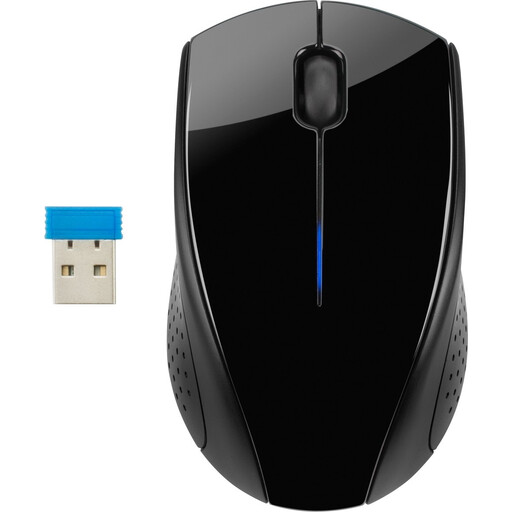
Why it suits this profile: For anyone looking for a simple wireless mouse for a laptop or desktop without Bluetooth or complicated settings. According to the product information, the model is suitable for both right- and left-handed use.
The 2.4GHz connection works via a USB receiver, so you do not need to set up a Bluetooth connection. However, bear in mind that it requires two AA batteries and has a fixed DPI value of 1300.
2.4GHz wireless connectivity, a rounded shape, suitability for either hand and, according to the product information, up to 15 months of battery life with daily use.
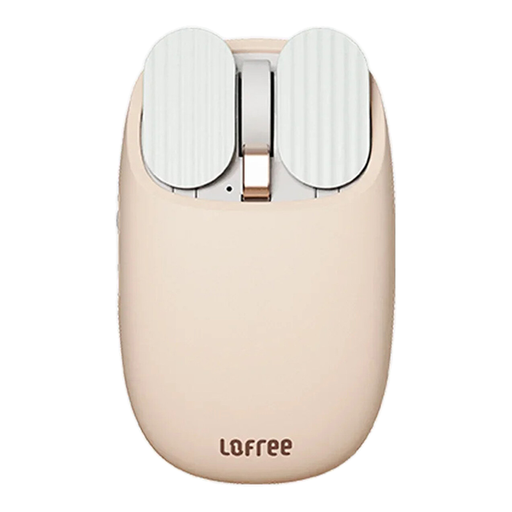
Why it suits this profile: For home workers, students and office professionals who want to combine a distinctive design with multi-device use, adjustable sensitivity and a rechargeable battery.
The dual-mode connection means you are not dependent on Bluetooth alone. The five DPI levels let you adjust the control rather than relying on a single fixed sensitivity.
Bluetooth 4.0 and 2.4 GHz, a PAW3220LU optical sensor, 800–3600 DPI, Kailh microswitches and a built-in 800mAh battery. According to the product information, a full charge takes approximately three hours.

Why it suits this profile: For users who work with a laptop, desktop and tablet and frequently navigate wide spreadsheets, timelines or documents.
According to the product description, the mouse supports one 2.4GHz device and two Bluetooth devices. The side wheel is designed for horizontal scrolling. Due to its size, this model is less suitable for compact travel bags.
Up to three paired devices, a side wheel, an adjustable optical sensor of up to 3200 DPI and a rechargeable battery with LED indicator. According to Trust, the model has quiet buttons.
We have put together a complete, up-to-date list of products that fully meet these strict selection criteria and the applicable European safety regulations.
Yes. According to the product specifications, you can connect the mouse via Bluetooth, so you do not need a USB receiver for this connection. The 2.4GHz mode does require the accompanying receiver and a suitable USB connection.
According to the product information, the built-in 800mAh battery lasts for approximately one month. This depends on usage and connection mode. A full charge takes around three hours. The mouse comes with a USB-to-Type-C cable.
According to the product description, the mouse has an ergonomic shape, thumb wheel and side buttons. The five DPI settings provide additional choice when controlling the cursor. Whether the shape is comfortable depends on your hand size, grip and working posture. During extended use, take regular short breaks and check that your wrist and fingers remain relaxed.
