
Vandaag of morgen in huis

Kwaliteit gegarandeerd

Welkomstaanbiedingen ontgrendelen: GRATIS bezorging | Tot 80% korting | Gratis 30 dagen JoyPlus-proefperiode
Download de app
In practice, a wireless mouse should above all be reliable, comfortable and easy to connect. Yet many models are promoted with impressive DPI values, long battery life or an ergonomic design, while important details are left out. These may include limited compatibility, a missing USB receiver or a shape that does not suit your hand.
The Lofree Wavy Chips Bluetooth mouse is aimed at homeworkers, students, office professionals and laptop users looking for multiple connection options and a distinctive design. The model is also known as the Lofree EP115. Below, you can find out which specifications really matter and which alternatives are better suited to different uses.
A Bluetooth mouse works without a dongle, but not every older device supports Bluetooth in the same way. A mouse with Bluetooth only is therefore not always practical for desktops or computers where Bluetooth has been disabled.
A dual-mode mouse offers greater flexibility. The Lofree EP115 supports both Bluetooth 4.0 and a 2.4GHz connection via the included wireless receiver. Do check that your computer has a suitable USB port for the receiver.
DPI determines how quickly the cursor moves across the screen for the same hand movement. A high value is not automatically more comfortable for word processing or photo editing. For everyday office work, a lower setting may feel calmer, while a higher setting can be useful with large screens.
It is therefore worth looking for several adjustable settings. The Lofree has five levels: 800, 1200, 1600, 2400 and 3600 DPI. According to the product specifications, the default setting is 1200 DPI. This allows you to adjust the mouse's sensitivity to suit different tasks.
Battery claims can vary depending on how frequently the mouse is used, the connection type and power-saving features. So check the battery type, charging time and whether the mouse can be used while charging.
The Lofree EP115 has a built-in 800mAh lithium battery. According to the product information, a full charge takes approximately three hours and the stated usage time is around one month. This is a product estimate, not a guaranteed period for every user.
If you regularly switch between a laptop, tablet and desktop computer, a mouse that supports multiple connections can be highly useful. Bluetooth keeps your USB ports free, while a 2.4GHz receiver is often handy for devices without Bluetooth.
The Lofree Wavy Chips Bluetooth mouse supports:
The stated compatibility includes macOS 10.15 or later, Windows 8 or later, iPadOS and iOS 13 or later, and Android 8 or later. Please note: according to the product information, this model does not work with Boot Camp dual-system mode on Mac devices.
The EP115 uses a PAW3220LU optical sensor with a maximum resolution of 3600 DPI. The stated IPS value is 30. Optical mice generally track most predictably on a flat, matt surface. Highly reflective desks or bright direct light can affect tracking.
A mouse mat is not essential, but it can help provide smoother cursor movement and prevent the desk surface from interfering with the sensor.
An ergonomic mouse does not have the same ideal shape for everyone. Consider its width, height, thumb support and the position of any extra buttons. A compact model is practical for travelling, but may be less suitable for larger hands or long working days.
According to the product description, the Lofree features an ergonomic design, a thumb wheel and side buttons. The Kailh microswitches are designed to provide a light, distinct click. These are technical product features; the comfort you experience will still depend on your hand size, grip and posture.
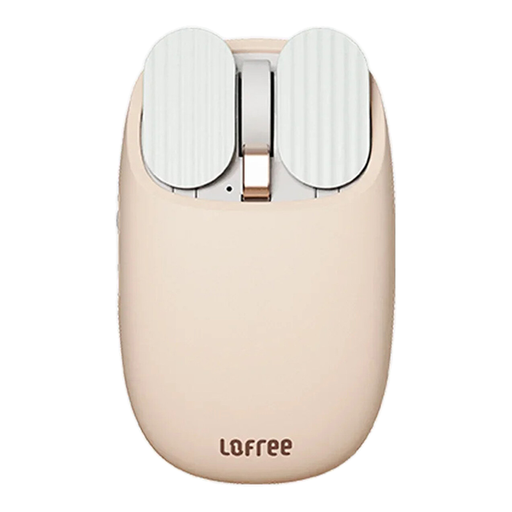
Why it suits this profile: This wireless mouse combines Bluetooth and 2.4GHz, offers five DPI settings and has a rechargeable battery. That makes it suitable for everyday use at home, in the office and on the go.
You are not dependent on just one type of connection. You can also adjust the cursor sensitivity instead of being tied to a single DPI setting.
800mAh battery, five DPI levels, thumb wheel, side buttons and support for Windows, macOS, iOS, iPadOS and Android.

Why it suits this profile: This model is designed for users who value a vertical hand position, adjustable speed and multiple connection options during office work.
The shape and connection options are clearly described. However, check that the vertical grip suits your hand and working style.
Bluetooth and 2.4GHz via a receiver, adjustable DPI up to 4000, a rechargeable battery and a vertical angle of 57 degrees.
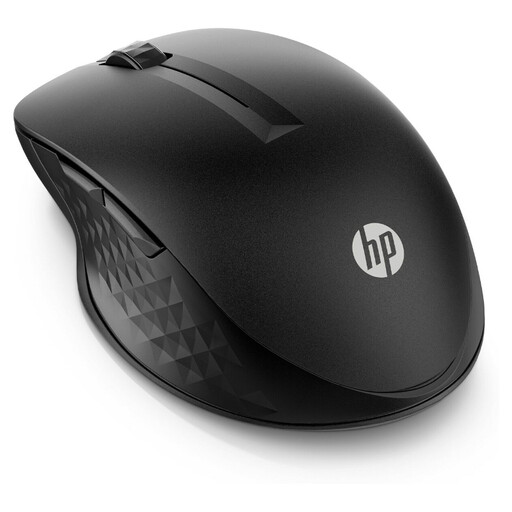
Why it suits this profile: If you frequently switch between a work computer, laptop and tablet, this model offers Bluetooth and RF wireless, four programmable buttons and adjustable scrolling speed.
The connection is not limited to Bluetooth or a receiver alone. You can also customise functions and scrolling behaviour using the accompanying software.
Support for multiple devices, up to 4000 DPI according to the product information, four programmable buttons and power from a single AA battery.
We have put together a complete, up-to-date list of products that fully meet these strict selection criteria and the applicable European safety regulations.
Yes, Bluetooth does not require a USB receiver. If your laptop does not have Bluetooth or you want to use the receiver, you will need a suitable USB port. Also check that the operating system falls within the stated compatibility range.
According to the product information, the built-in 800mAh battery lasts approximately one month and takes around three hours to charge. Actual battery life depends on usage and the connection. Fully charge the mouse before first use, as instructed.
That depends on your devices. A Bluetooth mouse keeps USB ports free and is convenient for laptops and tablets. A dual-mode mouse also offers a 2.4GHz receiver, giving you more connection options for desktops or devices without usable Bluetooth. Start by considering your own equipment and preferred way of working.
