
Switch players sharing one screen
Want to know whether the game supports one Joy-Con per player or requires each player to have a full gamepad. Nintendo says that using a Joy-Con on its own depends on the software and play style.


Start with your console or PC and the game you want to play. Check how many people can play locally, and whether each player needs a full gamepad or can use a single Joy-Con. Then choose between wireless and wired play, and check the power requirements, distance from the screen and whether the game requires a particular type of controller.
Want to know whether the game supports one Joy-Con per player or requires each player to have a full gamepad. Nintendo says that using a Joy-Con on its own depends on the software and play style.
Need a controller that works with their system and game, while taking into account the distance between the screen and their seat, as well as any cable. Microsoft and 8BitDo describe compatibility with specific systems; that does not automatically mean other systems are supported.
Need to consider which version of the game they’re playing: PlayStation lists different options for supported PS4 games on PS5 and PS5 games.
First, check the system, game version and number of players. Then see whether the controls required by the game are available on the controllers you already own. Finally, consider grip, cable length and power requirements for your bedroom set-up.
| What to consider | What to look for when buying | Who is this important to? |
|---|---|---|
| System and game version | Check compatibility with both your system and the version of the game. For example, PlayStation distinguishes between PS4 and PS5 games on PS5. | I want to avoid buying a controller that connects to my device but doesn’t work with the version of the game we’re playing. Around 29% of consumers say compatibility is their main concern. |
| Controls for each player | Check local multiplayer, the number of players and whether the game supports one Joy-Con per player. Nintendo says this depends on the supported software and play style. | I want to make sure everyone can play at the same time and that we have enough suitable controllers. Around 23% of consumers prioritise having separate controls for every player. |
| Buttons and grip | Compare the buttons required by the game with the controller layout; a single Joy-Con and a full gamepad offer different controls. | When jumping and steering, I want a grip and button layout that suit the way we play. Around 18% of consumers say this is their main consideration. |
| Cable and room to move | Measure the distance from the dock or PC to your seat, and plan a safe route for the cable. The PowerA model reviewed has a 3 m cable and works with a docked Switch. | I want to play from my bed or chair without a cable getting in the way of where I sit or walk. Around 18% of consumers prioritise room to move and cable management. |
| Power and what you need | Check how the controller is charged or powered, and what’s included. Nintendo quotes around 40 hours of battery life for the original Switch Pro Controller, depending on use. | I want to know how to keep both controllers charged and whether I need anything else to use them. Around 12% of consumers prioritise convenient charging and any additional items they may need. |
Whether a single Joy-Con works as a separate controller depends on the game and the supported play style. Some games may also require a full gamepad for each player.
Check the controller requirements for the specific game before deciding how many controllers you need.
If the game requires a full controller for each player, you may still need an extra gamepad or pair of Joy-Con.
Nintendo says that Joy-Con 2 only works with Switch 2. Original Joy-Con can be used wirelessly with Switch 2, but cannot be attached to the system.
Before buying, check which generation of system you have. If you want to use older Joy-Con wirelessly with Switch 2, check how to charge them too.
To charge older Joy-Con while using them with Switch 2, you may need a Switch system or a suitable charging accessory.
The PowerA controller reviewed has a 3 m cable, only works with a docked Switch and does not support games that require Joy-Con exclusively.
Measure the cable route to your seat and check that both your system and the game support the controller.
If the cable route doesn’t work with your room layout, you may need a different set-up or controller.
According to the Netherlands Authority for Consumers and Markets (ACM), the retailer remains responsible for the statutory guarantee if a product is faulty.
Compare the terms of any additional cover with the rights you already have.
An additional plan could be an unnecessary expense if it doesn’t provide relevant extra cover.
Relevant controller ranges for Nintendo Switch and Switch 2, with different options for individual controls and full gamepads.
DualSense is relevant for supported PS5 games and can also connect to a PC.
The Xbox Wireless Controller is an option for supported Xbox systems and Windows PCs.
A wired option for Nintendo Switch if you play with the system docked and the cable can safely reach your seat.
The Ultimate 2C Wireless is an option for certain Windows PC and Android set-ups.
This selection includes controllers for Nintendo Switch, Switch 2, PlayStation 5 and Xbox or PC. Before buying, check that your system and local co-op game support the controller you’ve chosen.
 Image unavailable
The product name lists Xbox Series and PC; check that your system and local co-op game support the controller.
 Image unavailable
A full gamepad for one player on Nintendo Switch. Check that the game supports this controller and that it’s compatible with your system.
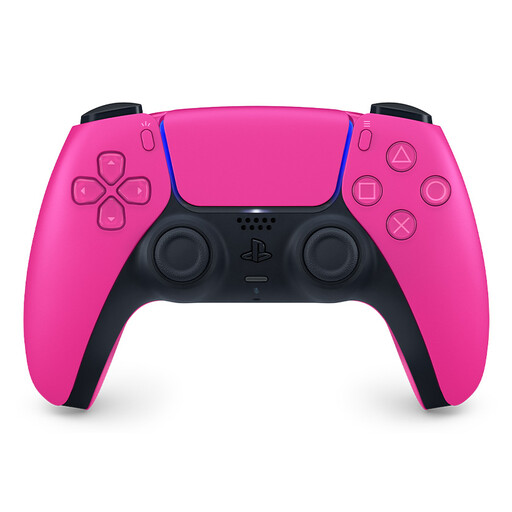 Image unavailable
This controller is listed as a PS5 DualSense; check that the version of the game you’re playing supports DualSense.
 Image unavailable
A pair for Nintendo Switch; whether you can use each Joy-Con as a separate controller depends on the game and supported play style.
 Image unavailable
Joy-Con 2 is only for Nintendo Switch 2; check that your chosen game supports local multiplayer with these controllers.
No, it depends on the game. A Joy-Con can be used horizontally as a separate controller when the software and play style support it, so check the platform game’s controller requirements.
No. Nintendo says that Joy-Con 2 only works with Switch 2. Original Joy-Con can be used wirelessly with Switch 2, but cannot be attached to that system.
Nintendo describes syncing it via USB while the system is docked, or using the SYNC button in the Controllers > Change Grip/Order menu. These instructions apply to Switch and Switch 2.
No, not for a PS5 game. PlayStation says that DualShock 4 and DualSense work with supported PS4 games played on PS5. Check which version of the game you’re starting.
According to ACM ConsuWijzer, when you buy online you generally have a statutory cooling-off period of up to 14 days after delivery, subject to legal exceptions. If a product is faulty, the retailer is responsible for the statutory guarantee; this is separate from any manufacturer’s warranty.