Who is this guide for?

Switch players with friends joining in

You want to play together using the Joy-Con you already own or an extra set. Check whether the game supports separate controllers, and plan when you’ll charge them. Nintendo explains which play modes are supported by Joy-Con and Joy-Con 2.

Console players with limited charging space

You play on PS5 or Xbox and want extra controllers without needing a plug socket for every player while you play. Think about charging or batteries in advance; Sony and Microsoft explain the different options for their controllers.

PC players with few spare ports

You play locally on a PC and need to consider the game, available USB ports, and whether to use a receiver or cable. Check which connection modes work with your device for each model.

What should you look for in extra controllers?

Switch 2 with Joy-Con 2

Choose this if: your game supports Joy-Con 2 held horizontally and used separately. Nintendo says each Joy-Con 2 can then work as a separate controller.

Bear in mind: to charge Joy-Con 2 while attached to the Switch 2, the system must be connected to power. Joy-Con 2 does not work with the original Switch.

Existing Joy-Con

Choose this if: you already have Joy-Con and the game supports separate Joy-Con as player controllers.

Bear in mind: original Joy-Con can be used wirelessly with Switch 2, but cannot be attached to the system for charging. Nintendo suggests charging them using an original Switch or a compatible charging accessory.

PS5 with DualSense

Choose this if: you play on PS5 and the game supports local multiplayer with multiple players.

Bear in mind: Sony says that up to four controllers can be used at once with PS5, although the game may support fewer players. Charge the controller beforehand.

Xbox controller with AA batteries

Choose this if: you use a compatible Xbox or PC and can keep AA batteries to hand.

Bear in mind: Microsoft specifies AA batteries for the controller. A rechargeable battery is a separate accessory and may mean an extra purchase.

Windows PC with a receiver or cable

Choose this if: your PC game supports multiple controllers and you have a USB port available for a receiver.

Bear in mind: a receiver takes up a USB port, while a cable limits how freely you can move. 8BitDo lists 2.4 GHz wireless or cable for the Ultimate 2C Wireless on Windows, and Bluetooth for Android.

What to consider What should you check? Who is this important for?
Compatibility Check the exact system, connection mode and whether the game supports local multiplayer with that controller. If I’m playing on my own console or PC, I want to be sure that both the device and the game support the controller. Around 33% of consumers put compatibility first.
Power during play Check whether the controller uses AA batteries or a rechargeable battery, and how you can charge it. If I don’t have a spare plug socket during a gaming session, I want to have charged controllers or spare batteries ready beforehand. Around 27% of consumers say playing without a charging socket is their top priority.
Number of players Count the controllers needed for the game’s play mode, and check for any system limits too. If I’m playing with several people, I want to know whether one separate controller is enough or whether each player needs a full pair. The player setup comes first for around 20% of consumers.
Extra essentials Check whether you’ll need batteries, cables, receivers or compatible charging accessories, and what’s included in the bundle. Before buying, I want to know whether I’ll need batteries, a charging accessory or a spare USB port as well as the controller. Extra essentials are the first thing around 20% of consumers consider.

Common buying mistakes

  • Assuming a pair of Joy-Con automatically counts as two players

    Whether two Joy-Con work as separate controllers depends on the play mode supported by the game. A pair can also work together as a single controller.

    Before buying, check the game’s local play mode and count how many controllers each player needs for it.

    If the game requires a full pair for each player, you may need extra controllers.

  • Assuming every wireless Xbox controller has a built-in rechargeable battery

    Microsoft specifies AA batteries for the Xbox Wireless Controller and also offers a separate rechargeable battery with a USB-C cable. The power source you need depends on the model and bundle.

    Check the exact model and what’s included in the box before deciding how to power the controller.

    Depending on your choice, you’ll need AA batteries or a separate rechargeable battery.

  • Assuming a charging accessory is included

    Nintendo says the Joy-Con 2 charging grip is sold separately.

    Plan how you’ll charge the controllers beforehand, and check that your chosen method works with your setup.

    If you need the separate grip, you’ll have to buy it in addition to the controllers.

Relevant brands to consider

Nintendo

Joy-Con and Joy-Con 2 are options for local multiplayer on their respective Switch systems, provided the game supports the play style you choose.

  • Nintendo says that a Joy-Con 2 held horizontally can work as a separate controller in supported software.
  • Joy-Con 2 only works with Switch 2. Original Joy-Con can be used with it wirelessly, but cannot be attached to the system for charging.

Sony PlayStation

An extra DualSense is designed for local PS5 games that support multiple players on one system.

  • Sony says that up to four controllers can be used with PS5 at once, and that an extra controller can be paired wirelessly.
  • The DualSense needs charging, and the number of players also depends on the game.

Xbox

The Xbox Wireless Controller is an option for compatible Xbox systems and PCs if AA batteries suit your gaming setup.

  • Microsoft specifies AA batteries and also offers a separate rechargeable battery with a USB-C cable.
  • Check the exact model and what’s included in the bundle. Don’t assume the standard controller has a built-in rechargeable battery without checking.

8BitDo

The Ultimate 2C Wireless is a PC option if a 2.4 GHz receiver or cable suits your setup.

  • 8BitDo lists 2.4 GHz or a cable for Windows, and Bluetooth for Android, for this model.
  • The listed Bluetooth connection for Android does not confirm Bluetooth support for Windows or consoles.

Trust

Trust says the GXT 542 Muta offers a choice of 2.4 GHz receiver, Bluetooth or cable.

  • Multiple connection modes can suit different compatible devices.
  • Check which connection mode works with your system. A receiver uses a USB port, while a cable means playing wired.

Controllers for different play setups

These controllers suit a range of console and PC setups, with both wireless and wired options. Before buying, check that the model and connection mode listed are compatible with your system and game.

PlayStation DualSense wireless controller, Marvel's Wolverine Battle Yellow Limited Edition

PlayStation DualSense, Marvel's Wolverine Battle Yellow Limited Edition

An option for PS5 games that support local multiplayer; the product description lists Bluetooth and a built-in rechargeable battery.

Model: DualSense wireless controller. Platform: PlayStation 5.

View at Joybuy

Wireless DualShock game controller for PS4 and PC

Wireless DualShock game controller for PS4 and PC

The product description says a wired cable connection is available for syncing or charging.

The product name lists compatibility with PS4 and PC; check that your game and system support this controller.

View at Joybuy
GameSir Cyclone 2 Multiplatform Controller, Black-Bundle Edition

GameSir Cyclone 2, Black-Bundle Edition

An option for compatible PC or Switch games if you’re considering wireless connections and the listed charging accessories.

The product information lists PC, Switch, iOS and Android, 2.4 GHz, Bluetooth, USB-C, a rechargeable battery and a charging dock in the bundle.

View at Joybuy

GameSir G7 SE wired controller, Dynamic Blue

GameSir G7 SE, Dynamic Blue

A wired option for compatible Xbox, Windows or Steam games if a USB cable suits your setup.

The product information lists Xbox Series X/S, Xbox One, Windows 10 and later, Steam and a detachable USB cable.

View at Joybuy
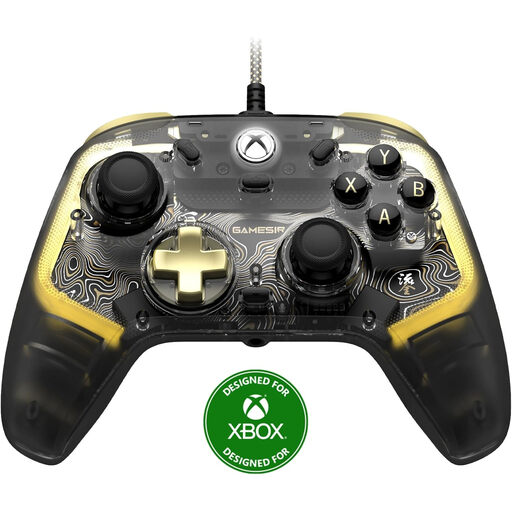
GameSir Kaleid Flux wired Xbox controller, Smoke Transparent RGB

GameSir Kaleid Flux, Smoke Transparent RGB

A wired option for compatible Xbox and Windows games if a USB connection suits your gaming setup.

The product name lists Xbox Series X/S, Xbox One and Windows 10/11.

View at Joybuy

Frequently asked questions

Can one extra pair of Joy-Con 2 let two players join in?

Only if the Switch 2 game supports separate Joy-Con 2 held horizontally. If you use the two controllers together in another play mode, they may work as a single controller, so check the game’s play mode.

How can you charge Joy-Con 2 without a separate mains adapter for each controller?

Nintendo says Joy-Con 2 can charge while attached to Switch 2 when the system is connected to power and switched on or in sleep mode. The separately sold Joy-Con 2 charging grip is another option.

Do you need a separate rechargeable battery for a standard Xbox Wireless Controller?

Not if you’re happy to play wirelessly using AA batteries. If you want to use a rechargeable battery, check whether it’s included in your chosen bundle; Microsoft also lists a separate rechargeable battery with a USB-C cable.

What can you do in the Netherlands if a controller breaks too soon under normal use?

According to ACM ConsuWijzer, if a product breaks sooner than you could reasonably expect under normal use, the seller must repair it, replace it or refund you at no cost. The Netherlands Authority for Consumers and Markets explains that there is no fixed statutory warranty period for every product.

Can you put dead controller batteries in your household rubbish?

No. The Dutch government advises taking used batteries to a collection point, such as a shop or supermarket that sells batteries.
