What should you look for when buying?
Start with your system and game, then count the player slots you need and weigh up freedom of movement, power and extra controls.
| What to consider |
What to look for when buying |
Who should prioritise this |
| Compatibility |
Check the exact system and make sure the game supports the controller and the features you want. |
I want to make sure the controller works with my console or PC and my arena game before anything else. Around 33% of consumers prioritise compatibility. |
| Controllers for players |
Count the controllers you need and check which local multiplayer modes and connections the game supports. |
If I’m inviting extra players, I want to know whether everyone needs their own controller or can use a detached Joy-Con. Around 27% of consumers prioritise the number of usable player slots. |
| Freedom to move and power |
Check the connection type and what’s included for use and charging. |
I want to play from the sofa without a cable running across the room, and know how the controller is powered during a session. Around 20% of consumers prioritise freedom of movement and power. |
| Controls and handling faults |
Check whether the buttons can be customised, whether the game supports those features and what’s in the box. |
For regular matches, I want to know whether I can customise the controls and who to contact if the controller develops a fault. Around 20% of consumers prioritise controls and after-sales support. |
Switch 2 with detached Joy-Con 2 controllers
Choose this if: your game supports using separate Joy-Con 2 controllers horizontally and you want players to control the game individually.
Bear in mind: a pair of Joy-Con 2 controllers counts as two controller connections when used separately; these controllers don’t work with the original Switch.
Switch 2 with Pro Controller
Choose this if: one player prefers a conventional controller with customisable GL/GR buttons.
Bear in mind: Nintendo says the Pro Controller only works with Switch 2. Also count how many controllers the other players need.
PS5 with DualSense
Choose this if: you’re looking for an extra controller for local matches on PS5.
Bear in mind: according to Sony, haptic feedback and adaptive triggers depend on the game; they may require a USB connection on PC.
Xbox with Xbox Wireless Controller
Choose this if: you play on Xbox Series X|S or a Windows PC and want a wireless controller.
Bear in mind: check the power options and box contents for the exact version; a rechargeable battery with a USB-C cable may be sold separately.
Windows PC with 8BitDo or GameSir
Choose this if: the 8BitDo Ultimate 2C Wireless with 2.4 GHz or cable suits your setup, or you specifically want the wired GameSir G7 SE with extra buttons.
Bear in mind: a cable limits your freedom to move; GameSir’s stated resistance to stick drift is a manufacturer claim, not an independent durability test.
Controllers at Joybuy
This selection includes controllers for Nintendo Switch and Switch 2, PS5, Xbox and PC. Check which connections, play modes and features are supported for each model and game.
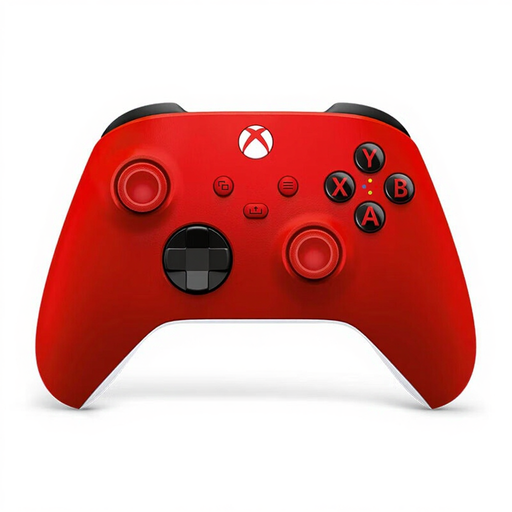 Image unavailable
Xbox Wireless Controller — Pulse Red
A wireless option for playing on Xbox or a Windows PC.
The product information lists Bluetooth, a hybrid D-pad and button mapping. For PC, check that your preferred game and features are supported.
View at Joybuy
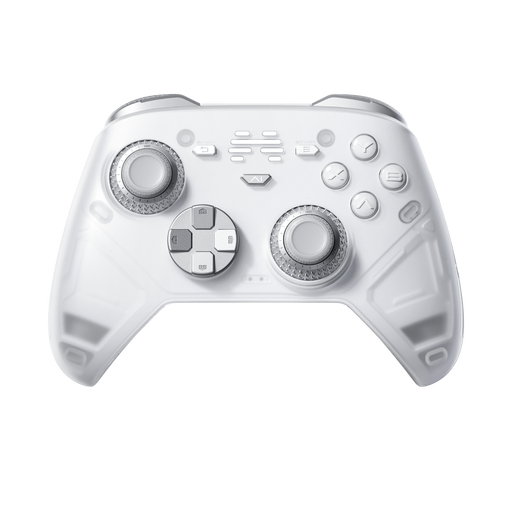 Image unavailable
BEITONG KP70 Haptic Feedback Elite Wireless Controller
An option to compare if you want programmable buttons and play on one of the listed platforms.
The product name lists 6 programmable buttons and compatibility with PC, NS, NS2, iOS and Android. Check which platform listing suits your device and game.
View at Joybuy
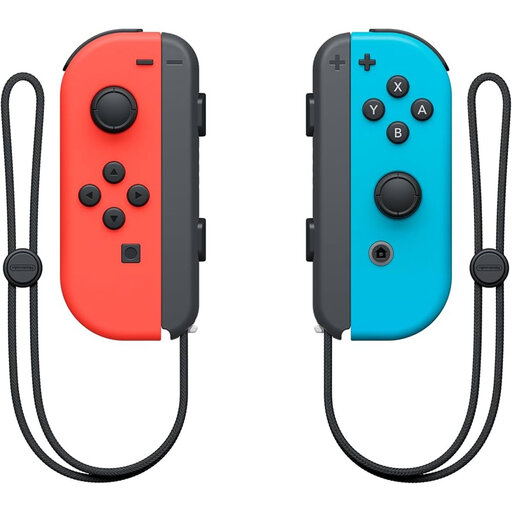 Image unavailable
Nintendo Joy-Con Controller Pair — Neon Red/Neon Blue
A pair to consider for local multiplayer modes on Nintendo Switch.
Check whether the specific game supports using Joy-Con controllers separately and which controller layout is needed.
View at Joybuy
 Image unavailable
Sony PlayStation 5 DualSense Wireless Controller — White
An extra wireless controller to consider for local matches on PS5.
Haptic feedback and adaptive triggers depend on game support. This version doesn’t include a USB cable.
View at Joybuy
 Image unavailable
Nintendo Switch 2 Joy-Con 2 Pair — Light Blue/Light Red
An extra pair to consider for local multiplayer modes on Nintendo Switch 2.
Nintendo says Joy-Con 2 controllers can work separately when the game supports this. According to the product information, these controllers are designed exclusively for Switch 2.
View at Joybuy
Frequently asked questions
Are two Joy-Con 2 controllers always enough for two players?
No, not in every game. Nintendo says each Joy-Con 2 can work horizontally as a separate controller, but the game must support that play style. Check the local multiplayer mode in your arena game.
How many controllers can I connect to Switch 2?
Nintendo says the system can synchronise up to eight wireless controllers in most cases. The controller type, features in use and local communication can affect the limit; this doesn’t mean every game supports eight players.
Will a different controller help with glare in a bright living room?
No, glare is caused by the screen and incoming light, not the controller. Nintendo says you can only adjust the brightness of Switch 2 in handheld or tabletop mode. For TV play, check the screen and your setup.
What if a controller develops a fault quickly during normal use?
In the Netherlands, you can claim your statutory guarantee from the seller if the product doesn’t meet what you could reasonably expect. According to the Netherlands Authority for Consumers and Markets (ACM), this guarantee isn’t automatically limited to two years; the product and how it’s used both matter.
Can I return a controller bought online if I don’t like the grip?
According to the ACM, for a standard online consumer purchase you generally have a statutory cooling-off period of up to 14 days after delivery. Check the terms for trying the controller carefully and returning it. The same right to cancel doesn’t automatically apply to purchases made in a physical shop.


