What should you look for?
First check that your platform and game support the local controls you want. Then consider how many controllers you need and how well the connection works from your seat.
| What to consider |
What should you check? |
Who should consider this? |
| Compatibility |
Check the exact platform and whether the game supports local multiplayer with your chosen controller. |
If I want to play with others on one screen, I want to be sure my platform and the game both recognise the controller. Around 31% of consumers put platform and game compatibility first. |
| Connection from your seat |
Check where your console, PC and any USB receiver will be. For a wired controller, measure a safe cable route; for a wireless one, test it from your intended seat. |
When I sit far from my gaming device, I want a connection that works from where I’m sitting. Around 31% of consumers give the connection between their seat and device top priority. |
| Number of players |
Check how many players the game supports locally and how many separate controllers you’ll need. On Switch, also check whether the game supports individual Joy-Con controllers. |
For an evening with several players, I want enough usable controllers without buying an extra one unnecessarily. Around 25% of consumers put the number of controllers they need first. |
| Power and accessories |
Check the power type, what’s included in the box and which receivers or cables you already have. |
If I use my controller frequently, I want to know whether I’ll need to think about charging, batteries or a receiver. Around 13% of consumers focus mainly on power and the accessories they need. |
Controllers at Joybuy
This selection includes controllers for Switch platforms, Xbox and Windows PC, and PS4 and PC. Before buying, check that your game and exact platform support the local play mode you want.
 Image unavailable
Turtle Beach Afterglow Wave Wireless Controller, transparent
A wireless option for a Switch set-up; the listed platforms include Switch 2, Switch, Switch Lite and Switch OLED.
Bluetooth; TMR sticks; stated battery life of 40 hours; four RGB modes; two programmable buttons.
View at Joybuy
 Image unavailable
Xbox Wireless Controller for Xbox Series and PC, Ice Breaker Special Edition
A wireless option to compare for an Xbox or Windows PC set-up; the listed compatibility includes Xbox Series X|S, Xbox One and Windows 10/11 PCs.
The product name lists Xbox Wireless, Bluetooth, USB-C and two included AA batteries.
View at Joybuy
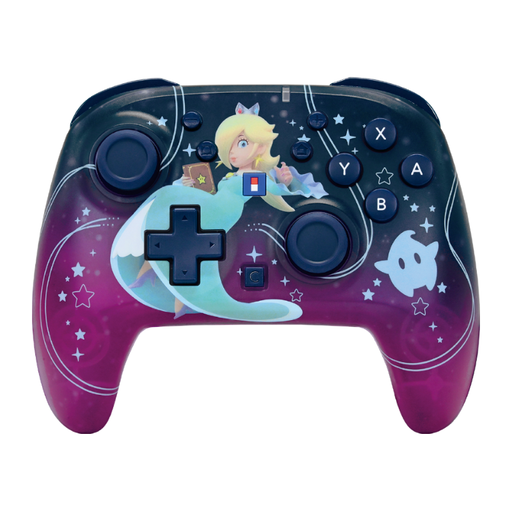 Image unavailable
HORI Super Mario Galaxy Horipad Turbo, Harmony Pattern
A wireless option for a Nintendo Switch or Switch 2 set-up; the listed platform compatibility also includes Switch OLED and Switch Lite.
The product name lists button mapping, a C button and stated battery life of 10 hours.
View at Joybuy
 Image unavailable
Turtle Beach Rematch Super Mario Jump Wireless Controller, Super Mario Jump Edition
A wireless option for a Nintendo Switch 2 or Switch OLED set-up; check that your chosen game supports it.
The product name lists a TMR joystick, stated battery life of 40 hours, a C button for GameChat and two programmable buttons.
View at Joybuy
 Image unavailable
Wireless Dualshock game controller for PS4 and PC
A wireless option for a PS4 or PC set-up; the listed compatibility includes PS4, PS4 Slim, PS4 Pro and PC.
View at Joybuy
Frequently asked questions
How many controllers can you use at once on a PS5?
PlayStation says the PS5 supports up to four controllers at once. Whether four players can join your arena game at the same time also depends on the game’s local multiplayer mode.
Why does your Switch count Joy-Con differently than you expect?
On the original Switch, each wirelessly connected left or right Joy-Con counts as a separate controller; a Pro Controller counts as one. Nintendo also says that no more than two wireless controllers can be connected while Bluetooth audio is connected.
How do you pair an extra DualSense for local play?
PlayStation explains how to pair a second DualSense wirelessly via Settings, Accessories, General and Bluetooth Accessories, using a controller that’s already paired. Charge the controller beforehand, then check that the game recognises it as a separate player.
Do you always need Bluetooth for a PC controller?
No. According to 8BitDo, the Ultimate 2C Wireless uses 2.4 GHz or a cable on Windows; Logitech lists a USB nano receiver for the F710. Check which connection and PC port each model needs.
Will a wireless controller automatically work over a long distance?
No. A wireless connection label doesn’t guarantee that the controller will work from your seat. Test it where you’ll be playing and check where your console, PC or any USB receiver is located.


