
Switch players sharing controllers
You want to play with someone else at a small desk and first need to know whether the left and right controllers can be used separately in your game. Nintendo confirms this is possible in supported games.


First, check that your system and the specific game support the local multiplayer controls you want. The number of players doesn’t automatically tell you how many controllers you’ll need. In supported Switch 2 games, a pair of Joy-Con 2 controllers can serve two players; if a game requires a full gamepad for each player, choose controllers that are compatible with your platform. At a small desk, also think about the space controllers and cables will take up, and how you’ll charge them.
You want to play with someone else at a small desk and first need to know whether the left and right controllers can be used separately in your game. Nintendo confirms this is possible in supported games.
You’re looking for a controller for each player and want to avoid buying a model that works with another device but not with your system or game. Microsoft lists Xbox consoles and Windows PCs as compatible with the Xbox Wireless Controller; Sony explains that DualSense can be used with a PC, although features may vary by game and device.
You’re comparing a compact wireless controller with a wired option, while taking charging, batteries and freedom of movement into account. The Netherlands Authority for Digital Infrastructure notes that wired devices are less likely to experience interference than wireless equipment.
First, find out which controls your game supports for each player. Then compare how much room controllers and cables will take up, and how you’ll power any additional controllers.
Choose this if: you’re playing a Switch 2 game that supports one Joy-Con 2 held horizontally per player.
Bear in mind: not every game supports this play style, and Joy-Con 2 controllers don’t work with the original Switch.
Choose this if: your game requires a full controller or you want each player to have their own gamepad. Check that the model is compatible with your system.
Bear in mind: multiple gamepads need extra storage space and a battery or charging solution.
Choose this if: you’re particularly concerned about grip or cable management at your desk, and you’ve found a model that works with your system and game.
Bear in mind: a cable needs room to run freely, and a compact model may lack features your game uses.
| What to consider | What should you check? | Who is this important for? |
|---|---|---|
| Number of usable controllers | Check how many players the specific game supports and which controller configurations are available. | If I want to keep the number of separate gamepads on my desk to a minimum when playing with two people, I’ll first check whether separate Joy-Cons work with my game. Around 29% of consumers prioritise having enough usable controllers for their game. |
| Compatibility | Check the full model name, console version, PC support and connection type. | If I’m buying an extra controller, I want to be sure it works with both my system and the game. Around 29% of consumers prioritise compatibility with their own platform. |
| Space, grip and cables | Check the controller’s dimensions and whether a cable can run freely between players. | When controllers and hands have to share a small desk, I want to leave enough room to play comfortably. Around 24% of consumers prioritise making the most of their available space and freedom of movement. |
| Charging and batteries | Check how each controller is charged and what batteries or charging options you already have. | If the game is already ready to play, I don’t want an extra player to mean an unexpected charging or battery routine. Around 18% of consumers prioritise convenience when it comes to charging and batteries. |
Separate horizontal use is only possible in games that support this play style; in other configurations, the left and right controllers are used together.
Check the controller configurations for the specific multiplayer game before deciding how many controllers you need.
According to 8BitDo, the Ultimate 2C Bluetooth and Ultimate 2C Wireless versions support different platforms and connection types.
Compare the full variant name and connection type with the system you play on. For Switch 2, 8BitDo says the Bluetooth version needs a firmware update.
According to PowerA, the Nano Enhanced Wireless Controller doesn’t support HD rumble, IR or amiibo NFC.
Check whether your game needs these features and whether the exact version is compatible with your Switch model.
An extra controller may need its own battery or charging solution. Nintendo sells the Joy-Con 2 Charging Grip separately.
Before choosing a model for each player, check which controllers you already have and how you can charge them.
Joy-Con 2 is designed for Nintendo Switch 2. In games that support horizontal controls, each controller can be used separately.
The Xbox Wireless Controller is a full gamepad for compatible Xbox consoles and Windows PCs.
DualSense is a full controller for PS5 and supported games on PC.
PowerA describes the Nano Enhanced Wireless as a compact controller for Nintendo Switch systems.
8BitDo distinguishes the Ultimate 2C Bluetooth version for Switch from the Ultimate 2C Wireless for Windows and Android.
This selection includes a pair of Joy-Con 2 controllers for supported Switch 2 games, as well as separate gamepads for Switch 2, Xbox and Windows systems, and PS5. Always check that the specific game and version suit your set-up.
 No image available
A dedicated wireless gamepad for one player on a compatible Xbox console or Windows PC.
Microsoft lists support for Xbox and Windows. Bear in mind the battery solution you choose.
 No image available
A full controller for a PS5 player who wants their own gamepad.
Sony notes that available features may vary by game and device.
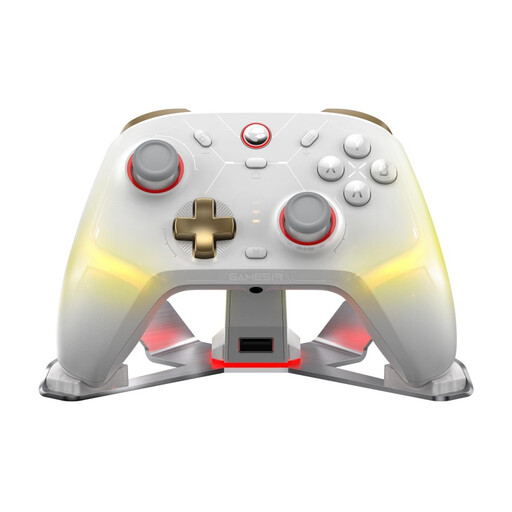 No image available
A dedicated gamepad for anyone looking for a multiplatform controller; the product name lists PC and Switch.
The product name also mentions a charging dock and the White-Bundle Edition.
 No image available
A full controller for a Switch 2 player. Nintendo lists the Switch 2 Pro Controller as an option for local multiplayer.
Check that your chosen game supports this controller configuration.
 No image available
A left and right controller for players who want to use the Joy-Cons separately in a supported Switch 2 game.
Separate use depends on the game. When playing wirelessly, attach the straps as instructed by Nintendo.
Not necessarily. Switch 2 comes with a left and right Joy-Con 2 controller and two straps. In games that support separate Joy-Cons held horizontally, they can serve two players. Check the play style supported by your game.
On Switch 2, go to Controllers and select Change Grip/Order, then press SL and SR on each Joy-Con 2 for horizontal use. Nintendo advises attaching the straps when playing wirelessly.
According to Nintendo, you can charge them while attached to a powered-on or sleeping Switch 2 that’s connected to the mains, or use the Joy-Con 2 Charging Grip, sold separately. Check whether your existing charging set-up is sufficient.
As well as any commercial warranty, you’re entitled to a product that lasts as long as you could reasonably expect it to. According to ACM ConsuWijzer, if a product breaks too soon during normal use, the seller must put it right free of charge, for example by repairing or replacing it, or refunding you where appropriate. There isn’t a fixed statutory warranty period for every product.
The Netherlands Authority for Digital Infrastructure states that equipment must carry the mandatory CE marking. Ordinary licence-exempt wireless devices use shared frequency bands, where interference can occur. If in doubt, check the controller’s markings and product information.