What should you look for?
First, check that the controller and game are compatible with your console. Then work out whether one or both players need their own headphone audio.
PS5 with DualSense
A good fit if: you’re looking for an extra controller for local PS5 games and want a headset socket.
Keep in mind: a socket on the controller doesn’t confirm that two players can receive separate audio at the same time.
Xbox with a headset socket
A good fit if: you want to plug a compatible wired headset straight into a suitable controller.
Keep in mind: check that the cable is long enough on wired models. For wireless versions, check how the controller is powered too.
Switch 2 with Switch 2 Pro Controller
A good fit if: you have a Switch 2 and one player wants to connect wired headphones to the controller.
Keep in mind: this model doesn’t work with the original Switch. Nintendo Support Singapore notes a limitation on headphone use with multiple wirelessly connected Pro Controllers; check whether this information applies to your set-up.
Original Switch with Joy-Con
A good fit if: the game supports playing with separate Joy-Con controllers.
Keep in mind: Nintendo says Bluetooth audio may drop out during local wireless communication. With Bluetooth audio, a maximum of two wireless controllers can be connected.
| What to consider |
What to look for |
Which shoppers is this for? |
| Console and game |
Check the console generation and whether the local game supports the controller and the way you want to play. |
I want the extra controller to work with both my console and the game we’re playing together. Around 33% of shoppers prioritise compatibility with their console and game. |
| Audio for both players |
Check whether the complete console, controller and headphone set-up sends audio to both players at the same time. |
I want both of us to be able to listen through our own headphones, not just have sockets on the controllers. Around 27% of shoppers prioritise simultaneous headphone audio. |
| Number of players |
Check how many players the game supports locally and how many wireless controllers the chosen audio connection allows. |
I want to be able to use enough controllers for everyone playing. Around 20% of shoppers prioritise the number of players who can play at the same time. |
| Connection and power |
Check whether you’ll need batteries, a charge or a USB cable, and whether a wired cable is long enough. |
I want to connect my controllers easily and know in advance how they’re powered. Around 20% of shoppers focus on the connection and running costs. |
Controllers on Joybuy
This selection includes controllers for PS5, Nintendo Switch, Xbox and Nintendo Switch 2. Check each model’s console generation and how your headphones work with your gaming set-up.
 No image available
PlayStation DualSense Wireless Controller – Marvel’s Wolverine Battle Yellow Limited Edition
For a PS5 set-up with a wired headset; the product description lists a 3.5 mm socket on the controller.
Wireless DualSense controller for PS5. A headset socket doesn’t confirm that two players can receive separate audio at the same time.
Joybuy
 No image available
Nintendo Switch Pro Controller – Black
For an original Nintendo Switch set-up if you’re looking for an extra wireless controller.
The product description lists compatibility with Nintendo Switch. Before buying, check how headphones work in the play mode you’ve chosen.
Joybuy
 No image available
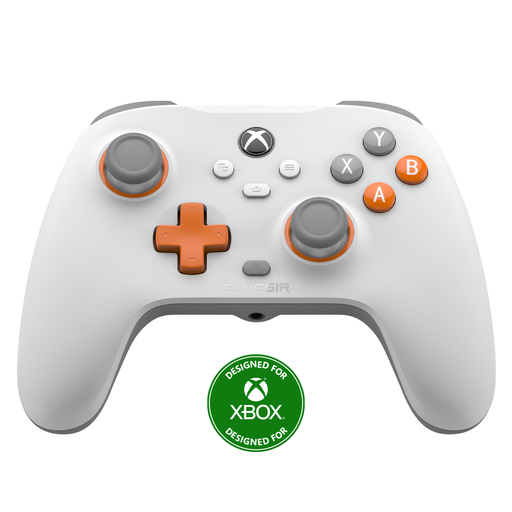
GameSir T7 Wired Xbox Controller with Hall Effect Joysticks and Triggers – White
For Xbox Series X|S, Xbox One or Windows when you want to use a wired controller.
The product name lists Hall Effect joysticks and triggers. Check how to connect your headset to the Xbox set-up you’ve chosen.
Joybuy
 No image available
GameSir G7 Pro Tri-Mode Xbox Controller – Shadow Ember
For Xbox Series X|S or Xbox One if you’re looking for an Xbox controller; the title also mentions use with PC and mobile devices.
The title lists wired use with Xbox and wireless use with PC and mobile devices. Check how your chosen headphones work in the connection mode you’ll be using.
Joybuy
 No image available
Official Nintendo Switch 2 Pro Controller – Black
For Nintendo Switch 2 if one player wants to connect wired headphones to the controller.
Nintendo lists a 3.5mm socket and compatibility with Switch 2 only. Nintendo Support Singapore notes a limitation on headphone use with multiple wirelessly connected Pro Controllers; check whether this applies to your set-up.
Joybuy
Frequently asked questions
Can I use wired headphones with a DualSense connected to a PC via Bluetooth?
PlayStation says you need a wired controller connection to use the headset socket on PC and Mac. So, if you’re playing on a PC, check which connection you’re using.
Why can’t I connect more wireless players to the Switch when Bluetooth audio is on?
Nintendo allows a maximum of two wireless controllers with Bluetooth audio; a pair of Joy-Con counts as two. The Bluetooth audio connection may also drop out during local wireless communication.
How do I connect a Switch 2 Pro Controller?
Nintendo explains that you can pair it using the supplied USB-C cable or the SYNC button in the controller menu. Check that your console is a Switch 2 too, as this controller doesn’t work with the original Switch.
Do I need to buy extra cover if a controller develops a fault?
Not automatically: when you buy as a consumer in the Netherlands, you have statutory rights as well as any manufacturer’s or seller’s guarantee. If a product doesn’t meet reasonable expectations during normal use, the seller is responsible for an appropriate solution. ACM ConsuWijzer says statutory guarantee doesn’t have a fixed duration of exactly two years.
What cooling-off period usually applies to a controller bought online?
For an applicable distance purchase, you usually have 14 days from delivery to cancel without giving a reason. Check the applicable exceptions and any return costs communicated to you in advance.


