
PC gamers sharing a desk
You want to play together on one PC. Check that the game supports local co-op, as well as which controllers and connections your PC game can use.


First, check that your game supports local co-op and the controller input you want to use. Then choose a controller that works with your PC or console. A wired connection avoids wireless connectivity and controller batteries, but the cable can get in the way. Wireless keeps your gaming area clearer, although the connection and power requirements vary by model. Before buying, check whether your existing controllers will do the job.
You want to play together on one PC. Check that the game supports local co-op, as well as which controllers and connections your PC game can use.
You already have an Xbox, PS5 or Switch and need a controller for a second player. First, see whether your existing controllers, including Joy-Cons, will work for the way you want to play.
You want to play together after work without a cable trailing across your desk or walkway. The wireless connection that works depends on the exact controller model and device.
First, check the game’s local play modes and controller support, then make sure the controller is compatible with your device and connection. Only then can you decide whether you need an extra controller and whether a cable will work for your setup.
| What to consider | What should you check? | Who is this important for? |
|---|---|---|
| Device and game | Check the exact controller model, how it connects to your device and whether the game supports that controller. | If I want to make sure the game recognises my PC or console and the input I’ve chosen, I check that combination first. Around 31% of consumers put compatibility with their device and game at the top of their buying priorities. |
| Number of players | Check the game’s local play modes and input requirements, and count the controllers you already have. | If I want to start playing with two people, I first check whether the controllers I have will work with this game. Around 25% of consumers prioritise the number of controllers needed and the local play style. |
| Cables and connections | Check which port you need, whether a receiver is required, the cable length and whether you can keep the cable route clear. | If I want to keep my desk and walkway clear, I weigh up using a cable against the receiver or wireless connection required. Around 19% of consumers give connection type and cable space top priority. |
| Controls | Look at the button layout and grip, and check whether the game supports any extra features. | If I’m playing for longer sessions, I want to know whether the controls feel comfortable and suit the game. Around 13% of consumers put how the controls feel and useful extra features ahead of other considerations. |
| Power | Check whether the controller is wired or needs batteries or charging, and what’s included. | If I don’t want to think about charging or batteries mid-game, I weigh that up against the freedom of playing wirelessly. Around 12% of consumers make power and charging their main consideration. |
Device compatibility and support from a specific game are two different things. A controller that works with your PC isn’t necessarily supported by the game for local co-op.
Before buying, check the game version, local play mode and stated controller input.
The connection type can vary by model and device. For the Ultimate 2C Wireless, 8BitDo specifies 2.4 GHz or USB for Windows and Bluetooth for Android.
Check the connection details for the exact version and make sure you have a suitable free port if needed.
In games that support this play style, each Joy-Con can be used as a separate controller for one player. This doesn’t apply to every game.
Check how your game can be played and try your existing controllers first to see whether they’re enough.
The Dutch government distinguishes between statutory rights and warranties offered by the manufacturer or seller, or available to buy separately.
Check any extra cover separately, and first consider your statutory rights against the seller.
Paid extra cover comes at an additional cost; compare it separately from your statutory rights.
A relevant option if you use a supported Xbox or Windows PC.
DualSense is an option for PS5 and for PC games that support the controller features you want.
Joy-Cons and the Switch Pro Controller offer different ways to play in games that support them.
The Ultimate 2C Wireless is an option for Windows users who can use 2.4 GHz or USB.
The Enhanced Wired Controller for Xbox Series X|S is a relevant option if a wired setup suits your Xbox or Windows PC.
These controllers suit a range of PC and console setups. Before choosing, check that your game supports local play and the controller input you want to use.
 Image unavailable
A wireless option for a compatible Xbox Series or Windows PC setup.
The product description lists Xbox Wireless, Bluetooth, a 3,5 mm jack and AA batteries. Compatible devices listed: Xbox Series X|S and Windows 10/11 PC.
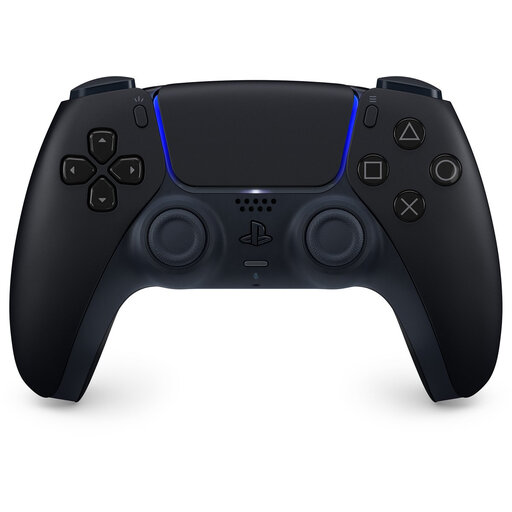 Image unavailable
An option for PS5 players and for PC games that support the DualSense features you want.
The product description lists Bluetooth and USB Type-C, and names PS5, Windows PC, Mac, Android and iOS as compatible devices. Sony says adaptive triggers depend on game support; haptic feedback on PC requires USB. The product description doesn’t list PlayStation 4 compatibility.
 Image unavailable
A wired controller for a compatible Xbox or Windows PC, if a cable works for your gaming setup.
The product description lists Hall Effect sticks, impulse triggers, a headset jack and a detachable 3 m USB-C cable.
 Image unavailable
A wireless option for a Switch setup when the game supports this controller.
The product description lists motion controls, HD Rumble and a built-in lithium-polymer battery. Nintendo confirms that the original Switch Pro Controller can work wirelessly with Switch 2, but its HOME button won’t wake the console from sleep mode.
 Image unavailable
An option for a PC or Nintendo Switch setup, if the supported connection suits your device.
The product description lists wired, wireless and Bluetooth connectivity, along with six programmable buttons. The platform names in the product title are PC, NS, NS2, iOS and Android.
No, it depends on the game’s local play style and which controllers you already have. Nintendo says that separate Joy-Cons can be used individually in supported games, so check what your game allows.
Pair the controllers by following Nintendo’s instructions, then check which play styles the game supports. Nintendo says the number of controllers you can connect depends partly on the type of controller and the features being used.
For this model, 8BitDo lists a 2,4GHz connection or USB cable for Windows; Bluetooth is listed for Android. Check the full model name and which connections your device supports.
No. Sony says adaptive triggers depend on game support, and haptic feedback on PC also requires a USB connection.
The Dutch government says you’re entitled to a product that works properly, and that there is no fixed statutory warranty period in the Netherlands. When you buy from a business at a distance, you’re also often entitled to a 14-day cooling-off period; applicable terms and exceptions may vary.