First, check whether your game supports local co-op, what controls each player needs and whether your existing controllers are enough. Then choose a controller that suits your console or PC. Wireless play keeps controller cables out of the route to the kitchen, while wired play is only practical if the cable can be kept clear of that route. For example, Nintendo says that Overcooked! 2 on Switch supports one Joy-Con per player, but that setup won’t necessarily work with other games.
Who is this relevant to?
A Switch duo who want to puzzle together
You want to check whether your existing Joy-Con are enough, or whether the game requires an extra controller or a full gamepad. For Overcooked! 2 on Switch, Nintendo describes a setup with one Joy-Con per player.
A console duo with a second player
You’re looking for an extra controller for your PS5 or Xbox and want to check that the version you choose suits your system and preferred power source. Sony, Microsoft and Xbox Support provide information about the platforms and power options for their controllers.
Players with a kitchen next to their gaming area
You want to play together without running a controller cable across a walkway. If wired play works for you, the position of your console, seating and the route through the room will all matter.
What should you look for when choosing?
| What to consider |
What should you check? |
Who is this important for? |
| Compatibility |
Check your console or PC, the exact game version, local co-op support and the type of controller required. |
If I play on a console or PC, I want to know whether both the device and the local game mode support the controller. Around 36% of consumers give compatibility top priority. |
| Number and type of controls |
Check each game to see whether one Joy-Con per player is enough or whether each player needs a full controller. |
I want to know first whether our existing Joy-Con can work as two separate controllers, or whether everyone needs a full gamepad. Around 29% of consumers prioritise the number and type of controllers they need. |
| Route to the kitchen |
Check where the console, seating and walkway are. Wired play is only suitable if the cable can be kept clear of the route. |
If the kitchen is next to the gaming area, I don’t want a cable running across the walkway. Wired play can still work if the cable stays safely out of the way. Around 21% of consumers prioritise keeping walkways clear. |
| Power and charging |
Check the battery type, charging method and which cables or accessories come with the model. |
I want to know in advance whether I’ll need batteries or a suitable way to charge the controller, so I can keep using it. Around 14% of consumers prioritise power and any additional items they may need. |
Common buying mistakes
-
Buying a controller before checking the co-op controls
For Overcooked! 2 on Switch, Nintendo describes a setup with one Joy-Con per player. Other games may require different controls, so your existing controllers might already be enough.
Check your game’s local play mode and try your existing controllers before deciding how many more you need.
-
Assuming Joy-Con and Joy-Con 2 are interchangeable
Nintendo says that Joy-Con 2 work only with Switch 2. Original Joy-Con can be used wirelessly with Switch 2, but can’t be attached to or charged from that console.
Check which console generation you have and how you plan to charge the controllers before choosing a model.
-
Confusing controller versions with similar names
8BitDo lists support for Windows and Android for Ultimate 2C Wireless, and for Switch for Ultimate 2C Bluetooth. For Switch 2, the manufacturer lists a firmware requirement for the Bluetooth version.
Check the full model name, intended platform and any firmware requirements before ordering.
-
Choosing wired play without checking the walkway
A cable included in the box makes wired play possible, but it doesn’t mean the cable can be kept out of the way in your room.
First, check where your device and seating are, and the route to the kitchen. Choose wireless if a cable would cross that route.
Brands to compare
Nintendo
Joy-Con and Pro controllers for supported Switch systems; the game determines which controls are available.
- Nintendo describes a setup with one Joy-Con per player for Overcooked! 2 on Switch.
- Joy-Con 2 work only with Switch 2. Original Joy-Con can be used wirelessly with Switch 2, but can’t be attached to or charged from that console.
Sony PlayStation
DualSense as an extra controller for PS5 and supported other devices.
- Sony describes Bluetooth and USB use on certain operating systems.
- Sony says that features may vary by device; adaptive triggers work only when supported by the game.
Microsoft Xbox
Xbox Wireless Controller for supported Xbox consoles and Windows PCs.
- Microsoft lists support for Xbox and Windows.
- Xbox Support says that AA batteries are needed if you don’t have a compatible rechargeable battery pack. Check which power source comes with the version you choose.
8BitDo
Controllers for specific platforms; versions with similar model names may have different connections and compatibility.
- According to 8BitDo, Ultimate 2C Wireless supports Windows and Android, while Ultimate 2C Bluetooth supports Switch.
- For Switch 2, 8BitDo lists a firmware requirement for the Bluetooth version. These models aren’t automatically interchangeable.
Trust
The GXT 542 Muta range includes different versions; check the full item number.
- For item 26198, Trust lists a 2.4GHz receiver, Bluetooth and an included cable, along with support for PC and Switch 2, among other platforms.
- The specifications for item 26198 don’t necessarily apply to other GXT 542 versions.
Controllers at Joybuy
These controllers are designed for various Nintendo Switch systems, PS5 and Xbox. Choose one to suit your console, the controls your game requires and the space around your gaming area.
 No image available
PS5 DualSense wireless controller V3 - Cosmic Red
An option for a PS5 duo who need an extra wireless controller.
The product information lists USB-C charging. Sony notes that features may vary by device and that adaptive triggers depend on support from the game.
Joybuy
 No image available
Xbox Wireless Controller - Robot White
According to the product information, it’s suitable for a second player on the Xbox systems listed or a Windows 10 PC.
The product information lists Xbox Wireless, Bluetooth and AA battery power. Check what’s included in the box and whether you need a compatible rechargeable battery pack.
Joybuy
 No image available
Nintendo Switch Pro Controller - Black
A full-size wireless controller for a Switch player who doesn’t want to use a single Joy-Con as a controller.
The product information lists a built-in rechargeable battery. Nintendo describes how to pair the Switch Pro Controller with Switch and Switch 2.
Joybuy
 No image available
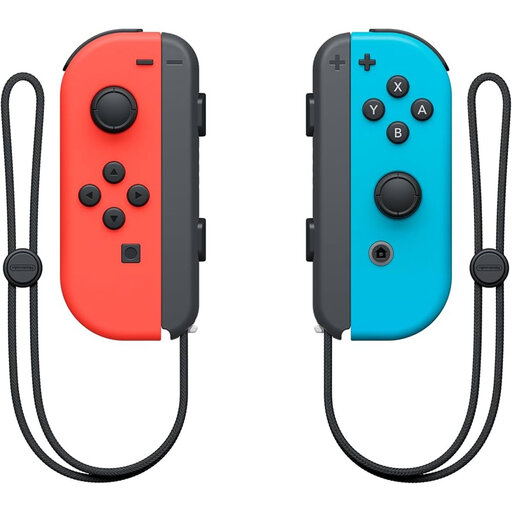
Nintendo Switch Joy-Con pair - Neon Red/Neon Blue
A pair for Switch players if their game supports using each Joy-Con as a separate controller.
The product information describes two Joy-Con, each of which can be used as a separate controller. Check that this setup works with each game.
Joybuy
 No image available
Nintendo Switch 2 Joy-Con 2 pair - Light Blue/Light Red
A pair for two players on Switch 2 when the game supports using separate Joy-Con.
Nintendo says that Joy-Con 2 can only be used with Switch 2.
Joybuy
Frequently asked questions
Do you need to buy an extra controller straight away for co-op on one Switch?
Not always. For Overcooked! 2 on Switch, Nintendo describes a setup with one Joy-Con per player. Check whether this setup is supported for your specific game and version.
Can you use and charge original Joy-Con with a Switch 2?
According to Nintendo, you can pair original Joy-Con wirelessly with Switch 2, but you can’t attach them to the console. You can charge them using an original Switch or a suitable charging accessory.
How do you connect a Switch Pro Controller?
Nintendo describes pairing it with Switch and Switch 2 using the SYNC button, through the controller menu, or via USB, following the system instructions. Check which controller generation you have.
What power source does an Xbox Wireless Controller need?
It depends on the version you choose and your accessories. Xbox Support says that you’ll need AA batteries if you aren’t using a compatible rechargeable battery pack. Check what comes with the controller.
What rules apply in the Netherlands when you buy a controller online?
According to the Dutch government, when you buy from a business online, you’ll generally have 14 days to change your mind; the seller must provide information about the product and this cancellation period before you buy. Your statutory rights if a product is faulty are separate from any additional commercial warranty.


