Start with your console or PC, then check whether the specific co-op game supports two players and the controls you want for each player. With compatible Switch games, a pair of Joy-Con may be all you need, saving space; other games and platforms may require a full controller for each player. Going wireless avoids trailing a cable across your seating area, but remember to check the power supply and whether a receiver is needed.
Who is this guide for?
A Switch duo short on space
You want to know whether the left and right Joy-Con you already own can control two players, without adding full-size controllers to your seating area. It depends on the game: Nintendo Support explains that the available Joy-Con controls vary from one game to another.
A console player with a second player
You have a PS5 or Xbox and are looking for a second controller that connects to your system, preferably without a cable running across your seating area. Some controllers can also be used with a supported PC via USB or Bluetooth; check which features are available for your device and game.
A PC gaming duo on the sofa
You want to use two controllers with one PC. As well as checking game support, find out whether you’ll need Bluetooth, USB or a wireless receiver. Sony, Xbox and 8BitDo list different connection options for their respective controllers.
What should you look for in a controller for local co-op?
First, check that your game supports two players with the controller layout you want to use. Then consider which connection and power options will work best in your seating area.
| What to consider |
What should you check? |
Who should pay particular attention? |
| System and game compatibility |
Check your console or PC, the exact controller model and the type of player input required by the game. |
I want to make sure my system and co-op game both support the controller layout I’ve chosen, so I don’t end up with a combination I can’t use. Around 36% of consumers put system and game compatibility first. |
| Space and connection |
Check whether Bluetooth, a compatible receiver or USB will work with your system, and where it’s set up. |
If space is tight, I’d rather not have a cable running between the seats and the console or PC. Around 29% of consumers give a cable-free seating area top priority. |
| Controls for two players |
Check the game’s controller instructions to see whether it requires one Joy-Con per player or a full controller. |
I want both players to have comfortable controls; a single Joy-Con isn’t the right setup for every game. Around 21% of consumers say usable controls for both players are their main consideration. |
| Power and required accessories |
Check how the exact model is powered and whether you’ll need a cable or receiver. |
I want to know in advance how to power the controllers and what I’ll need to play. Around 14% of consumers prioritise power and any additional accessories. |
Common buying mistakes
-
Assuming a pair of Joy-Con is the same as two full controllers
Whether one Joy-Con per player will work depends on the multiplayer options in the specific game.
Check the co-op game’s controller requirements before you buy. If it requires a full controller for each player, make sure you already have them.
-
Confusing Joy-Con 2 with the original Joy-Con
According to Nintendo, Joy-Con 2 can only be used with Switch 2. Joy-Con and Joy-Con 2 wrist straps are not interchangeable either.
Check the generation of your console, controllers and wrist straps separately.
-
Assuming every wireless controller works with every platform
According to 8BitDo, the Ultimate 2C Wireless is designed for Windows and Android, while the Ultimate 2C Bluetooth is a separate model for Switch. The USB receiver supplied with the Windows model we looked at is required.
Check the full model name, supported platform and which accessories are included with the version you choose.
-
Confusing an extended warranty with your statutory rights
The UK Government says you’re entitled to goods that are of satisfactory quality and that the retailer must put things right if there’s a problem. An additional warranty service doesn’t replace this right.
Check exactly what an extended warranty covers, and contact the retailer if a product is faulty.
Brands worth comparing
Nintendo
A good option for Switch and Switch 2 games that support using individual Joy-Con. Nintendo notes that the compatible play style can vary from game to game.
- In compatible games, the left and right Joy-Con can each be used as a separate player input.
- Joy-Con 2 are for Switch 2 only. For wireless play, also check which wrist straps fit your controllers.
Sony PlayStation
DualSense is worth considering if players need a full controller for PS5 or a compatible PC game.
- Sony lists USB and Bluetooth as connection options for supported PCs.
- According to Sony, available features depend on the game and device; haptic feedback on PC may require a USB connection.
Xbox
The Xbox Wireless Controller is a good option for supported Xbox systems and Windows PCs when each player needs a full controller.
- Xbox lists wireless and USB as connection options.
- On PC, check which connection is available and whether the game supports controller input for the players you want to use.
8BitDo
The Ultimate 2C models we looked at differ by platform: Wireless for Windows and Android, and Bluetooth for Switch.
- The two models offer options for different platforms.
- The USB receiver supplied with the Windows model we looked at is required. According to 8BitDo, the Bluetooth model needs a firmware update for Switch 2 support.
PowerA
According to PowerA, the Enhanced Wireless Controller Rechargeable we looked at is designed for Switch and also works with Switch 2.
- PowerA lists a rechargeable battery and motion controls for this model.
- According to PowerA, this model doesn’t support HD rumble, IR or amiibo NFC; the C Button isn’t available on Switch 2.
Joybuy products for local co-op
These Joybuy picks cover individual controllers and controller pairs for local co-op on Switch, Switch 2, Xbox, Windows PC and PS5. Check which controls each game supports for each player.
 No image available
KONIX JoyPad Controller Pair, blue and red
A pair of controllers for playing together on a supported Switch system; check that the game supports separate controllers for each player.
The product name lists Nintendo Switch and Switch OLED as compatible, as well as Switch 2. The title states an 8-hour battery life and vibration function.
Joybuy
 No image available
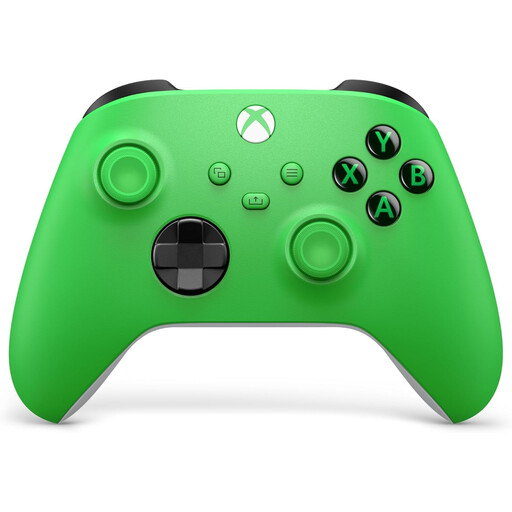
Xbox Wireless Controller, Velocity Green, Series X/S and Xbox One
A full controller for a second player on a supported Xbox or Windows PC. Check that your game supports controller input for local co-op.
The product name lists Xbox Series X/S and Xbox One.
Joybuy
 No image available
Nintendo Switch Joy-Con controller pair, neon red and neon blue
A left and right Joy-Con for two players, when the game supports one Joy-Con per player.
For wireless play, attach the matching wrist straps, as Nintendo recommends.
Joybuy
 No image available
Sony PlayStation 5 DualSense Wireless Controller, white
A full controller for a second player on PS5. Sony lists Bluetooth and USB as connection options for supported PCs; check whether your game supports it.
According to Sony, PC features vary by game and device; haptic feedback may require USB. The product information states that a USB cable isn’t included.
Joybuy
 No image available
Nintendo Switch 2 Joy-Con 2 pair, light blue and light red
A left and right controller for Switch 2; use one Joy-Con per player only if the game supports that control setup.
Nintendo states that Joy-Con 2 work exclusively with Switch 2. For wireless play, use the matching Joy-Con 2 wrist straps.
Joybuy
Frequently asked questions
Are two Joy-Con always enough for two players?
No, it depends on the multiplayer options in the specific game. Nintendo Support says the compatible Joy-Con positions can vary by game, so check the required controls before buying an extra pair.
Do Joy-Con 2 work with the original Nintendo Switch?
No. According to Nintendo, Joy-Con 2 can only be used with Switch 2. The original Joy-Con can be used wirelessly with Switch 2, but can’t be attached to it.
How can I use individual Joy-Con safely during wireless play?
Attach the matching wrist straps, as Nintendo recommends. Joy-Con and Joy-Con 2 wrist straps aren’t interchangeable; also make sure there’s enough space for the movements the game requires.
Do all DualSense features work wirelessly on a PC?
Not necessarily. Sony says available features depend on the game and device; haptic feedback on PC may require a USB connection.
Can I return a controller bought online?
For distance purchases, the UK Government says you usually have 14 days to change your mind, but there are exceptions. Check the terms for your specific purchase.


