
Groups with a Switch 2
Want to know whether their existing or extra Joy-Cons are enough for each player, or if someone needs a full-size controller.


Choose a controller that suits both your console or PC and the game’s local co-op controls. In supported Switch 2 games, two separate Joy-Con 2 controllers can control two players; on PS5, Xbox or PC, a compatible full-size gamepad is often the right choice. Also check how many controllers the game requires, and whether the cable, connection and charging options suit your setup.
Want to know whether their existing or extra Joy-Cons are enough for each player, or if someone needs a full-size controller.
Are looking for an extra controller that works with their console and chosen game.
Want to connect multiple controllers and check that their local co-op game supports the right inputs.
| What to consider | What should you look for? | Who should pay most attention to this? |
|---|---|---|
| Platform and game | Check the exact console model and whether the game supports local co-op with your preferred controller inputs. | When buying a controller for my console, I want to be sure that the specific game supports local co-op. Around 36% of consumers give platform and game compatibility top priority. |
| Controls for each player | Check how many players the game supports locally, which play styles work and how many suitable controllers you already have. | I want everyone to have controls they can use, without assuming that a single Joy-Con works like a full-size gamepad. Around 29% of consumers are most concerned with having enough separate controls for everyone. |
| Setup and connection | For a wired controller, measure the cable route and check whether the console needs to be in a particular position. | When we’re playing from the sofa, I want to know whether the cable will reach and can be positioned safely. Around 21% of consumers prioritise their setup and freedom of movement. |
| Charging and power | Check what’s included in the box and how your chosen controller is powered or charged. | I want to know in advance which controllers and charging options we’ll need. Around 14% of consumers prioritise the number of purchases and the power supply. |
Nintendo UK states that Joy-Con 2 and the Switch 2 Pro Controller don’t work with the original Switch. According to Nintendo, original Joy-Cons can be paired wirelessly with Switch 2, but can’t be attached to the system.
Check which Switch generation you have and the exact controller model. For older Joy-Cons, also check how to charge them in your chosen setup.
A pair of Joy-Con 2 controllers can only be split between players in games that support this play style. A full-size Pro Controller is for one player.
Check how many local players each game supports and which controller layouts are compatible before counting how many controllers you need.
The wired PowerA model described has a 3 m cable and only works when the Switch is in its dock.
Measure the route from the dock to your seat and keep the cable clear of walkways. Choose a different connection if it doesn’t suit your setup.
PlayStation states that haptic feedback on PC requires USB and support from the game. Other features may also depend on the game.
Check support for the specific PC game, and distinguish between basic controls and extra controller features.
Joy-Con 2 controllers are designed to be shared between players on Switch 2; the Switch 2 Pro Controller is a full-size gamepad for one player.
The Xbox Wireless Controller is a full-size gamepad for compatible Xbox consoles and Windows PCs.
The DualSense is worth considering as an extra full-size controller for PS5, with connection to compatible PCs as an added option.
A wired PowerA controller could suit co-op on your TV when the console is in its dock.
The Ultimate 2 Bluetooth Controller is worth considering for Switch, Switch 2 or Windows.
This selection includes extra controllers whose product names specify use with Nintendo Switch, Switch 2 or PS5. Check that your chosen game and platform support the local co-op controls you want.
 Image unavailable
A wired extra controller to consider for playing on Switch or Switch 2.
USB cable not included.
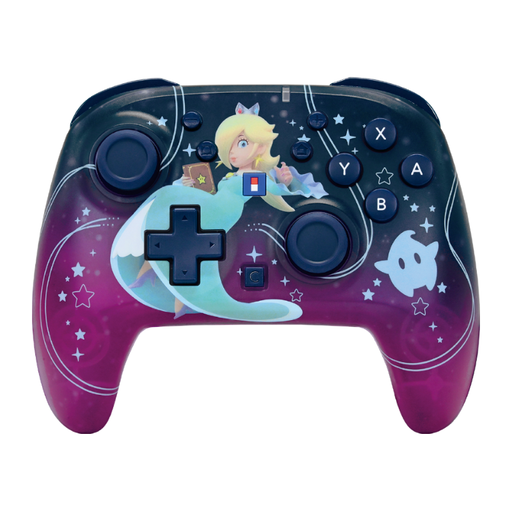 Image unavailable
A wireless option to consider if you’re looking for an extra controller for Nintendo Switch or Switch 2.
The product name lists a 10-hour battery life, a C button and programmable buttons.
 Image unavailable
An extra controller to consider if you use one of the Nintendo systems listed.
The product name lists a 40-hour battery life, a C button and two programmable buttons.
 Image unavailable
An extra DualSense to consider for PS5; the product name also lists PC, Mac and mobile devices.
Haptic feedback and adaptive triggers only work in compatible games; some features require USB.
 Image unavailable
A controller to consider if you play on Switch or PC; check that your chosen game supports its inputs.
The product name lists dual vibration and a gyroscope.
No, only if the game supports this play style. Nintendo UK explains that a Joy-Con 2 can be used horizontally as a separate controller; also check how many players the game supports locally.
According to Nintendo UK, original Joy-Cons can be paired wirelessly with Switch 2, but can’t be attached to the system. You can charge them using an original Switch or a suitable licensed accessory.
PowerA instructs you to place the Switch in its dock and connect the controller to the dock’s USB port. For the model described, with its 3 m cable, measure the route to your seat in advance.
ACM ConsuWijzer states that online purchases generally come with a statutory cooling-off period of up to 14 days after delivery. You’re also covered by the legal guarantee if a product doesn’t perform as you’d reasonably expect under normal use; a commercial warranty period doesn’t replace this right. Contact the seller if you have a problem.