First, choose a controller that works with your console or PC and the game you’ve picked. Nintendo lets you use a single Joy-Con per player, depending on the software. If the game doesn’t support that play style, look for a full-size controller that suits your system. Also check the player count, connection and charging options.
Who is this buying guide for?
Switch group with players taking turns
You want to find out whether your existing or additional Joy-Cons offer enough separate controls. Nintendo describes horizontal use by one player, but the play style depends on the game. Joy-Con and Joy-Con 2 are also designed for different Switch systems.
Two console players who want a gamepad each
You’re looking for an extra full-size controller for an Xbox or PS5 and want to check that it works with your chosen co-op game. Xbox describes support for Xbox consoles and Windows PCs, while Sony explains how to use multiple controllers on PS5.
PC players around the dining table
You want to play together on one PC, so you’ll need to check whether the game supports controllers, which connections are available and how you’ll arrange the seating. Microsoft and 8BitDo describe different connection options for their controllers.
What should you look for when choosing?
Start by checking compatibility with your system and game. Then consider the number of players, your seating arrangement and the power supply to find a controller that works in practice.
| What to consider |
What should you check? |
Who is this important for? |
| Compatibility |
Check your exact system and the game’s controller support. |
I want to avoid buying a wireless controller that doesn’t work with my console or game; around 36% of consumers make compatibility their top priority. |
| Controls for everyone |
Count the players and check which controller layout and number of players the game supports. |
If everyone needs to be able to join in, I count the separate controls the game actually supports; around 29% of consumers put having enough player controls first. |
| Connection from your seat |
Check whether the controller uses Bluetooth, a receiver or USB, and whether you have a spare USB port. |
From my seat at the table, I want to connect without getting in the way of the setup; around 21% of consumers focus on seating and connection. |
| Power and accessories |
Check what’s included with the exact variant and which charging options you already have. |
I want to know in advance how to charge extra controllers and which accessories I really need; around 14% of consumers prioritise power and additional costs. |
Common buying mistakes
-
Assuming Bluetooth works with every console
A wireless connection doesn’t automatically mean a controller is compatible with every console or game. For example, the supported platforms differ between the two 8BitDo variants compared here.
Compare the exact model and console version with the supported systems and connection type.
-
Assuming a pair of controllers means two players
Supported games may let you split a pair of Joy-Cons between two players, but a game may also require both Joy-Cons to be used together as one controller.
Before you buy, check the player count and supported controller layout for your chosen game.
-
Expecting older Joy-Cons to attach to Switch 2
Nintendo says original Joy-Cons can work wirelessly with Switch 2, but they can’t be attached to the system. You may therefore need a suitable separate charging solution.
Check which charging method you already have before choosing older Joy-Cons for Switch 2.
-
Confusing a two-year warranty with the full legal guarantee
ACM ConsuWijzer explains that the legal guarantee depends on what you could reasonably expect from the product with normal use; there is no automatic fixed two-year period.
Keep your proof of purchase and report any fault to the retailer.
Brands worth considering
Nintendo
Joy-Con and Joy-Con 2 are worth considering for supported Switch games where players can use separate controls.
- Nintendo describes using one Joy-Con horizontally per player as a possible play style when supported by the software.
- Joy-Con 2 only works with Switch 2. Original Joy-Cons can be used wirelessly with it, but can’t be attached; you’ll need a suitable charging solution.
Microsoft Xbox
Xbox Wireless Controllers are an option for supported Xbox consoles and Windows PCs.
- Microsoft lists Bluetooth connectivity and the option to remap buttons.
- The 2.7 m USB-C cable is included with a specific cable bundle; check the packaging of your chosen variant.
Sony PlayStation
DualSense is a full-size controller for PS5 and may also be suitable for compatible PC games.
- Sony lists support for up to four controllers connected at the same time on PS5.
- On PC, special features depend on the game; some features may require a USB connection.
8BitDo
The Ultimate 2 Bluetooth Controller and Ultimate 2C Wireless have different listed platform support.
- According to 8BitDo, the Ultimate 2 Bluetooth is designed for Switch and Windows; the manufacturer says a firmware update is needed for Switch 2.
- According to 8BitDo, the Ultimate 2C Wireless is designed for Windows and Android. Don’t confuse this variant with the Ultimate 2 Bluetooth.
- The Ultimate 2 Bluetooth product documentation lists NFC and HD rumble among the features it doesn’t have.
Controllers at Joybuy
These controllers suit a range of local co-op setups: from individual Joy-Cons for supported Switch games to full-size controllers for consoles and PCs.
 No image available
Xbox Wireless Controller – Pulse Red
A full-size controller for a supported Xbox or Windows PC; also check that your chosen game supports controller input.
The product information lists Xbox Series X|S, Xbox One and Windows PCs as supported systems. Button mapping through the Xbox Accessories app is also mentioned.
Joybuy
 No image available
Nintendo Switch Joy-Con Pair – Neon Green/Neon Pink
An option for Switch players who want to use Joy-Cons separately when the game supports that play style.
The product information lists wireless use and charging by reattaching the controllers to the console.
Joybuy
 No image available
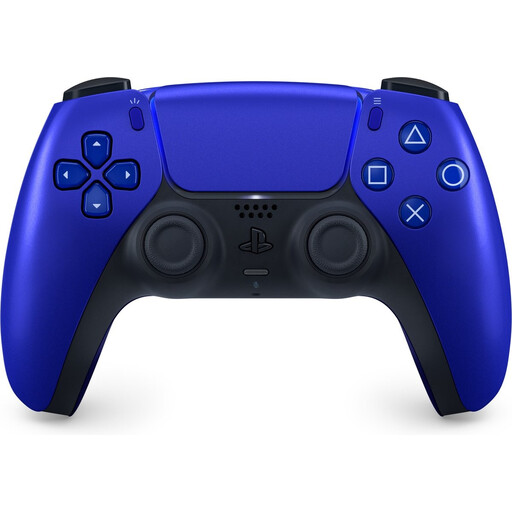
PlayStation 5 DualSense Wireless Controller – Cobalt Blue
A full-size controller for PS5 co-op or a compatible PC game; check which features are available for each game.
The product information lists Bluetooth or USB-C connectivity. Advanced features on PC depend on the game.
Joybuy
 No image available
BEITONG PanGu Modular Wireless Gaming Controller
A possible choice if you’re looking for a full-size controller for several listed systems; check compatibility with your game and device.
The product information lists PC, Nintendo Switch, Switch 2, smartphones and Android TV. Interchangeable joysticks, buttons and D-pads are also mentioned.
Joybuy
 No image available
Nintendo Switch 2 Joy-Con 2 Pair – Light Blue/Light Red
An option for Switch 2 players who want to use Joy-Con 2 controllers separately in a game that supports this layout.
Nintendo says Joy-Con 2 doesn’t work with the original Switch. When using them wirelessly, Nintendo recommends attaching the wrist straps.
Joybuy
Frequently asked questions
Can one pair of Joy-Cons always be used by two players?
No, it depends on the game. Nintendo describes using one Joy-Con horizontally per player as a possible play style when supported by the software; two Joy-Cons can also be used together as one controller.
Do Joy-Con 2 controllers work with a standard Nintendo Switch?
No. Nintendo says Joy-Con 2 only works with Switch 2. Original Joy-Cons can be used wirelessly with Switch 2, but can’t be attached to the system.
How do I get several PS5 controllers ready for a gaming session?
First, pair the controllers using a USB cable and check that the game supports your chosen number of local players. Sony lists support for up to four controllers connected at the same time on PS5.
Do I need an online subscription for local co-op?
Team17’s information about Overcooked! 2 distinguishes local multiplayer from online multiplayer, so it doesn’t establish a general subscription requirement for playing locally. Check the terms for the specific game and console if you also want to use online features.
What are my rights if a controller breaks too soon during normal use?
According to ACM ConsuWijzer, the retailer must put things right free of charge if a product doesn’t meet what you could reasonably expect. This could mean a repair or replacement. In the Netherlands, the legal guarantee doesn’t automatically have a fixed duration of two years.


