What should you consider when choosing?
Start with the game and the number of people who’ll be playing at once, then check your screen setup and the games you already own.
| What to consider |
What to look for |
Who is this important for? |
| Number of players |
Check the local play mode for the exact game and count how many controllers you’ll need. |
If you want to play with three or four people at once, first check that the game supports local play for that many; around 36% of consumers rank simultaneous group play as their top buying priority. |
| A suitable adventure game |
Check whether the game you want offers local co-op on your platform and in the edition you’re considering, and how many players it supports. |
If you want to play a specific adventure together, first check that the title is right for your group; around 29% of consumers give their preferred game top priority. |
| Shared screen |
Decide whether your group will gather around a TV or the console screen; for Switch models, check support for TV mode and make sure you have the right dock. |
If others will be watching, you’ll want both players and spectators to be able to follow the action, so choose your screen setup accordingly; around 21% of consumers put visibility first. |
| Games you already own |
Check whether your games are on disc or digital, whether they’re compatible with the console and what’s included in any bundle. |
If you want to keep playing your existing games, you’ll need to know which console version is right for you; around 14% of consumers give keeping their collection and getting everything they need top priority. |
Joybuy products
This selection includes Nintendo Switch and Switch 2 consoles, a retro games console for playing on a TV, and a digital PlayStation 5 edition for local gaming sessions.
 No image available
Nintendo Switch bundle 32GB with physical Mario Kart 8 Deluxe game card
A good fit if you’re looking for a Nintendo Switch bundle for playing together; check how many players can join in locally for each game.
The bundle name specifies 32GB and a physical game card for Mario Kart 8 Deluxe.
View at Joybuy
 No image available
Nintendo Switch 2 console (EU)
A good fit if you want to play Nintendo adventures on a TV or in tabletop mode; check the local player mode for the game you want.
Not every original Switch game is fully compatible. You need the Switch 2 dock to play in TV mode; the original Switch dock isn’t compatible.
View at Joybuy
 No image available
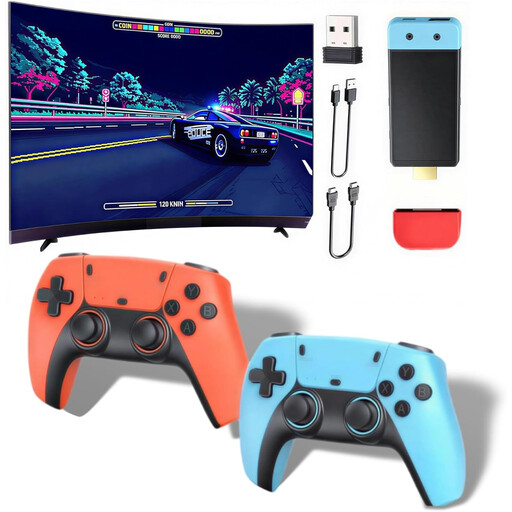
Retro games console with HDMI output
Could be suitable for group gaming on a TV, but check first that the adventure games you want are available on this system and support local co-op.
The product information lists HDMI output, local play for up to four players and two controllers; you’ll need extra controllers for four-player games.
View at Joybuy
 No image available
Sony PlayStation 5 Slim 825GB Digital Edition
A good fit if you want to play local PlayStation adventures on a TV; check the player count and number of controllers required for each game.
Digital edition without a disc drive; physical games aren’t an option with this console. One DualSense controller is included.
View at Joybuy
Frequently asked questions
Does support for multiple controllers mean everyone can play every adventure together?
No, it varies from game to game. PlayStation lists It Takes Two for one to two players; Xbox lists local co-op for two to four players in Minecraft Dungeons Hero Edition. Check the local play mode for the exact game edition.
How do you connect a Switch or Switch 2 to a TV?
Use the dock designed for your model. Nintendo says that the Switch Lite doesn’t support TV mode and that the original Switch dock isn’t compatible with Switch 2.
Do you need an online subscription to play together on the sofa?
You can’t tell from a listing that mentions online multiplayer. PlayStation says online play is optional for It Takes Two and that PlayStation Plus is required for online play; check the requirements for the specific game and play mode.
What can you do if a console bought online develops a fault too soon?
In the Netherlands, ACM ConsuWijzer says the seller must provide an appropriate solution at no extra cost if a product doesn’t meet what you could reasonably expect when used normally. This doesn’t mean every console automatically comes with a fixed statutory warranty period of two years. Online purchases generally also come with a 14-day cancellation period after delivery, subject to legal exceptions; this cancellation period is separate from your rights if a product is faulty.
Is a PEGI age rating the same as a difficulty rating?
No. PEGI assesses the age suitability of a game’s content, not how difficult it is to play. The Dutch government describes age ratings for computer games as age recommendations; you should also check whether the controls and content are suitable for the players.


