
Solving puzzles together on one screen
You’re choosing a console based on specific games for two people playing together in the same room, and want to know in advance whether one screen and the available controllers will be enough.


First, choose a game you’d like to play together, then check whether the exact version supports local co-op and which controllers you’ll need. A Nintendo Switch is a good fit if you want to switch between TV and tabletop mode; a PS5 or Xbox Series S is designed for a permanent TV setup, while a Steam Deck is best suited to anyone who wants to take their Steam games with them and check the controls for each game. Keep the console away from heat sources and make sure its ventilation isn’t blocked.
You’re choosing a console based on specific games for two people playing together in the same room, and want to know in advance whether one screen and the available controllers will be enough.
Your gaming spot is by the kitchen and you want to be able to move the screen without placing the console near a heat source.
You have a suitable spot by the TV or already own PlayStation, Xbox or Steam games, and want to know what’s needed for local co-op and any extra equipment.
Choose this option: if you want to switch between TV and tabletop mode, and are also considering Switch 2 games. Nintendo Netherlands cites Snipperclips as an example of a game you can play together on TV or in tabletop mode.
Bear in mind: Nintendo Netherlands warns that some older Switch games may not be compatible, or may not be fully compatible. Check the specific game.
Choose this option: if you want to play existing Switch games and value tabletop, handheld and TV play.
Bear in mind: this model doesn’t play Switch 2-exclusive games. Check which controllers each game requires.
Choose this option: if you have a permanent spot by the TV and want to play a local co-op game such as It Takes Two. Electronic Arts describes it as couch co-op with split-screen.
Bear in mind: the digital PS5 edition and Xbox Series S don’t have a disc drive. Choose based on the games you already own and want to play.
Choose this option: if you want to take your Steam games with you and might also want to play on a screen using a dock. Valve says its separately available dock lets you connect external screens and controllers.
Bear in mind: check local co-op and control support for each game. According to Valve, docking doesn’t improve performance.
| What to consider | What to check | Who it matters to |
|---|---|---|
| The right local puzzle games | For each game, check the console version, local play mode, number of players and required controller type. | If we want to solve puzzles together on one console, I’d start by choosing a game where the local mode works as intended; around 33% of consumers also put finding a suitable local game first. |
| Screen and spot by the kitchen | Decide where you’ll sit and play. Choose a stable spot with good ventilation, away from cooking heat. | If you want to switch between a table and the TV, it helps to have a setup that suits where you’re sitting; around 27% of consumers prioritise a gaming setup they can move. |
| Existing games and platform | Compare the games you already own with the exact console version, including disc use and compatibility. | If we already own games on a particular platform, I’d first want to know whether they’ll play on the console; around 20% of consumers prioritise their existing games or platform choice. |
| What two players need | For each game, check which controllers and screen connection you’ll need, and whether a dock is sold separately. | If we want to play together, I’d want to know in advance which controllers and connections the chosen game mode requires; around 20% of consumers prioritise having the complete setup. |
Game modes and controller requirements vary from game to game. So, a multiplayer label doesn’t automatically mean that two people can play locally on one console.
Check the details for the exact game version and decide whether you want to play locally on one screen, locally across multiple devices or online.
Depending on the game, you may also need a different game or extra controllers.
The digital PS5 edition covered here and the Xbox Series S don’t have a disc drive. So, these versions aren’t suitable for games you already own on disc.
Check your game library and, if needed, choose a version with a disc drive, such as the separate PS5 edition.
Nintendo recommends placing the Switch 2 dock in an open, well-ventilated spot, away from heat sources.
Plan your setup outside the hot cooking area and keep the ventilation openings clear.
Valve says that docking doesn’t improve performance; the dock is designed for connecting to a screen and peripherals.
Choose a dock to suit your TV setup and first check that the game and controllers support the local play mode.
For TV play, you may need a separate dock and possibly external controllers.
The Switch family is worth considering for tabletop and TV play. Snipperclips is a great example of a local co-op puzzle game.
PS5 models suit a permanent TV setup and games with local co-op, such as It Takes Two.
The Xbox Series S is a permanent TV console for digital games.
Steam Deck may suit anyone who wants to take their Steam games with them and perhaps play on an external screen.
These product picks are aimed at tabletop or TV play, or at connecting to a TV with controllers. For the puzzle game you want to play, always check its local game mode and the controls it requires.
 No image available
For a setup that switches between tabletop and TV: the product details list both play modes and Joy-Con 2 controllers.
Nintendo Netherlands lists a 7.9-inch screen for Switch 2. Check the compatibility of older Switch games individually.
 No image available
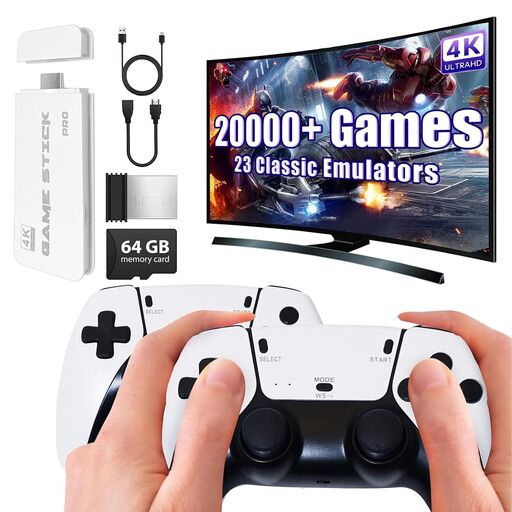
For TV play, the product title lists HDMI output and two wireless gamepads.
Before buying, check which games and local modes are available on this console. Having two gamepads doesn’t in itself confirm that a specific puzzle game supports local co-op.
 No image available
The handheld design may suit anyone who wants to use their own screen. Check that each game you want to play supports local co-op and the controls you need.
The product details list Windows 11 Home and a 7-inch FHD screen. The charger is sold separately.
 No image available
For tabletop, handheld or TV play; the product details list detachable Joy-Cons that can be shared for multiplayer.
Nintendo lists a 7-inch OLED screen for Switch OLED. For each puzzle game, check whether shared Joy-Cons are enough for the local game mode.
 No image available
For switching between tabletop and TV: the product details list both play modes and detachable Joy-Con 2 controllers.
Nintendo Netherlands lists a 7.9-inch screen for Switch 2. Keep the dock well ventilated and away from heat sources.
No. Check the local game mode for the exact game. Nintendo describes Snipperclips as a game you can play together on Switch, and Portal 2 in the Switch collection supports local split-screen co-op. The controllers you need vary from game to game.
According to Electronic Arts, you don’t need an internet connection for It Takes Two’s offline couch co-op. This doesn’t automatically apply to other games: check whether you’re choosing local or online play for each one.
Choose a stable spot away from cooking heat and keep the ventilation openings clear. Nintendo recommends placing the Switch 2 dock in an open, well-ventilated spot, away from heat sources.
For each game, check whether you need two suitable controllers and whether they’re available for your chosen setup. According to Valve, the official dock for TV play with a Steam Deck is sold separately.
According to ACM ConsuWijzer, online purchases generally come with a statutory 14-day cooling-off period from the date of delivery. If a product proves faulty during normal use, the seller is responsible for providing an appropriate solution free of charge, according to ACM ConsuWijzer. Your statutory guarantee depends on what you could reasonably expect from the product.