
Playing adventures together on the sofa
You want to play on the same TV as your partner or a friend. Check that your chosen game offers local co-op and how many controllers you’ll need; Nintendo and PlayStation describe games with local multiplayer.


Start by choosing a game that supports local co-op on the exact console you’re considering, for the number of players who’ll be playing together. The word ‘multiplayer’ alone isn’t enough to confirm this. Nintendo, PlayStation and Xbox all offer ways to play together locally, but the controllers you’ll need, TV support and choice of disc or digital games vary by model and game.
You want to play on the same TV as your partner or a friend. Check that your chosen game offers local co-op and how many controllers you’ll need; Nintendo and PlayStation describe games with local multiplayer.
You’re looking for a game for several players and want to check its content and age rating too. The Dutch government points to the PEGI age rating on game packaging.
You want to play together, but also need to know whether you can use your physical games and which display formats your TV supports. This depends, among other things, on the console model and the game you choose.
Best for: Anyone who wants to play Nintendo adventures on the TV and enjoy other ways to play too.
Consider: Nintendo lists a maximum of 3840 × 2160 at 60 fps; 4K and HDR depend on the game and a compatible display. Check compatibility with older Switch games too.
Best for: Anyone playing their chosen local co-op adventures on Switch who is happy with HD on the TV.
Consider: Joy-Con controllers can be used separately, but Nintendo says you may need extra controllers for local co-op, depending on the game.
Best for: Anyone looking for a dedicated TV setup who has a chosen PS5 game with local co-op.
Consider: The standard models reviewed are listed with one DualSense controller. Choose a model with a disc drive for compatible physical games; the Digital Edition plays digital games.
Best for: Anyone with an Xbox game that explicitly supports local co-op on Series X|S.
Consider: Microsoft lists the Series X model compared here with 1 TB, a disc drive and ‘true 4K’; the Series S has 512 GB and 1440p. Both are listed with one controller.
| What to consider | What to look for when buying | Who is this important for? |
|---|---|---|
| Local co-op | Check the local player mode, player count and console version for the exact game and edition. | I want to know in advance whether the adventure we choose can really be played together on one console. Around 36% of consumers prioritise local co-op. |
| TV display | Check the console’s video output and what both the game and TV support. | With a large TV, I want to know whether the console and our game will work with that setup. Around 29% of consumers give TV display top priority. |
| Complete gaming setup | Compare the included controllers, how many you need and whether you play games on disc. | I want to know whether we have enough controllers and can use the games we already own. Around 21% of consumers prioritise a complete gaming setup. |
| Playing away from the TV setup | Decide whether you also want to play in tabletop or handheld mode, and whether your games and controllers support this. | I want to be able to use the console away from my usual TV setup too. Around 14% of consumers prioritise this flexibility. |
A game may offer multiplayer without supporting the adventure mode you want to play with several people on one console.
Before buying, check the exact edition, whether it says ‘local co-op’, the player count and which console is supported.
The standard PS5 models reviewed and the Xbox consoles compared by Microsoft are listed with one controller.
Check what’s included in the exact bundle and which controls the chosen game requires for each player.
The PS5 Digital Edition reviewed here has no disc drive. Microsoft describes the Series S compared here as disc-free.
Check whether you want to keep using physical games and compare the exact model, not just the console name.
Nintendo says 4K and HDR on Switch 2 depend on support from the game and a compatible display.
Before choosing a console based on resolution, check what both your chosen game and TV can handle.
A good fit for anyone who wants to play local Nintendo co-op adventures on the TV and may also want to switch between different ways to play.
An option for anyone who wants to play PS5 games with local multiplayer on a dedicated TV console.
The Series X and Series S are options for Xbox games that support local co-op on your chosen console.
This selection includes Nintendo Switch and PlayStation 5 consoles and bundles for TV gaming. Check whether the adventure mode you want to play supports local co-op and how many controllers you’ll need.
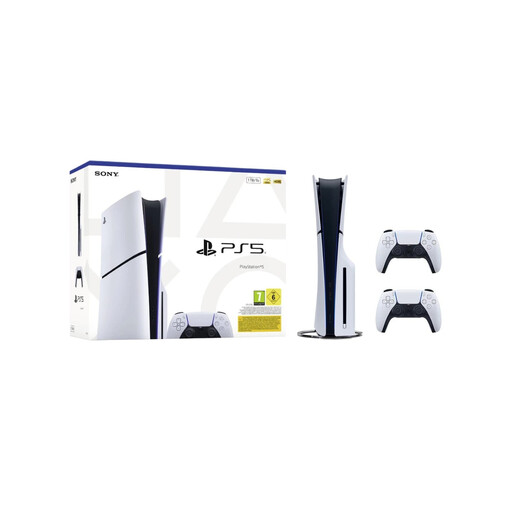 No image available
A good fit for anyone who wants to play on the TV with two separate controllers and use physical games; just check that the game you choose supports local co-op.
The product description lists 1 TB of storage, a disc drive and two DualSense controllers.
 No image available
A good fit for anyone looking for a Switch bundle with a game to play together locally; check that the adventure game you want has the right local co-op mode too.
According to the product information, the bundle includes Mario Kart 8 Deluxe on a game card. The product description lists local split-screen for up to four players in TV or tabletop mode.
 No image available
A good fit for anyone who wants to play digital PS5 games on a dedicated TV setup; check whether local co-op is available for each game.
The product description lists 825 GB of storage, an HDMI connection to a TV and one included DualSense controller. This Digital Edition has no disc drive.
 No image available
A good fit for anyone who wants to play on the TV as well as in tabletop or handheld mode; check which controllers you’ll need for co-op in each game.
The product description lists a 7-inch OLED screen, a dock with HDMI and TV mode. It also mentions using a shared Joy-Con for multiplayer.
 No image available
A good fit for anyone who wants to play Nintendo games on a large TV and enjoy other ways to play too; check each game’s local co-op mode and controller requirements.
The product information lists TV, tabletop and handheld modes, as well as Joy-Con 2 controllers. TV output of up to 4K requires a compatible game and display.
No. Check the exact game and edition to see whether local co-op is listed, how many players it supports and which console it works on. Microsoft, for example, lists this information separately for ARK: Survival Evolved.
Nintendo’s instructions are to connect the dock to the TV, detach the Joy-Con 2 and pair them wirelessly with the system, then place the console in the dock. Nintendo recommends using wrist straps when the Joy-Con 2 are detached.
Don’t assume an online subscription is a general requirement for playing together on one console. Sony mentions PlayStation Plus for online multiplayer; Microsoft lists separate subscription requirements for online multiplayer in the game reviewed. Check the requirements for the specific game you want to play.
According to the Dutch government, there is no fixed statutory warranty period in the Netherlands. A manufacturer’s warranty does not replace your statutory rights; keep your proof of purchase and contact the seller if your console develops a fault.
Check the age rating and content descriptors for the specific game. The Dutch government points to PEGI for age ratings; PEGI also explains parental controls for things like purchases and communication.