What should you look for when choosing?
First, check that the game you want can be played locally on the console you’re considering. Then compare the player and controller requirements with your room setup, and finally decide whether you need a screen away from the TV and a disc drive.
| What to consider |
What should you check? |
Who is this important for? |
| Local support |
Check the console, game version and number of local players; online play or a Friend’s Pass doesn’t in itself mean you can play together on one console. |
I want to play a particular adventure with someone else on the same console, so I want to be sure in advance that this specific version supports local co-op. Around 36% of consumers prioritise game suitability. |
| Players and controllers |
Compare the number of players who can play at the same time with the game’s limit, and check which controllers are supported. |
If more people want to join in around the TV, I want to know whether everyone can play at once and what controls they’ll need. Around 29% of consumers focus mainly on the number of players and compatible controllers. |
| Screen setup |
Check whether you need to connect to a TV and whether you also want to play in tabletop or handheld mode; according to Nintendo, the Switch Lite can’t connect to a TV. |
I sometimes want to play with the group on the TV and use the console elsewhere at other times. Around 21% of consumers prioritise being able to switch between places to play. |
| Discs and digital games |
Check the exact console version, whether it has a disc drive, and which controllers or online features the game requires. |
I want to know whether I can still use my physical games and what else I’ll need for the setup I have in mind. Around 14% of consumers focus mainly on how games are purchased and any additional essentials. |
Games consoles at Joybuy
These product options are relevant if you want to play together on a TV or switch between the TV and another place to play. Check the local player mode and controller requirements for each game separately.
 No image available
Nintendo Switch Game Console Bundle 32GB with Mario Kart 8 Deluxe Game Card
A bundle for anyone looking for a Switch setup for TV or tabletop play, with the included game as a possible option for playing together.
The product information lists 32 GB, a dock and Mario Kart 8 Deluxe on a physical game card. Check the number of local players and controller requirements for the game you want to play.
View at Joybuy
 No image available
Nintendo Switch 2 Game Console Bundle with Mario Kart World
A good fit if you’re looking for a Switch 2 bundle that lets you switch between TV and handheld play.
The bundle includes a digital version of Mario Kart World and 3 months of Nintendo Switch Online. Check the game’s local player mode; an online membership doesn’t confirm that it supports local play.
View at Joybuy
 No image available
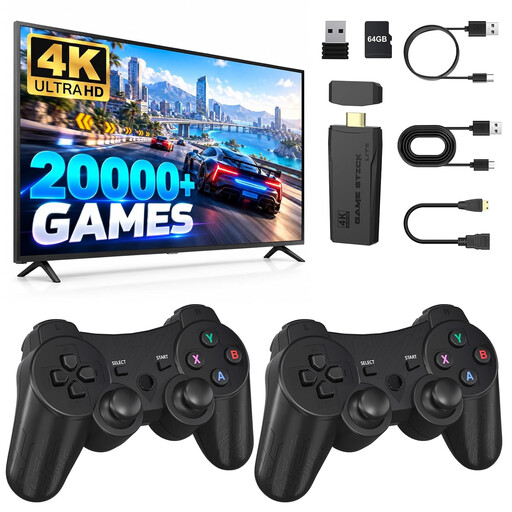
Retro Gaming Console with HDMI and 2 Wireless Controllers
A TV-focused option if you’re specifically looking for a retro console with two controllers.
The product name lists HDMI and two 2.4 GHz controllers. Check which games are included and whether the game you want supports local multiplayer; these features alone don’t confirm that every game does.
View at Joybuy
 No image available
ASUS ROG Xbox Ally 16GB RAM, 512GB SSD
A portable option if you’re looking for a handheld and want to consider the listed options for connecting an external screen.
The product information lists Xbox Remote Play, Xbox controller compatibility and video output via USB-C. The charger must be purchased separately. Check whether the game and setup you want support local play on one system.
View at Joybuy
 No image available
Nintendo Switch 2 Console (EU)
A good fit if you want one console for TV, tabletop and handheld play.
The product information lists detachable Joy-Con 2 controllers and a built-in 7.9-inch screen. Check that the controllers and local player mode suit your group for each game.
View at Joybuy
Frequently asked questions
Is online co-op the same as playing together on one console?
No. Check local players and online play separately. The Dutch PlayStation Store lists 1–2 players for It Takes Two, as well as separate requirements for online play.
How do you connect a Switch 2 to the TV?
Use the Nintendo Switch 2 holder for TV mode. Nintendo says that the original Switch holder doesn’t work with Switch 2; also check the instructions for detaching the Joy-Con 2.
Do you always need an extra controller for two players?
Not always: with compatible Switch games, each Joy-Con can work as a separate controller. Nintendo says that each player needs a compatible controller for It Takes Two; Sony recommends an extra DualSense for local PS5 multiplayer.
What are the returns and warranty rules in the Netherlands for a console bought online?
According to the Dutch government, you generally have a 14-day cooling-off period when buying at a distance. If a product is faulty, the seller may have to offer a solution; the Netherlands doesn’t have one fixed statutory warranty period that applies to all products. Check the terms that apply to your specific purchase.
Is a PEGI age rating a legal minimum age for gaming at home?
The Dutch government describes age ratings for computer games as recommendations. If you’re gaming with children, check the age and content ratings for the specific game; this government guidance doesn’t set a general legal minimum age for home use.


