First, choose a controller that works with your console or PC, then check how many controllers are needed for local play. Your playing distance, power supply and preferred button layout will help you decide whether a wireless or wired model suits your setup. If you’re playing during the day, consider how easy the screen is to read; don’t assume that extra controller features will make it easier to see in daylight.
Who is this buying guide for?
Player with a dedicated console
You’re looking for an extra controller for basketball games on your PS5, Xbox or Switch 2. First, check that the controller is compatible with your system and game. PlayStation, Microsoft and Nintendo list compatibility by platform and model.
Host of local matches
You want everyone to be able to play at the same time, so you check the local game mode and how many compatible controllers you’ll need. Nintendo says that every player in NBA 2K27’s multiplayer mode needs a compatible controller.
PC player who moves between setups
You play basketball on a PC and weigh up the available USB ports, cable space and power supply against the convenience of wireless play. Microsoft, PowerA and 8BitDo list different platforms and connection options for each controller.
What should you look for in an extra controller?
| What to consider |
What should you check? |
Who is this important for? |
| Compatibility |
Check the exact console or PC platform and the supported connection. |
I want an extra controller that works with the system I already own; around 36% of consumers say platform compatibility is their main concern when buying. |
| Controllers for the group |
Count the compatible controllers you already have and check the local game mode. |
If everyone is playing on one system, I want to know how many controllers we need; around 29% of consumers prioritise having enough controllers for the group. |
| Playing space and power |
Consider cable routing or the wireless connection, and check how the controller is powered. |
If we move between seats, I want to account for cable space and power; around 21% of consumers say flexibility in where they play is their main concern when buying. |
| Button layout |
Check which buttons can be customised and whether your chosen game supports this. |
I want a button layout that suits me without paying for features I won’t use; around 14% of consumers put this control preference first. |
Pitfalls to avoid when buying an extra controller
-
Confusing online play with a local match
A mention of online features doesn’t tell you how many players can join in locally using separate controllers.
Check the local game mode for your chosen game and how many compatible controllers it requires. Nintendo says that every player in NBA 2K27’s multiplayer mode needs a compatible controller.
-
Assuming similar 8BitDo model names mean the same compatibility
According to 8BitDo, the Ultimate 2C Wireless and Ultimate 2C Bluetooth have different platform and connection specifications.
Compare the full model name and supported connection with your system. Don’t assume it will work with other consoles just because the name is similar.
-
Assuming a product title confirms every detail of the model
A short title doesn’t always tell you which version or accessories are included with a product.
Before buying, check the full product information, the exact version and what’s included in the box.
-
Choosing a controller to make the screen easier to read during the day
Controller features such as vibration or customisable buttons don’t, by themselves, affect how easy the screen is to read.
Assess your screen setup separately, and choose a controller based on compatibility, playing distance and controls.
Brands to consider
Sony PlayStation
Sony describes DualSense as a controller for PS5, for example as an extra controller for another player on that system.
- Sony highlights haptic feedback and adaptive triggers.
- These features don’t, by themselves, demonstrate an advantage in a particular basketball game. Also check the local game mode and power requirements.
Microsoft Xbox
Microsoft lists Xbox consoles and Windows PCs as platforms for Xbox wireless controllers.
- Microsoft highlights a textured grip and hybrid D-pad.
- Check the exact model, power requirements and support for your game.
Nintendo
According to Nintendo, the Switch 2 Pro Controller is designed for Switch 2. Nintendo also says that a Switch Pro Controller can be used wirelessly with Switch 2.
- Nintendo lists customisable GL/GR buttons for the Switch 2 Pro Controller.
- Check whether your existing compatible controllers are enough and whether they work with your game and game mode.
PowerA
The Xbox-licensed Advantage Wired range is designed for supported Xbox systems and Windows PCs.
- For the Advantage Wired model reviewed, PowerA lists assignable buttons and a 10-foot USB-C cable.
- A cable can get in the way between players and the screen, so check that you’re choosing the exact model you want.
8BitDo
According to 8BitDo, the Ultimate 2C Wireless is designed for Windows via 2.4 GHz or cable, and for Android via Bluetooth. The separate Ultimate 2C Bluetooth model is designed for Switch.
- 8BitDo lists different connections and supported platforms for each model.
- A similar model name doesn’t prove compatibility with another platform. Also check that your chosen game supports input from the controller.
Controller options on Joybuy
Browse controller options below for PS4 and PC setups, Switch and PC, Xbox, and PC or Switch use. Check that your game and local game mode are supported for each model.
 No image available
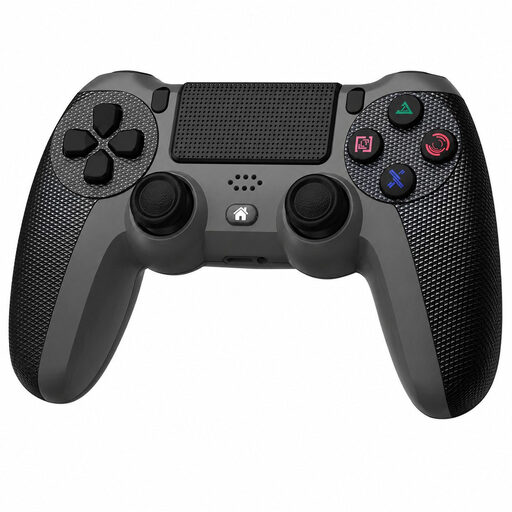
Black wireless Dualshock controller for PS4 and PC
The product name lists PS4 and PC. Check support for your game and local game mode before choosing this model.
Wireless connection; the product description lists a touchpad, gyroscope, two vibration motors and an included charging cable.
View on Joybuy
 No image available
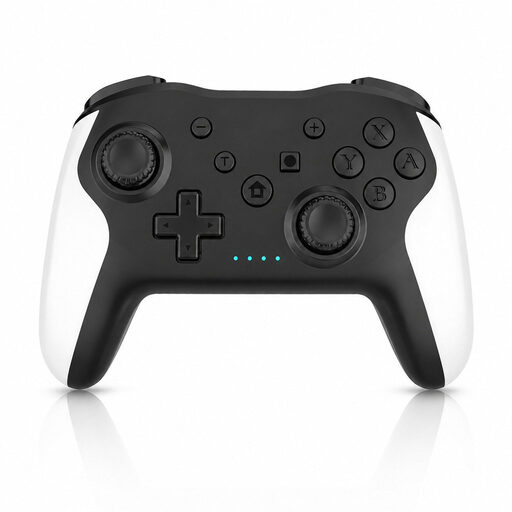
Wireless game controller with dual vibration and gyroscope for Switch and PC
The product name and description list Switch and PC. Check the exact compatibility with your device and game.
The description lists a wireless connection, dual vibration motors and a gyroscope.
View on Joybuy
 No image available
Xbox Wireless Controller Robot White
According to the product description, this model is designed for Xbox Series X|S, Xbox One and Windows PC. Check that your game supports your chosen connection.
The description lists Xbox Wireless, Bluetooth, USB-C, a hybrid D-pad, textured grip and AA batteries as a power option.
View on Joybuy
 No image available
GameSir Cyclone 2, Black Bundle Edition
The product description lists PC, Switch, iOS and Android. Check which connection is supported by your device and game.
The description lists TMR sticks, Hall effect and microswitch triggers, rear buttons, and Bluetooth, wireless dongle or cable connections.
View on Joybuy
 No image available
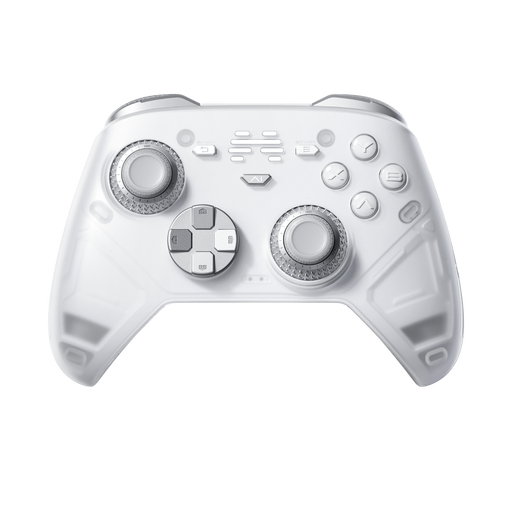
BEITONG KP70 Elite wireless controller
The product name lists PC, Nintendo Switch, Switch 2, Steam and Android. Check that your preferred controls are supported on each device and in each game.
The product description lists six programmable buttons, haptic feedback and a 1500 mAh battery. A wired connection is also mentioned.
View on Joybuy
Frequently asked questions
Does every player need their own controller when playing on one Switch 2?
For NBA 2K27’s multiplayer mode, Nintendo says that every player needs a compatible controller. Also check the game mode you actually want to play.
Can you use your existing Switch Pro Controller with a Switch 2?
According to Nintendo, a Switch Pro Controller can be paired wirelessly with Switch 2. Also check that it works with your chosen game and game mode.
What do you need to keep playing wirelessly?
It depends on the controller: check whether you’ll need batteries, a charging cable or another power supply. Nintendo says the Switch 2 Pro Controller has a built-in battery and comes with a USB charging cable; the PowerA Advantage Wired model reviewed uses a USB-C cable while you play.
Do you need an online subscription to play a match on one system?
Don’t assume that online features and local play have the same requirements. For NBA 2K27, Nintendo lists separate requirements for GameChat and says every player in multiplayer mode needs a compatible controller. Check which feature you want to use.
What are your rights when buying a controller online in the Netherlands?
According to the Dutch government, many online purchases from a business come with a 14-day cooling-off period, although there are exceptions. If a product is faulty, you also have consumer rights when dealing with the seller. Check who the seller is and which terms apply to your order.


