Who is this choice relevant to?

Switch players with guests

You want several people to play on one system and need to know whether the game accepts individual Joy-Con, Joy-Con 2 or a full controller for each player. Nintendo lists the available controller configurations for each game.

PC or console players with a specific game in mind

You’re looking for controllers for a particular arena game and want to check that both the system and the game support them, rather than relying on general platform compatibility alone.

Players with limited floor space

You want to sit with several players without having to work around an awkward cable route. Whether wired or wireless is more practical depends on the distance between the system and the seating area.

What should you look for when buying?

Individual Joy-Con or Joy-Con 2

Best for: Switch players whose game supports one individual Joy-Con per player.

Bear in mind: you’ll need the right Switch generation and button layout. Joy-Con 2 only works with Switch 2.

A full wireless controller for each player

Best for: players who need the full controls for their specific Xbox, PC, PS5 or Switch 2.

Bear in mind: each player needs their own controller. Also check how it’s powered or charged.

A wired controller

Best for: a docked Switch 2 with seating safely within cable reach.

Bear in mind: the cable route and missing features. PowerA lists a 10 ft cable and no motion controls for the Advantage Wired.

Concern What should you check? Who is this most relevant to?
Compatibility with the system and game Check the exact console or PC version, local game mode and required buttons or motion controls. If I want to play a particular game on my own system, I want to be sure that the specific game mode supports my controller. Around 36% of consumers put compatibility first.
Controllers for every player Check the number of players supported by the game, the permitted controller configuration and how many controllers the system can connect at once. If guests are joining in, I want to make sure there’s a control option for everyone that the game accepts. Around 29% of consumers are mainly looking to accommodate the number of players at once.
Space and connection Assess the cable route or check the wireless connection method. If you’re using a USB receiver, make sure there’s a suitable port available. In a small living room, I want to sit without a cable running through the walkway. Around 21% of consumers prioritise the room layout.
Power and charging Check what’s included in the box, how the controller charges and whether older Joy-Con can be charged on Switch 2 without a separate charging accessory. If several controllers need to be ready to play, I want to know which batteries, charging options or cables I’ll need. Around 14% of consumers prioritise power and any additional items they’ll need.

Common buying mistakes

  • Confusing the connection limit with the number of players

    Nintendo says that the number of controllers that can be synchronised depends on the controller type and the features in use. The game also determines how many players it supports and which controls are available.

    Before buying, check both the game’s requirements and your system’s connection options.

  • Assuming Joy-Con generations are interchangeable

    Nintendo says Joy-Con 2 only works with Switch 2. Original Joy-Con can be used wirelessly with Switch 2, but they won’t charge on that system.

    Check which Switch you have and how you’ll charge your chosen controllers.

  • Choosing a wired controller without checking the room layout

    The PowerA Advantage Wired works with Switch 2 when it’s docked. PowerA says it doesn’t include features such as motion controls, and it doesn’t support games that require Joy-Con exclusively.

    Check the game’s requirements first, then check the cable route from the dock to every seat.

  • Looking only at the controller and not at what else you’ll need

    Xbox controllers use AA batteries or a compatible rechargeable battery. PlayStation says that a cable isn’t included with the white DualSense model reviewed.

    Check which batteries, charging solutions or cables you already have available for all players.

Relevant controller brands

Nintendo

Joy-Con and Joy-Con 2 can be used individually in supported games. The Switch 2 Pro Controller is a full controller for Switch 2.

  • Nintendo explains when Joy-Con 2 can be used individually and what’s needed to synchronise them.
  • Joy-Con 2 doesn’t work with the original Switch. Original Joy-Con won’t charge on Switch 2.

Xbox

The Xbox Wireless Controller is suitable for supported Xbox consoles and Windows PCs.

  • Microsoft lists Bluetooth connectivity and support for Xbox consoles and Windows PCs.
  • According to Xbox Support, you’ll need AA batteries or a compatible rechargeable battery. Check separately that the game supports the controller.

PlayStation

DualSense is an option for PS5 and for PC games that support the controller.

  • PlayStation describes USB and Bluetooth connections on supported PCs.
  • Features such as haptic feedback and adaptive triggers don’t automatically work in every game outside PS5. USB is needed for certain PC features.

PowerA

The Advantage Wired range offers a wired controller for a docked Switch 2, provided the cable route works for your room.

  • PowerA lists a detachable 10 ft cable and two mappable buttons for the Advantage Wired.
  • PowerA says it doesn’t include features such as motion controls and amiibo NFC. The controller isn’t designed for games that require Joy-Con exclusively.

8BitDo

The Ultimate 2C Wireless is aimed at Windows PC players who want a 2.4GHz connection via receiver or USB.

  • 8BitDo lists 2.4 GHz or wired use on Windows and Bluetooth on Android for this model.
  • The manufacturer doesn’t list Switch or PS5 support for this model. The stated response figures are manufacturer specifications, not independent measurements for this setup.

Controllers at Joybuy

This selection of Joybuy products includes wireless controllers for Switch and Switch 2, Xbox and Windows PC, PS5, and supported Switch 2 games played with individual Joy-Con 2.
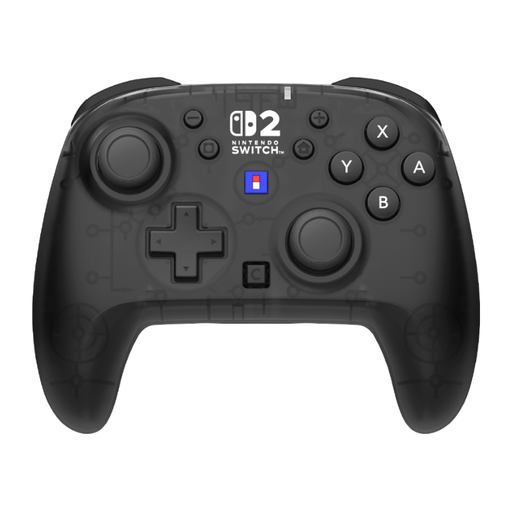
HORI HORIPAD Turbo Wireless Gamepad for Nintendo Switch and Switch 2, black and transparent

HORI HORIPAD Turbo Wireless Gamepad for Nintendo Switch and Switch 2

A wireless option if you want a full controller for each player without running a cable to the seating area.

The description lists up to 10 hours of battery life, a gyroscope and programmable rear buttons. According to the product information, this model doesn’t support HD Rumble 2 or vibration.

View at Joybuy

Xbox Wireless Controller Robot White

Xbox Wireless Controller Robot White

A full wireless controller for a supported Xbox console or Windows PC.

The product information lists Xbox Wireless, Bluetooth and USB-C. Xbox controllers use AA batteries or a compatible rechargeable battery. Check that the game supports the controller too.

View at Joybuy
Sony PlayStation 5 DualSense wireless controller, white

Sony PlayStation 5 DualSense wireless controller, white

A full wireless controller for PS5 and for PC games that support DualSense.

The product information lists haptic feedback, adaptive triggers and a built-in microphone. PlayStation says that support for features outside PS5 varies by game. USB is required for certain PC features.

View at Joybuy

Nintendo Switch 2 Pro Controller, black

Nintendo Switch 2 Pro Controller, black

A full controller for one player on Nintendo Switch 2.

The product information lists Bluetooth, motion controls, amiibo functionality and a rechargeable battery.

View at Joybuy

Nintendo Switch 2 Joy-Con 2 pair, light blue and light red

Nintendo Switch 2 Joy-Con 2 pair, light blue and light red

A pair for Switch 2 games in which each Joy-Con 2 can be held horizontally and used as an individual controller.

Nintendo says Joy-Con 2 only works with Switch 2. Using them as individual controllers depends on the game supporting this. The product information lists motion controls, HD rumble 2, NFC and two wrist straps.

View at Joybuy

Frequently asked questions

Can two players share one pair of Joy-Con 2?

Yes, if the specific game supports one horizontally held Joy-Con 2 per player. Nintendo gives Mario Kart 8 Deluxe on one system as an example. Check the controls for your arena game separately.

Can I use my original Joy-Con with a Switch 2?

Yes. Nintendo says original Joy-Con can be used wirelessly with Switch 2, but they won’t charge when connected to the console. To charge them, you’ll need an original Switch or a suitable separate charging accessory.

What should I get ready before a gaming session?

Check which controller configuration the game accepts for each player, pair the controllers and make sure they’re sufficiently charged or have batteries. When using wireless Joy-Con or Joy-Con 2, attach the wrist straps as instructed by Nintendo and keep cables out of walkways.

Who can help if a controller I’ve bought develops a fault?

In the Netherlands, the Government of the Netherlands says that the seller must provide a solution if a product is faulty. Statutory consumer rights aren’t the same as a fixed manufacturer’s warranty period; a manufacturer’s or extended warranty is in addition to your statutory rights.
