
Players sharing one console
You want to know how many controllers your specific game needs, and whether one Joy-Con per person will do. Nintendo says the supported play style varies from game to game.


First, choose based on your console or PC and the exact game: using one Joy-Con per player only works if the game supports that play style. In a narrow living room, a wireless controller avoids trailing a cable across a walkway; a wired controller is only suitable if its cable can be placed safely. Then check how many controllers and charging accessories you already have.
You want to know how many controllers your specific game needs, and whether one Joy-Con per person will do. Nintendo says the supported play style varies from game to game.
You want to play with several people without a controller cable crossing a walkway; a wired option may work if the cable can be placed safely. Xbox Netherlands and PowerA describe wireless and wired controller options.
You’re looking for a connection method that suits your Windows PC, and will need to check separately whether your arena game supports multiple controllers. 8BitDo and Xbox Netherlands describe PC connections for their specified models.
Check the platform and game first, then consider cable routing and controls, and finally count the controllers and power accessories you’ll need.
| What to consider | What should you check? | Who should give this more weight? |
|---|---|---|
| Platform, game and players | Check the console version, local player limit, supported play styles and how many controllers you already have. | If I want everyone to be able to join in on my existing system, I check the multiplayer mode for the exact game. Around 36% of consumers prioritise compatibility between the platform, game and players. |
| Cables and room to move | Check where the console, seating and walkways are; if you’re considering a wired controller, check the cable length too. | If players are sitting close together, I don’t want a cable crossing the walkway. Around 29% of consumers prioritise a tidy set-up without cables. |
| Controls and grip | Check the buttons and features the game requires, the controller layout and any accessibility needs. | If you’re looking for comfortable controls for repeated matches, focus on the button layout and grip. Around 21% of consumers make this their top priority. |
| Controllers and power | Count the controllers you already have and check whether you’ll need batteries or a charging cable. | If I don’t want to buy more accessories than necessary, I first count the extra controllers and check how they’re powered or charged. Around 14% of consumers prioritise these additional requirements. |
Supported Joy-Con play styles vary from game to game. So, having a controller connected to the system doesn’t automatically mean you can add another player.
Check the multiplayer information for the exact game before buying extra controllers.
The PowerA Wired Controller we looked at has a 3-metre cable and only works with a docked Switch. Whether the cable is practical depends on how it can be routed around players and furniture.
Decide where everyone will sit beforehand, and route the cable away from walkways.
Joy-Con 2 are designed for Switch 2. Nintendo says original Joy-Con can sync wirelessly with Switch 2, but can’t be attached to that console.
Check your exact console and preferred play style, not just the product name.
The standard Xbox Wireless Controller uses AA batteries or compatible rechargeable batteries. The white DualSense version we looked at doesn’t include a USB cable.
Check what’s in the box and see which batteries or charging cables you already have.
Joy-Con and Joy-Con 2 are options for local games that support individual controllers.
The Xbox Wireless Controller is an option for supported Xbox systems and Windows PCs.
DualSense is an option if you need an extra controller for a supported local PS5 game.
The Wired Controller we looked at is a wired option for a docked Switch.
The Ultimate 2C Wireless is an option for a Windows PC, using the connection methods specified by the manufacturer.
This selection includes controllers for PS5, the original Switch, Switch 2, Xbox and Windows PCs. Before buying, check that your specific game and platform support the local multiplayer and controls you want.
 No image available
An option for an extra PS5 player; Sony lists up to four controllers connected at the same time, but whether an extra player can join still depends on the game.
Wireless; Bluetooth and USB-C are listed for this version. The USB cable isn’t included.
 No image available
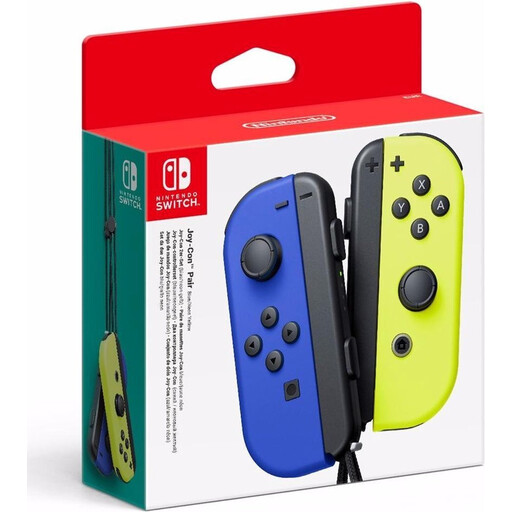
A pair of Joy-Con for the original Switch; using one Joy-Con per player only works in games that support this play style.
The set includes two Joy-Con controllers for wireless use.
 No image available
An option for Switch or PC if you want to avoid a cable across a walkway; check which connection mode suits your platform.
The product information lists Bluetooth, a wired connection and a wireless dongle. This version is listed as a bundle with a charging dock.
 No image available
A set for Switch 2 with a left and right controller; the game determines which local play styles are supported.
The set includes two wrist straps. Nintendo says you should attach them when playing wirelessly.
 No image available
A wireless option for supported Xbox systems and Windows PCs; check that the game supports local players using this controller.
Microsoft lists a hybrid D-pad and textured grip. This version uses AA batteries.
Only if the game supports that individual horizontal play style. Check the game information, then go to Controllers on your Switch to set the preferred play style and controller order.
Follow the pairing steps for your console, then check in the game whether the extra player can join. For PS5, Sony describes pairing via Settings, Accessories, General and Bluetooth Accessories; Xbox lists using the pairing button or a compatible USB cable.
Nintendo says the Joy-Con 2 wrist straps must be attached when playing wirelessly. Also make sure there’s enough room for everyone to move.
Check how many controllers you already have and whether you need batteries or a charging cable. ACM ConsuWijzer explains that statutory warranty in the Netherlands doesn’t have a fixed duration: with normal use, the product must meet the expectations you could reasonably have, and if it doesn’t, the seller is responsible for providing an appropriate solution free of charge.
The Dutch Authority for Digital Infrastructure states that electrical and electronic equipment must carry the correct CE marking. Check the marking on the controller and contact the seller if you’re unsure.