
Group with a regular arena game
For players who want to play one specific fighting or arena game together on the same screen. First, check the game version, console compatibility and local play mode.


Start by choosing the exact arena game and checking that it supports local play on one console with your preferred group size; the online player count won’t tell you that. A Nintendo Switch or Switch 2 is a good fit for supported Nintendo games, while a PS5 or Xbox is only suitable if your chosen game and local play mode are available on that platform. Then factor in the controllers and games you’ll need, and check whether you want to keep using discs.
For players who want to play one specific fighting or arena game together on the same screen. First, check the game version, console compatibility and local play mode.
For groups with different numbers of players. Check how many people the chosen game supports locally and which controllers you’ll need.
For anyone who wants to keep using discs or older Switch games, or would rather buy everything digitally. The exact console version and game compatibility will make the difference.
Start with the game you want and the number of people who need to play on one console at the same time. Then check the controllers, what’s included in the bundle and which games you want to keep.
| What to consider | What to check | Who is this important for? |
|---|---|---|
| Game and local play mode | Check the exact game version and the number of players on one system; online player counts are different. | If I want to play one specific arena game with the group, I need to know that that particular game supports local play. Around 36% of consumers say their main consideration is having the game and play mode they want. |
| Controllers for the group | Compare the number of players with the suitable controllers and the exact contents of the bundle. | When everyone wants to join in at the same time, the controller set-up needs to suit the play mode. Around 29% of consumers mainly look for enough suitable controllers for the group. |
| Complete gaming set-up | Check which game and controllers are included, and whether you need storage or services for the features you want to use. | If I want everything ready for a gaming night, I need to know what else I’ll need besides the console. Around 21% of consumers say their main consideration is having a complete set-up. |
| Existing games and format | Check whether the console uses discs and, for Switch 2, whether each older Switch game you want is compatible. | If you want to keep your existing games or prefer buying discs or digital games, make sure the console version suits that choice. Around 14% of consumers mainly consider their existing games and preferred format. |
A game may support multiplayer online or across multiple systems without allowing your group to play together on one console.
For the exact game, look up its local play mode and the number of players supported on the same system.
Nintendo warns that some older Switch games are not fully compatible, or won’t work at all. Some games may require original Switch Joy-Cons.
Check compatibility and controller requirements for each game before upgrading.
Some games may require a different controller set-up.
The game you want, extra controllers and, depending on how you play, storage or an online service may also be relevant. An online service isn’t automatically required for local play.
Compare what’s included in the bundle with the number of players and the features you actually want to use.
The PS5 Digital Edition and Xbox Series S are described by their manufacturers as versions that don’t use discs.
Make a list of the games you want to keep, then choose between a digital console and a version with a disc drive.
Any games you want to buy digitally again will need to be added to your set-up separately.
A good option for Nintendo Switch games on a TV or in tabletop mode, as well as Switch 2 games. With Switch 2, check compatibility for every older Switch game you want to play.
A PS5 is an option if the local game you want is available on PlayStation. Choosing between a digital version and a model with a disc drive will partly depend on the games you already own.
The Xbox Series S is designed for a digital set-up. Before buying, check that the arena game you want is available on Xbox and supports local play with your preferred group size.
These products are Nintendo Switch and Switch 2 set-ups for playing on a shared TV. Check each product and game to make sure they support the local arena game you want.
 No image available
For anyone looking for a Switch 2 set-up for a shared TV; the product name lists a dock and Joy-Con 2 controllers.
The bundle name includes Nintendo Switch Sports Resort and three months of Nintendo Switch Online. Check separately that the arena game and local play mode you want are supported; Nintendo warns that some older Switch games aren’t fully compatible with Switch 2, or won’t work at all.
 No image available
For anyone who wants to use Switch 2 with a TV; the product description lists Joy-Con 2 controllers and a dock as included.
Before choosing, check that the older Switch game you want is compatible and whether it has any specific controller requirements.
 No image available
For anyone looking for a Switch bundle with a physical game card; the product description lists a dock and Joy-Con controllers.
The description says Mario Kart 8 Deluxe supports split-screen for up to four players in TV or tabletop mode. This doesn’t confirm that another arena game supports the same group size.
 No image available
For anyone looking for a Switch 2 set-up with a dock for the TV; the bundle name lists 256 GB and a Mario Kart World download.
Nintendo lists support for up to four players on the same system in Mario Kart World. This is a racing game, so check separately that the arena game you want is supported. Nintendo also warns that some older Switch games aren’t fully compatible, or won’t work at all.
 No image available
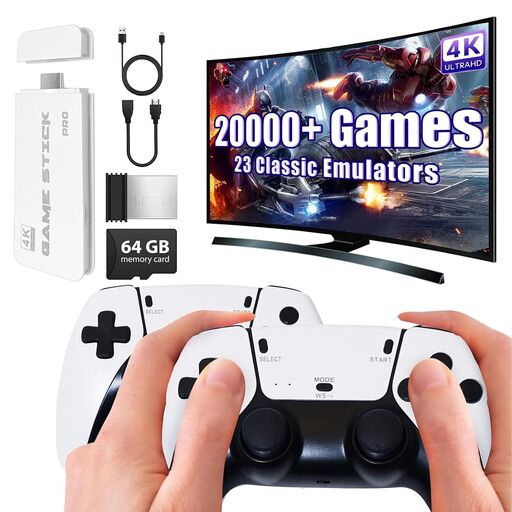
For anyone looking for a TV set-up with two wireless gamepads; the product name lists an HDMI output.
The product description says it supports two-player games. Check that the arena game you want is available and works locally on this console.
No. Check the local play mode for the exact game. Nintendo lists up to eight players in the Smash mode in Super Smash Bros. Ultimate on Switch; for Mario Kart World on Switch 2, Nintendo lists up to four players on the same system. These player counts apply to the games mentioned.
Check that you can connect the console to the TV using its dock or connection, and that you have enough suitable controllers. Nintendo confirms that the Switch OLED model’s dock has an HDMI connection; the controller set-up you need depends on the game you choose.
No. Nintendo warns that some older Switch games aren’t fully compatible, or won’t work at all. Check compatibility for every game you want to play and see whether it requires original Switch Joy-Cons.
No. The PS5 Digital Edition and Xbox Series S are described by their manufacturers as consoles that don’t use discs. If you want to keep playing physical games you already own, check that your chosen version has a disc drive.
A subscription for online features isn’t automatically required for local play on one console. Check the requirements for the specific game and feature before adding an online service to your set-up.