
Switch group with extra players
You want more people to join in locally and need to check whether your game supports individual Joy-Cons or requires full controllers. Nintendo explains that Joy-Cons can be used individually in supported play styles.


First, choose a controller that works with your console and your game’s local play mode. Then decide whether every player needs a full gamepad or whether individual Joy-Cons will do. For longer or more intense battles, check the controls, connection and power supply. Glare from bright windows is a screen or lighting issue, not something a different controller can fix.
You want more people to join in locally and need to check whether your game supports individual Joy-Cons or requires full controllers. Nintendo explains that Joy-Cons can be used individually in supported play styles.
You play on a console or PC and want a controller for each player that suits the platform, connection and game controls. PlayStation, Xbox and 8BitDo list different platform and connection options for their models.
You play in daylight from large windows and want to know whether glare will affect the shared screen. RTINGS discusses direct reflections on TV screens; changing your controller won’t affect them.
Start by choosing a controller that suits your console and the local play mode your game supports. Then decide how much control each player needs, and treat troublesome window glare as a separate screen issue.
| What to consider | What to look for when buying | Who is this important for? |
|---|---|---|
| Platform and game | Check the exact console or PC, local play mode, player count and the buttons or motion controls required. | If I want to be sure my controller works with both my system and my game, I check both. Around 27% of consumers prioritise compatibility. |
| Number of players | Count the controllers available and check how many players and what controller layout the game supports. | If I want more players to join in, I need to know whether one Joy-Con per player is enough or whether everyone needs a full gamepad. Around 27% of consumers share this priority. |
| Controls and grip | Compare the sticks, triggers and buttons you need with the game’s controls; try the grip for yourself if possible. | If I need full controls for every player during arena battles, I look at the button layout and how the controller feels in my hands. Around 20% of consumers prioritise this. |
| Connection and power | Check whether the controller uses USB, Bluetooth or a receiver with your platform, and consider cable routing and power. | If I don’t want a cable to restrict where I play or to have to charge while playing, I check the connection and power requirements in advance. Around 13% of consumers prioritise playing distance and power. |
| Screen visibility | Check from your usual playing positions and at your usual playing time whether windows are reflected in the screen. | If light from a window makes dark areas of the playing field hard to see, I want to assess the screen and lighting first. Around 13% of consumers prioritise visibility. |
A Joy-Con 2 can be used on its own if the game supports that play style, but that doesn’t mean every game will work with it. If a game requires a full controller, you may need different controllers.
Before buying, check your game’s local play mode and the buttons it requires.
According to RTINGS, large windows and direct reflections can make a TV screen harder to see. A different controller won’t change the reflections.
Assess the screen and lighting from your playing positions, separately from your choice of controller.
According to 8BitDo, the 8BitDo Ultimate 2C Wireless uses 2.4GHz or USB on Windows and Bluetooth on Android. Connection options therefore depend on the platform and model.
Check the full model name, platform and connection method together.
You may need a compatible receiver or a different model.
According to PowerA, the Enhanced Wired Controller reviewed has no motion controls or HD rumble and isn’t designed for games that support Joy-Cons only.
Check which features the game requires, whether the controller suits your docked setup and whether the cable will reach your playing position.
If a game requires features the controller doesn’t support, you may still need a different one.
Joy-Con and Joy-Con 2 are worth considering for Switch games that support individual controllers for local play.
The Xbox Wireless Controller is a full gamepad for supported Xbox consoles and Windows PCs.
DualSense is the official gamepad for PS5 and could be an option for an extra player in games with suitable local multiplayer.
The Ultimate 2C Wireless is an option for playing on a supported Windows PC.
The Enhanced Wired Controller reviewed for Nintendo Switch is a wired option for a docked Switch or Switch 2.
This selection includes wired controllers for Switch and Switch 2, full gamepads for PS5 and Xbox or Windows PC, and Joy-Con pairs for local play. Check which play style and controls each game requires.
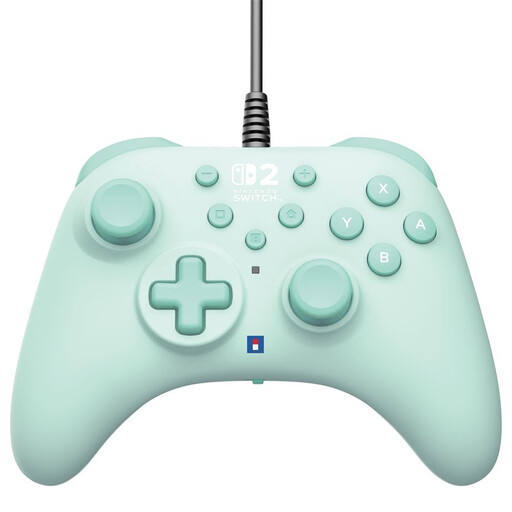 No image available
A wired option for a Switch or Switch 2 setup.
The product information lists a 3 m cable, programmable rear buttons and a turbo function. Consider the cable route and distance to your console.
 No image available
A full gamepad for a PS5 game with local multiplayer.
The product information lists Bluetooth or USB-C. Haptic feedback and adaptive triggers work only in games that support these features.
 No image available
A full gamepad for a supported Xbox or Windows PC setup.
The product information lists Xbox Wireless, Bluetooth and USB-C, plus up to 40 hours of battery life.
 No image available
A pair for local play when the game supports using Joy-Cons individually.
The product information lists HD Rumble, motion sensors and up to 20 hours of battery life. Individual use depends on game support.
 No image available
A pair for Switch 2 games that support using Joy-Con 2 controllers individually.
The product information lists wireless use and HD Rumble 2. Joy-Con 2 works only with Nintendo Switch 2; individual use depends on game support.
Yes, if the game supports that horizontal play style. Nintendo says the left and right Joy-Con 2 controllers can then be used individually; check your game’s play modes.
No. Nintendo says Joy-Con 2 works only with Switch 2. Original Joy-Cons can be used wirelessly with Switch 2, but can’t be attached to the system.
For the PowerA Enhanced Wired Controller reviewed, PowerA specifies use with a docked Switch or Switch 2. Check in advance whether your game requires motion controls or Joy-Con-only controls, and whether the 3 m cable will reach your playing position.
According to the Dutch Government, consumers buying at a distance from a business generally have 14 days to change their mind. Check the applicable returns policy and legal exceptions; these rules don’t automatically apply to purchases from a private seller.