Start with the arena game you want to play together: check whether it has a local play mode and how many compatible controllers you need. Nintendo Switch 2 can play compatible Switch games, while PS5 and Xbox are alternatives if your chosen game supports local play on those consoles. The highest stated resolution won’t automatically make details easier to see from across the room, so consider your TV in relation to your seating distance too.
Who is this advice for?
Sofa gamers with a favourite arena game
You mainly want to play the same game with friends, so start by checking its local play mode and how many controllers you need. Nintendo Netherlands lists Super Smash Bros. Ultimate as supporting up to eight players.
Players who sit a long way from the TV
You have a regular seat and want to keep track of characters and in-game information. RTINGS.com discusses screen size in relation to viewing distance, so assess the two together for your own set-up.
Households weighing up the complete gaming set-up
You’re comparing more than just the console: consider the games you want, how many controllers you’ll need, and whether you want to use physical games or buy them digitally.
What should you look for when choosing?
Start with the game you want and its local play mode. Then consider how easy it is to see everything from the sofa, before comparing the controllers and game editions that suit your set-up.
| What to consider |
What should you check? |
Who is this important for? |
| Game and local play |
Check the local play mode, player limit and controller requirements for the game you want. |
If I want to play a particular arena game with friends, I want to know in advance whether it supports local play and how many controllers we’ll need; around 36% of consumers give game choice and player numbers top priority. |
| Visibility from the sofa |
Consider screen size in relation to your seating distance, and allow for split-screen play. |
From my usual seat, I want to be able to follow the characters and in-game information without relying solely on the console’s output; around 29% of consumers prioritise visibility at their own viewing distance. |
| Complete gaming set-up |
Compare how many controllers you need and whether you want to use discs or choose digital games. |
I want to know what I need to play with my group and whether the games I want are available on disc or digitally; around 21% of consumers give the complete set-up top priority. |
| Use beyond TV gaming |
Check whether you also want to use the console portably and whether your chosen games are compatible. |
If I want to use the same console away from the TV too, I’ll take that into account alongside the game we’ll play together; around 14% of consumers prioritise this versatility. |
What to watch out for when buying
-
Assuming the maximum resolution or fps guarantees game performance
A console’s capabilities, a game’s support and a TV’s capabilities are not the same thing. Nintendo Netherlands states that 4K display on Switch 2 requires support from both the game and the TV, and that the maximum frame rate at 4K is 60 fps.
Check support for the specific game and screen before choosing based on a maximum display specification.
-
Choosing a digital console when you want to use discs
The PS5 Digital Edition and Xbox Series S models mentioned do not have a disc drive. Xbox Series X is available with or without a disc drive, so check the exact edition.
Think about which games you want to play and whether you want to use them on disc or digitally.
You may need to buy the games you want digitally; this depends on the titles and what you already own.
-
Assuming the included controllers will be enough
A game’s player limit doesn’t tell you how many controllers come with the console. Sony lists one DualSense controller with the PS5 Digital Edition mentioned.
Count the players and check which controllers the game supports before comparing your set-up options.
A larger group may need extra compatible controllers.
Relevant brands to compare
Nintendo
Switch 2 combines TV and portable play for compatible games; Super Smash Bros. Ultimate is a specific example of a local arena game.
- Nintendo Netherlands lists Super Smash Bros. Ultimate as supporting up to eight players.
- Check compatibility for the specific Switch game. For 4K on Switch 2, both the game and TV must support it; Nintendo lists a maximum of 60 fps at 4K.
PlayStation
PS5 is available in editions with and without a disc drive for anyone who wants to play a local game on PlayStation.
- You can choose an edition to suit whether you play physical or digital games.
- According to PlayStation Netherlands, the digital edition mentioned does not have a disc drive. The number of local players and controller requirements depend on the game you choose.
Xbox
Xbox Series X and Series S offer different options for disc use and the gaming resolutions stated by Microsoft.
- Microsoft lists 4K gaming for Series X and 1440p gaming for Series S.
- Series S is all-digital; Series X is available with or without a disc drive. Stated console capabilities don’t guarantee how a specific local game will run.
Games consoles on Joybuy
These products include Nintendo systems for TV and portable play, a PS5 Digital Edition and a retro HDMI games console. Check whether your chosen arena game supports local play on each product.
 Image unavailable
Nintendo Switch games console bundle, 32GB, with Mario Kart 8 Deluxe (physical game card)
An option if you’re looking for this Switch bundle with Mario Kart 8 Deluxe as a physical game card; check separately whether your chosen arena game supports local play.
View on Joybuy
 Image unavailable
Nintendo Switch 2 bundle, 256GB, with Mario Kart World download and 3-Month Nintendo Switch Online
The bundle includes Mario Kart World as a download and 3-Month Nintendo Switch Online; also check whether the arena game you want is compatible and has a local play mode.
View on Joybuy
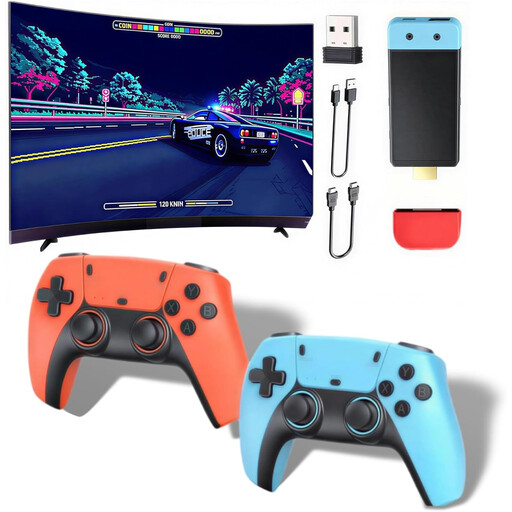 Image unavailable
Retro HDMI games console with wireless controllers
Consider this console only if its built-in games suit the arena battles you’re looking for; check the game selection and local play support beforehand.
The product name lists HDMI output and 1080P/720P.
View on Joybuy
 Image unavailable
Sony PlayStation 5 Slim 825GB Digital Edition
This digital edition doesn’t have a disc drive. Check whether the PlayStation game you want supports local multiplayer and which controllers you’ll need.
View on Joybuy
 Image unavailable
Nintendo Switch 2 console (EU)
A good fit if you want to play Switch 2 games on your TV and on the go; check that the specific Switch game is compatible and supports local play.
View on Joybuy
Frequently asked questions
Is a console with 4K output enough to see arena battles clearly from far away?
No. Also consider your TV’s size in relation to your seating distance, and how the game itself is displayed. Nintendo Netherlands also states that 4K on Switch 2 requires support from both the game and the TV.
How do you connect Switch 2 to play from the sofa?
Use the included dock to connect Switch 2 to a television. Then check the game mode and connect enough compatible controllers for the number of players.
Do you need to include an online subscription for local battles?
Not necessarily: local and online are different play modes. Check the requirements for the specific game and play mode before factoring in any subscription costs.
What are your rights in the Netherlands if a console bought online is faulty or you change your mind?
According to ACM ConsuWijzer, the statutory guarantee applies if a product doesn’t meet what you could reasonably expect under normal use; the seller must then offer an appropriate solution. For a console bought online, a statutory cooling-off period generally applies and ends 14 days after delivery. Check the relevant exceptions and returns policy.


