
Player of local PC games
Primarily wants both their PC and the software used to play the local game to recognise the controller. Libretro Docs explains that RetroArch lets you configure input for each controller, core or game.


Only choose a controller after checking that both your device and the software you use to launch the local game file support its inputs. The right choice then depends on the game: a D-pad suits digital input, while sticks or analogue triggers are only relevant if the game uses them. For wired play, you’ll need a practical cable route; for wireless play, check device support and consider the power supply.
Primarily wants both their PC and the software used to play the local game to recognise the controller. Libretro Docs explains that RetroArch lets you configure input for each controller, core or game.
Wants a usable D-pad for digital input and checks whether the specific game uses sticks or analogue triggers. Product information from 8BitDo and Microsoft describes different types of controls.
Wants to play without a controller cable, so looks at wireless pairing, power and support from their device. Microsoft describes Bluetooth connectivity for the Xbox Wireless Controller; Bluetooth must be available on Windows.
| What to consider | What should you check? | Who should pay particular attention? |
|---|---|---|
| Device and software | Check support from your device, operating system and game software. Also see whether you can remap the buttons. | I want to make sure my PC and software recognise the controller before I try to launch the local game. Around 36% of consumers prioritise recognition and compatibility. |
| In-game controls | Check the original controls and whether the game uses a D-pad, sticks or analogue triggers. | For digital directional input, I want a suitable D-pad; for analogue controls, the game must support that input. Around 29% of consumers choose mainly according to the controls required by the sports game. |
| Connection and playing space | Check which USB port or Bluetooth connection is available, how far you’ll be from the device, and which cables or receivers are included with that version. | If I’m playing further away from the screen, I want room to move. With a cable, the route needs to be practical. Around 21% of consumers give the most attention to playing space and connection. |
| Extra features and power | Check which features, power options and accessories are included with the exact version, and whether the game supports them. | I only want extra settings if my game can make use of them and the version I choose supports them. Around 14% of consumers prioritise extra features and ease of use. |
Your PC may recognise the controller, while the game or emulator requires different input settings.
Check the game or emulator settings, and find out which software you need to launch the local file.
Even a long cable still runs between the controller and the device, and can get in the way when you’re playing from the sofa or with other players.
Check the distance from your seat beforehand and keep the cable out of walkways, or see whether a compatible wireless version would suit your set-up.
A commercial guarantee may be in addition to your statutory rights; it does not automatically define the limits of your protection. The Dutch government does not specify a fixed statutory warranty period of two years in the Netherlands.
Read the terms of any additional guarantee. If there’s a fault, contact the seller.
According to 8BitDo, the Ultimate 2C Wired is a wired option for supported Windows and Android devices, with a D-pad and extra remappable buttons.
Microsoft describes the Xbox Wireless Controller as compatible with supported Xbox consoles and Windows PCs. A version with an included USB-C cable is also available.
GameSir describes the G7 SE as a wired controller for Xbox and PC, with Hall effect sticks and analogue triggers.
PowerA describes the Enhanced Wired Controller for Xbox Series X|S as a wired version that also works with Xbox One and Windows.
Sony describes using the DualSense via USB or Bluetooth with supported Windows PCs and other compatible devices.
These Joybuy picks are aimed at controllers for compatible PC and Xbox set-ups, with both wired and wireless versions available. Check that the game and software support the input for your particular combination.
 Image unavailable
Worth considering if you play on a Windows PC or Xbox. Check that your device and game are supported.
The product information lists AA batteries for wireless use and USB-C for wired use.
 Image unavailable
Worth a look if you’re after a wired version listed for Xbox or Windows. Check that your game supports the controls you want.
The product name lists Xbox Series X/S, Xbox One and Windows 10/11. Bear the cable route in mind.
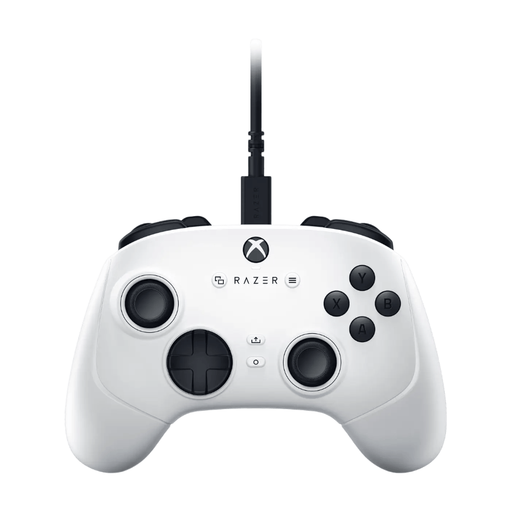 Image unavailable
Worth considering if you’re looking for a gamepad for PC or Xbox. Check that your own game software supports it.
The product name lists PC, Xbox Series S and Xbox Series X. The description mentions a 3 m cable and the Razer Controller app for settings.
 Image unavailable
Worth a look if you’re after a wired version for a listed Xbox or Windows platform.
The product name lists Xbox Series X|S, Xbox One, Windows 10/11 and Steam. Check that your game and software are compatible.
 Image unavailable
Worth a look if you want to choose between wired and wireless use. Check which connection mode suits your device.
The product name lists Xbox Series X|S, Xbox One, PC, Android and Steam. The listed devices and connections vary by mode.
No. A controller sends input, but it doesn’t launch the local file itself. According to Libretro Docs, RetroArch needs a suitable core and a ROM file to launch a game; other software may have different requirements.
First check that the controller is recognised, then adjust the button mapping. Libretro Docs describes automatic controller profiles and manual mapping in RetroArch; the right layout can vary between systems.
You may need a USB Bluetooth adapter if your PC doesn’t have Bluetooth. Microsoft lists an adapter as one option; also check that your controller supports Bluetooth with Windows.
For an online distance purchase from a business, the Dutch government says you generally have a 14-day cooling-off period, with exceptions depending on the circumstances. You also have statutory rights if a product is faulty. The Dutch government does not specify a fixed statutory warranty period of two years and says to contact the seller if there’s a fault.
No. Finding a file does not automatically give you permission to use it. The Dutch government states that you may only make a backup copy of copyrighted computer programs and games; check the rights for the specific file.