
Install Linux yourself
You want to install a Linux desktop yourself on a compact, standard PC and learn how to check that the hardware works. ASUS documents support by model and distribution.


If you want to install Linux yourself and learn how a standard desktop PC works, choose a mini PC with a specific configuration that suits your distribution. ASUS lists Ubuntu 24.04 LTS for the NUC 14 Essential L6 barebone, while Canonical ties certification to specific configurations. A PC with Linux pre-installed could be a good fit if you want to get started with commands straight away. For GPIO and ARM projects, a Raspberry Pi offers a different way to learn, but it is not an obvious substitute for software that requires x86.
You want to install a Linux desktop yourself on a compact, standard PC and learn how to check that the hardware works. ASUS documents support by model and distribution.
You want to run Linux commands in your room straight away, and installation is not your main learning goal. System76 lists Pop!_OS 24.04 LTS and Ubuntu 24.04 LTS for the Meerkat meer10.
You also want to work with a small circuit board and connectable electronics, and are happy to use something different from x86. Raspberry Pi documents the GPIO connections for the Pi 5.
First decide whether you mainly want to install Linux yourself, use it straight away or experiment with ARM and electronics. Then you can compare the relevant configuration and everything you need.
| What to consider | What to look for when buying | Who is this important for? |
|---|---|---|
| Linux compatibility | Compare the full model name and configuration with the support available for your distribution. If in doubt, test the display, network and audio using a live USB. | If I want to install Linux myself, I want to know whether this specific configuration works with my distribution. Around 30% of consumers say proven compatibility is their main purchasing priority. |
| Total set-up cost | Compare what is included, such as memory, storage, operating system, power supply and any screen and input devices you need. | I want to buy a usable setup within my budget and not discover later that essential parts are missing. Around 30% of consumers say total set-up cost and included components are their top priority. |
| Memory and storage | Choose RAM and SSD capacity to suit your tasks, and check the upgrade options. Canonical lists at least 25 GB of storage for installing Ubuntu Desktop 26.04 LTS; this does not indicate how much space your future projects will need. | If I want to save more tasks and files later, I want to know whether the storage and upgrade options will suit me. Around 20% of consumers put space for future study projects at the top of their list. |
| Space and noise | Check the dimensions and where the ventilation is positioned. If quiet operation matters, look for noise measurements for that exact configuration under similar conditions. | I work and sleep in the same room, so I want to know how much space the computer takes up and how noisy it is. Around 10% of consumers consider keeping their room quiet their main purchasing priority. |
| ARM and electronics projects | Check whether your course software supports Arm, and whether the power supply, storage, case and display connection are suitable for the setup you choose. | If I want to experiment with Arm and electronics, I want connections that suit my projects. Around 10% of consumers say ARM and hardware projects are their main reason for choosing a computer. |
A barebone and a ready-to-use PC may differ in operating system, memory and storage. You may not be comparing like with like.
Check which components are actually included with each offer, and what you already have.
A barebone may need additional components and peripherals. What that means for your setup depends on the specific offer and what you already own.
Supported operating systems and Ubuntu certification may apply only to a specific model, combination of components or distribution version.
Compare the full model and component details, and if in doubt, try Linux from a live USB.
The Raspberry Pi 5 uses Arm. That makes it suitable for other hardware projects, but it is not the same as a PC for software that requires x86.
Check which processor architecture your course software requires and what you need to complete your chosen setup.
A complete setup may require a power supply, storage and other components in addition to the computer.
Worth considering if you are looking at a NUC barebone and plan to install an operating system yourself.
The ThinkCentre Tiny range is worth looking into if you want to explore a compact business PC configuration.
The Meerkat meer10 is worth considering if you are looking for a compact computer with Linux pre-installed.
The manufacturer offers mini PCs that, according to the product information, can also be used with Linux.
The Pi 5 is a compact Arm learning computer for Linux and electronics projects.
This Joybuy selection includes compact mini PCs and a barebone for a small study setup. Check whether the Linux distribution you want and the components you need are suitable for each specific configuration.
 No image available
Could suit a small study setup where local storage is important; check Linux compatibility for this exact configuration before buying.
The product name lists 128 GB LPDDR5x and a 1 TB SSD.
 No image available
Could be an option for a compact study setup; check that your chosen Linux distribution works with this exact configuration before relying on it for coursework.
The product name lists Windows 11 Home pre-activated, 16 GB LPDDR5 and 512 GB M.2 NVMe storage.
 No image available
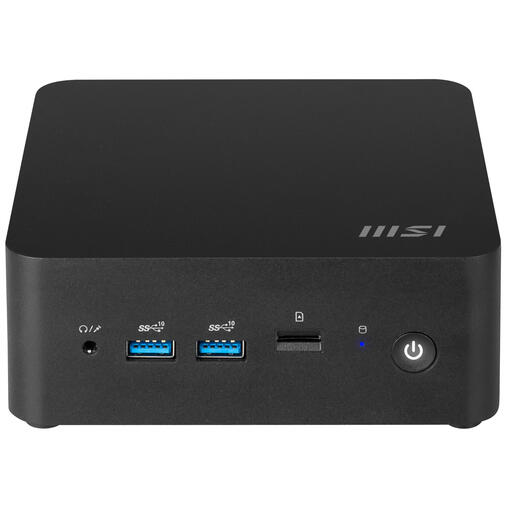
Could suit you if installing and configuring the computer is part of your learning goals; check which components are included in the specific offer.
The product name lists a capacity of 0.84 l and an Intel Core 7 150U. The product description lists support for up to 64 GB of DDR5 memory and HDD and SSD storage. As a barebone, this configuration requires you to plan your own operating system setup.
Canonical explains how to try Ubuntu from a USB stick without making permanent changes to your computer. On the exact PC you plan to use, test the display, sound and network, among other things. Back up your files if you later change an existing installation.
Canonical’s installation guide for Ubuntu Desktop 26.04 LTS lists at least 25 GB of storage and recommends a USB stick of 8 GB or more. Writing the installation image erases the USB stick, so save any files on it elsewhere first.
Don’t assume so: Raspberry Pi specifies USB-C power at 5 V/5 A for the Pi 5. The manufacturer warns that equipment connected to USB may not work properly if less power is available, so check that the power supply is suitable for your complete setup.
When you buy as a consumer, the product must meet what you can reasonably expect from it; a commercial manufacturer’s warranty does not replace your statutory rights. Business.gov.nl also says that online consumer purchases generally come with a 14-day cooling-off period, starting the day after delivery. Exceptions may apply, for example to custom-made products.
No. Business.gov.nl explains that the CE mark relates to applicable product rules; it is not proof of Linux compatibility. Check the exact PC configuration and the distribution you want to use separately.