Joybuy products for configuring yourself
These Joybuy products are suited to configuring your own system and installing Linux yourself. For each version, check Linux support, the components included and the applicable CE marking.
 No image available
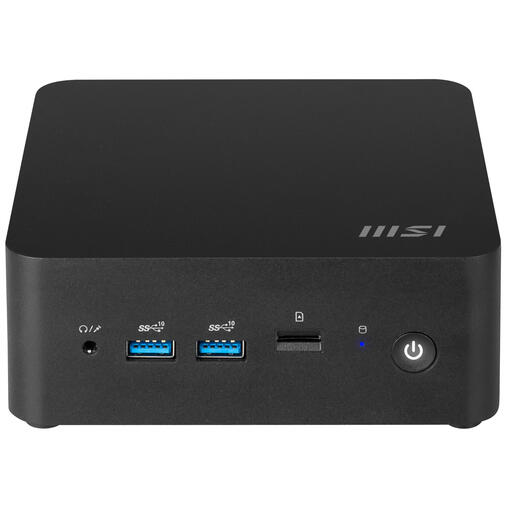
MSI Cubi NUC 1MG-237BEU barebone
Suited to anyone who wants to configure the components and operating system themselves; check what’s included with this barebone before buying.
Support for up to 64 GB of DDR5 memory is listed.
M.2 and SATA storage and VESA mounting are listed. Keep the ventilation openings clear.
Joybuy
 No image available
ASUS Ascent GX10 GX10-GG0003BN, 128 GB LPDDR5x, 1 TB SSD
Could provide a basis for your own Linux setup; check support for the exact hardware and distribution before installing.
The product name lists 128 GB of LPDDR5x memory and a 1 TB SSD.
Place the PC on a stable surface and keep the air vents clear to ensure good ventilation.
Joybuy
Frequently asked questions
Can I install Ubuntu Desktop on any mini PC running Windows?
No, a Windows listing alone doesn’t confirm that you can. Check the exact hardware and distribution; ASUS says selected distributions have been tested on some NUC models. For a comfortable experience with Ubuntu Desktop 26.04 LTS, Canonical recommends, among other things, 6 GB of RAM and 25 GB of available storage.
How can I try Linux before changing an existing installation?
Canonical describes a bootable Ubuntu USB that lets you try the desktop without changing your PC’s configuration. Creating it will erase the USB stick, so back up any files on it first. During installation, carefully check which drive you select.
Can I mount a mini PC behind a monitor or under a desk?
It depends on the model, bracket and your workspace. Lenovo says the ThinkCentre M75q Gen 5 Tiny can be mounted under a desk. Check what mounting hardware your version needs, and leave enough room for cables and ventilation when adjusting the desk.
What should I check with a barebone, and what about the warranty?
Check whether memory, storage and an operating system are included. For consumer purchases in the Netherlands, the seller is responsible for the legal guarantee. According to the Authority for Consumers and Markets, there is no fixed term: it depends on what you can reasonably expect from the product.
Which Dutch rules apply to online purchases?
According to the Dutch government, electronic devices sold in the EU must carry a CE marking. Check this for the specific PC and any electrical components supplied with it. For online purchases, you generally have 14 days to change your mind. Check who the seller is and whether a legal exception applies.


