If you want to get practising straight away, compare mini PCs that the seller says come with your chosen Linux distribution and tested hardware; Laptopmetlinux describes this service for its own range. If you also want to learn how to install Linux, check the exact hardware configuration and distribution, and try a live USB first if possible. To deal with reflections from a window, focus on how you position the separate monitor rather than choosing a different mini PC: angle your viewing direction parallel to the window, and also check the connections, included items and applicable product requirements.
Who is this guide for?
Linux beginner who wants to install it themselves
Wants to learn how to install Linux and therefore compares the exact hardware with the documentation for the distribution they plan to use. Canonical lists specific Ubuntu configurations, while Linux Mint describes a live session that lets you try the hardware before carrying out a permanent installation.
Learner with a spot beside the window
Wants to read comfortably in daylight, so considers not only the mini PC’s video connection but also the position and finish of the separate monitor. Arboportaal recommends positioning your viewing direction parallel to the window; BenQ explains how light can reflect off a glossy screen.
Beginner who wants to get started straight away
Wants to use Linux without first having to work out the installation process themselves. Laptopmetlinux says it installs the chosen distribution and tests the hardware for its own range; check which distribution and configuration are included with the specific model you’re considering.
What should you look for when choosing?
| What to consider |
What should you check? |
Who is this most important for? |
| Linux compatibility |
Compare the exact configuration and the distribution you plan to use with the relevant documentation. If possible, test the display and network with a live USB before wiping a drive. |
If I want to install Linux myself, I need to know whether this exact hardware works with my distribution and be able to test it first. Around 33% of consumers put compatibility first. |
| Readability beside the window |
Check the finish of the separate monitor and that it has a suitable video connection. Arboportaal recommends positioning your viewing direction parallel to the window. |
If I’m learning beside a bright window, I want to be able to read text on my separate monitor without distracting reflections. Screen readability is the main concern for around 27% of consumers. |
| Installation preparation |
Find out whether your chosen distribution is actually installed and tested, or whether you need to create your own installation media. |
If I mainly want to start practising straight away, I don’t want to have to work out the installation process first. Around 20% of consumers prioritise being able to get started immediately. |
| What’s included and upgrade options |
Check which items are included with the specific model. Lenovo states that the ThinkCentre M75q Gen 5 supports up to 64 GB of RAM and two M.2 SSDs; check the exact configuration. |
If I want to avoid finding that items are missing or upgrade later, I compare the full configuration. Around 20% of consumers prioritise completeness and upgradeability. |
Pitfalls to avoid when buying
-
Mistaking a kit for a ready-to-use Linux PC
ASUS distinguishes between the NUC 14 Pro Kit, which comes without a pre-installed operating system, memory or storage, and the complete Mini PC version.
Check the parts list for the exact version on offer before comparing how easy it is to set up.
With a Kit, you may still need to buy memory and storage separately. The parts you need depend on the version.
-
Assuming an Ubuntu listing applies to every configuration
Canonical lists specific hardware configurations. A listing for a model range does not automatically confirm support for a different configuration or another Linux distribution.
Compare the full model and its components with the documentation for the distribution you want to use.
-
Trying to fix window reflections by choosing a different mini PC
Reflections occur on the separate monitor and depend on its screen surface and the direction of the light.
First, try positioning your viewing direction parallel to the window. Then decide whether you need a different monitor or window blinds.
Brands to compare
ASUS
The NUC 14 Pro could suit anyone who wants to install Ubuntu themselves and carefully compare the exact version.
- ASUS lists support for Ubuntu 24.04 LTS for the NUC 14 Pro.
- The NUC 14 Pro Kit is listed without a pre-installed operating system, memory or storage. Don’t assume these details apply to the complete Mini PC version.
Lenovo
The ThinkCentre M75q Gen 5 is worth comparing if you’re looking for a specific Ubuntu configuration with documented support or want to upgrade later.
- Canonical lists a configuration with an AMD Ryzen 5 PRO 8500GE and RTL8852BE Wi-Fi. Lenovo states that the product family supports up to 64 GB of RAM and two M.2 SSDs.
- This information does not confirm that every version on offer has the same components or works with every Linux distribution.
HP
The Elite Mini 800 G9 could be an interesting option if you want to compare a specific configuration from Canonical’s Ubuntu catalogue with a particular listing.
- Canonical lists an Elite Mini 800 G9 configuration with an Intel Core i5-14600T.
- A Dutch HP version with an Intel Core i7-14700 is a different configuration. The Ubuntu listing for the i5 version therefore does not confirm support for the i7 version.
Mini PCs at Joybuy
These mini PCs can be a useful starting point when comparing hardware for a Linux learning set-up. Before you buy, check that the exact version is suitable for the distribution you want to use and what’s included.
 No image available
ASUS Ascent GX10 GX10-GG0003BN GB10 Mini PC, 128 GB LPDDR5x, 1 TB SSD
Compare the exact hardware with the Linux distribution you want to learn to use, and check which items are included with this version.
The product name lists 128 GB of LPDDR5x memory and a 1 TB SSD.
View at Joybuy
 No image available
FIREBAT F1 Mini PC, AMD Ryzen 5 7640HS, 24 GB LPDDR5, 512 GB PCIe 4.0 SSD
The listed video connections could be useful for a separate monitor; check that the connection is compatible and that the exact configuration works with your Linux distribution.
The product name lists HDMI 2.1, USB 4.0 and support for output to three screens.
View at Joybuy
 No image available
FIREBAT AM02L Mini PC, AMD 6600H, 16 GB LPDDR5, 512 GB M.2 NVMe, Windows 11 Home
If you want to install Linux yourself, check that the exact hardware is supported beforehand and bear in mind the operating system listed for this version.
The product name lists Windows 11 Home, HDMI 2.1 and DisplayPort 1.4.
View at Joybuy
 No image available
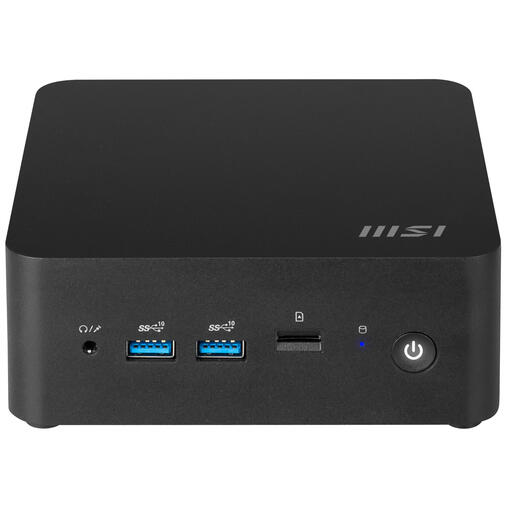
MSI Cubi NUC 1MG-237BEU Barebone, 0,84L, Intel 150U SoC
This barebone could suit anyone who wants to configure their own Linux system. Before you buy, check which components and operating system are included with the version on offer.
The product name lists a size of 0,84L and an Intel 150U SoC.
View at Joybuy
Frequently asked questions
Will a faster mini PC make the screen easier to read beside the window?
Not if distracting reflections are the problem; these occur on the separate monitor. Arboportaal recommends positioning your viewing direction parallel to the window. Also consider the screen finish and whether you need window blinds.
How can I try Linux without immediately wiping my existing installation?
Linux Mint describes a live session from a USB drive where changes are not permanent. Try the display and network, among other things. If you install it later, bear in mind that choosing ‘Erase disk and install Linux Mint’ can delete existing data on the drive.
Is Ubuntu certification the same as meeting European product regulations?
No. Canonical describes its tests for Ubuntu hardware compatibility; the Dutch government separately refers to the applicable CE marking for electronic devices on the EU market. Check this for the exact version on offer, and don’t assume it is CE-compliant just because it has an Ubuntu listing.
Who should I contact if a product is faulty?
According to the Dutch government, if there’s a problem with a purchase made by a consumer in the Netherlands, you should be able to contact the seller. There is no fixed statutory warranty period for all products in the Netherlands; a manufacturer’s warranty does not replace your statutory rights.
Do you get 14 days to change your mind with every online purchase?
According to the Dutch government, a consumer generally has 14 days to change their mind for applicable distance sales. Check whether the rules apply to your purchase: according to the Dutch government, buying online from a private individual is not covered by the same rules.


