Which setup is right for you?

Linux learners with limited sockets

You want a compact place to learn, but you also need to factor in the power supply, monitor and other devices that may each need power. Raspberry Pi documentation explains the power supply and peripherals required for desktop and headless use.

Beginners learning desktop Linux on x86

You want to install a standard desktop distribution and need to check support for the exact model and the components included. ASUS lists Ubuntu 24.04 LTS for the NUC 14 Essential kit, while Lenovo lists Ubuntu Linux as a possible operating system for the ThinkCentre M75q Gen 5.

ARM and GPIO enthusiasts

You want to use Linux on a Raspberry Pi for single-board computer projects or headless learning, and need to check that your software and learning materials work with ARM. Raspberry Pi and Canonical document the Pi 5 and Ubuntu support; check the requirements for the version you choose too.

What should you consider when choosing?

Complete x86 mini PC

Best if: you mainly want to learn to use a Linux desktop and x86 software.

Keep in mind: check support for the exact model and distribution version; configurations can vary.

x86 barebone

Best if: you want to choose and install the memory and storage yourself.

Keep in mind: ASUS says the NUC 14 Essential kit NUC14MNK-B is supplied without memory or storage installed; also check the regional version and power cable.

Raspberry Pi 5

Best if: you want to explore ARM Linux, GPIO or a headless setup.

Keep in mind: for headless use, you’ll need another computer and a network connection; a Pi isn’t a like-for-like replacement for an x86 PC.

What to consider What should you check? Who should consider this?
Power supply and sockets Check the power input, supplied adapter, peripherals and space for ventilation. If I have limited sockets, I want to know in advance which devices and power supplies my complete setup requires. Around 36% of consumers give power and socket availability top priority.
x86 Linux compatibility Check the exact model, supported distribution and version, and whether the RAM and SSD are already installed. If I want to install a standard x86 desktop, I want to know whether my specific model and chosen Linux version are supported. Around 29% of consumers prioritise x86 Linux compatibility.
ARM and headless use Check whether your learning materials support ARM and whether you have the power supply, boot medium and any necessary network or input devices. For ARM projects or learning without my own monitor, I want to know what additional equipment and software I’ll need. Around 21% of consumers prioritise ARM or headless use.
Components required Compare everything you’ll need, including memory, storage or a boot medium, power supply, cables and, if necessary, a case. If I want to avoid unexpected extra components, I’d rather compare complete setups than just the computer or board. Around 14% of consumers focus on the complete purchase.

Pitfalls to avoid

  • Comparing a barebone with a ready-to-use PC

    According to ASUS, the NUC14MNK-B is supplied without memory or storage installed. So it won’t necessarily be ready to use on the same basis as a complete mini PC.

    Before comparing models, make a note of the components you’ll need for the exact version.

    Memory and storage may need to be purchased separately.

  • Assuming a small computer means you won’t need extra sockets

    A Raspberry Pi 5 also needs a power supply. A desktop setup also requires a display and input devices, while headless use requires another computer and a network connection.

    Map out your complete setup and count all the power supplies and devices you’ll need.

    A suitable power supply, boot medium or peripherals may be needed for your setup.

  • Treating ARM and x86 as interchangeable

    The Raspberry Pi 5 uses ARM, while the NUC kit reviewed uses an Intel processor. Your learning materials or software may therefore require a specific architecture.

    Check the architecture and installation instructions for the software you want to use.

  • Assuming the adapter’s wattage is the actual power consumption

    The stated power rating of a power supply isn’t the same as a measurement of the complete setup’s power consumption while in use.

    If energy consumption is a deciding factor, compare measurements taken under similar conditions.

Brands to consider

ASUS

The NUC 14 Essential is available as a complete mini PC or as a kit, including the NUC14MNK-B barebone.

  • ASUS lists Ubuntu 24.04 LTS support for the NUC14MNK-B kit.
  • According to the specifications, memory and storage aren’t pre-installed. Check the exact model and power cable.

Raspberry Pi

The Raspberry Pi 5 is an ARM single-board computer for Linux and hardware projects, including headless setups.

  • Raspberry Pi documents the power and boot requirements; Canonical documents Ubuntu support for the Pi 5.
  • Check ARM compatibility, the boot medium and the requirements for your chosen setup.

Lenovo

The ThinkCentre M75q Gen 5 is a compact x86 PC whose product specifications list Ubuntu Linux as a possible operating system.

  • Lenovo provides a Linux user guide for the ThinkCentre M75q Gen 5.
  • An operating system listed in the product specifications doesn’t automatically tell you which software is installed on every sales configuration. Check the specific model.

MSI

The Cubi N ADL range includes N100 and N200 versions and is available as a complete system or barebone.

  • MSI lists a 65 W power supply for the range.
  • This power rating isn’t a measurement of actual consumption. The listed Windows options don’t confirm that Linux is supported on every version.

Joybuy products

These compact mini PCs and barebones are options to compare for a Linux learning setup. Before buying, check that the Linux distribution and components you need are suitable for the exact configuration.

ASUS Ascent GX10-GG0003BN mini PC, 128 GB LPDDR5x and 1 TB SSD

ASUS Ascent GX10-GG0003BN, 128 GB LPDDR5x, 1 TB SSD

The mini PC form factor may suit a compact learning setup; check that your Linux distribution and required components are suitable for this exact configuration.

128 GB LPDDR5x memory and 1 TB SSD.

Joybuy

FIREBAT AM02L mini PC, AMD 6600H, 16 GB LPDDR5 and 512 GB SSD

FIREBAT AM02L, AMD 6600H, 16 GB LPDDR5, 512 GB SSD

The mini PC form factor is an option for a compact learning setup; check that your Linux distribution is suitable for this exact version.

The title lists Windows 11 Home, 16 GB LPDDR5 and a 512 GB M.2 NVMe SSD.

Joybuy
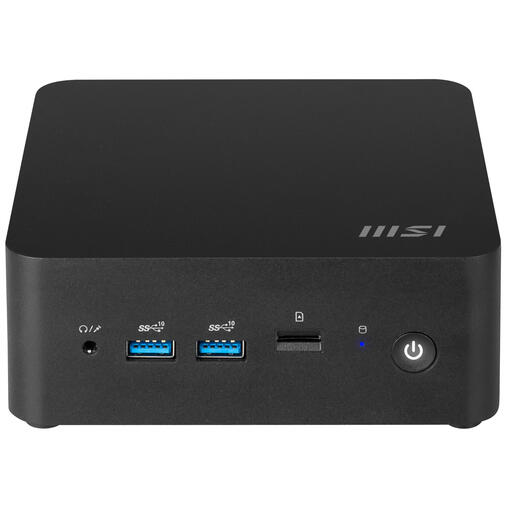
MSI Cubi NUC 1MG-237BEU barebone PC, 0.84 litres, Intel SoC 150U

MSI Cubi NUC 1MG-237BEU barebone PC, 0,84 litres, Intel SoC 150U

This barebone may suit you if you want to configure the components yourself; allow for the extra preparation and check which components your Linux learning setup requires.

The product name lists a volume of 0,84 litres and an Intel SoC 150U.

Joybuy

Frequently asked questions

Can I install Ubuntu on any mini PC in a product range?

No. A listing for a product range doesn’t automatically confirm support for every version and Ubuntu release. ASUS lists Ubuntu 24.04 LTS for the NUC 14 Essential kit; check the exact model and the version you want to install. Ubuntu also notes that writing an installation USB stick erases its contents.

Can I use a Raspberry Pi 5 without a monitor?

Yes, as a headless setup, provided you have another computer, a network connection, a boot medium with an operating system and a suitable power supply. For Ubuntu on the Pi 5, also check support for the version you’ve chosen and any EEPROM requirements.

Does a 65 W adapter mean a mini PC constantly uses 65 W?

No. The 65 W listed by MSI for the Cubi N ADL range is the stated power rating, not a measurement of actual consumption. To compare power consumption, look at measurements taken under similar conditions.

What warranty applies when buying in the Netherlands?

You have a statutory guarantee in addition to any manufacturer’s or seller’s warranty. ACM ConsuWijzer explains that the law doesn’t set a fixed duration; what you can expect from a product depends, among other things, on its type, price and brand.

What should you consider for electrical safety and compliance?

Make sure the equipment can dissipate heat and follow the instructions for its power supply and connections; a lack of sockets isn’t a reason to connect things unsafely. Business.gov.nl explains that the product requirements that apply depend on the product group. Brandweer Nederland advises leaving electrical appliances enough space to dissipate heat.
