
Vandaag of morgen in huis

Kwaliteit gegarandeerd

Welkomstaanbiedingen ontgrendelen: GRATIS bezorging | Tot 80% korting | Gratis 30 dagen JoyPlus-proefperiode
Download de app
In fast-paced, competitive games, every millisecond counts. Your reaction time is crucial, but your equipment can be the difference between winning and losing. A heavy, cumbersome mouse can slow you down and cause wrist fatigue—exactly what you don't want during an intense FPS match. Finding the right lightweight gaming mouse is therefore not a luxury, but a strategic choice.
This article is intended as a practical guide. We filter out the marketing jargon and focus on the specs that truly matter: weight, sensor performance, and response speed. This way, you can make an informed decision that fits your playstyle.
Before we look at the models, it's helpful to know which features define a professional gaming mouse.
A lightweight gaming mouse (usually under 65 grams) enables faster movements and micro-adjustments with less effort. This is a particular advantage in FPS gaming mouse scenarios where quick aiming is essential. Besides weight, pay attention to the shape. An ergonomic gaming mouse that fits your hand and grip style (palm, claw, or fingertip) prevents cramping and ensures long-lasting comfort.
The polling rate, measured in Hertz (Hz), indicates how often the mouse reports its position to the computer. The standard is 1000Hz, but a gaming mouse 8000Hz reports 8 times more frequently. This can result in smoother cursor movement and a fractionally faster response time, which can be an advantage in esports. A high DPI (Dots Per Inch) is an indicator of a sensitive sensor, but the accuracy and consistency of the tracking are more important than the maximum DPI number itself.
The technology for a wireless gaming mouse has improved immensely. Modern wireless models now offer a response speed comparable to wired variants, without the restriction of a cable. The choice depends on your preference: the ultimate freedom of wireless or the reliability of a constant connection and no battery to worry about with a wired esports mouse.
Based on specifications and features, we have compiled a list of interesting models for you.
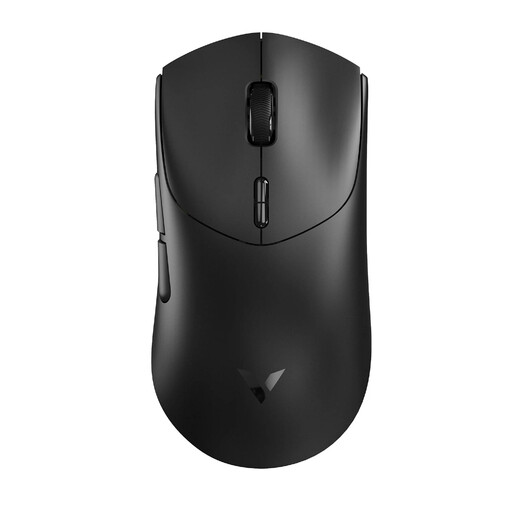
Why It Stands Out The RAPOO VT7 combines an extremely low weight with advanced wireless technology. What sets this model apart is its native 8000Hz wireless polling rate, which doesn't require any additional software. According to the manufacturer, the Nordic nRF54L15 MCU ensures a stable connection and impressive battery life.
Pros
Who Is It For? For the gamer seeking top-tier wireless performance and an ultra-lightweight design, without the need for constant recharging. The numerous programmable buttons also make it versatile for various game genres.
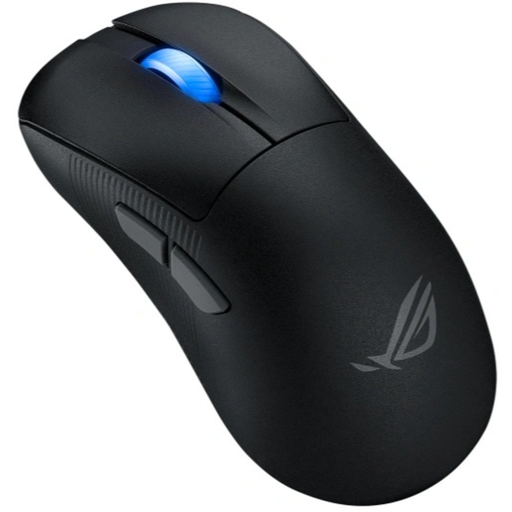
Why It Stands Out The ASUS ROG Keris II Ace is designed with a focus on ergonomics for right-handed users. Weighing just 54 grams with a shape that fits comfortably in the hand, this mouse is built for long gaming sessions. Its versatile connectivity options (RF wireless, Bluetooth, and wired) make it flexible in its use.
Pros
Who Is It For? Right-handed gamers who prioritise comfort and an ergonomic fit. The flexibility of its three connection modes makes it a great choice for users who want to use the mouse across multiple devices.
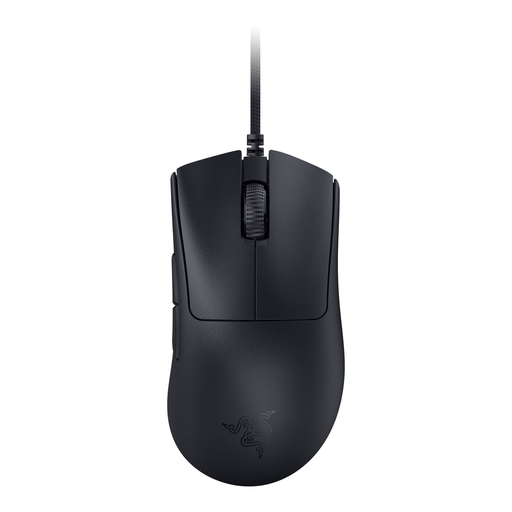
Why It Stands Out The Razer DeathAdder V3 builds on an iconic shape that, according to Razer, has been refined in collaboration with esports pros. This wired model focuses purely on performance with a weight of 59 grams and Razer's 8000Hz HyperPolling Technology. The shape is specifically designed for control and comfort.
Pros
Who Is It For? Competitive gamers who prefer a wired connection for the most stable performance. Its iconic ergonomic shape makes it a popular choice for FPS players already familiar with the DeathAdder line.
The models above are strong contenders in the lightweight mouse category. However, if you're looking for a different button layout, a specific shape, or other features, there's more to explore.
Check out our full range of gaming mice with right-side buttons for more choices.
For most gamers, 1000Hz (reporting 1000 times per second) is the standard and more than sufficient. For competitive players, a higher polling rate of 4000Hz or 8000Hz can offer a small but noticeable advantage in the form of smoother cursor movements and lower input lag.
For many players, yes. A lighter mouse requires less force to move, which can lead to faster reactions and less wrist fatigue during long sessions. It allows you to 'flick' and track targets more quickly. Ultimately, it remains a matter of personal preference; some players prefer a slightly heavier mouse for more stability.
A high maximum DPI value (like 26,000 or 42,000) indicates that the mouse has a very capable sensor. In practice, however, most competitive gamers use a much lower DPI setting, often between 400 and 1600. The most important thing is that the sensor is accurate and consistent at the DPI value you use, without any acceleration or jitter.
