
Vandaag of morgen in huis

Kwaliteit gegarandeerd

Welkomstaanbiedingen ontgrendelen: GRATIS bezorging | Tot 80% korting | Gratis 30 dagen JoyPlus-proefperiode
Download de app
An LG 27GS85Q-B gaming monitor is aimed at gamers looking for a 27-inch gaming monitor with a high refresh rate, QHD resolution and an adjustable stand. On paper, the combination of 200Hz, 1ms, HDR400 and Adaptive Sync sounds appealing. However, individual marketing terms do not tell you everything about a screen’s practical suitability.
The key question is not just which specifications a monitor has, but also which connection and settings are required to achieve them. Before buying, check your graphics card, cables, connections and desk setup.
The LG 27GS85Q-B has a specified refresh rate of 180Hz, with a maximum of 200Hz via overclocking, according to the product information. This means that 200Hz is not necessarily the standard setting. You may need to activate it in the monitor menu and configure it in Windows or your graphics driver.
Your graphics card must also deliver enough frames per second. 200Hz can be relevant for competitive games, but you will not automatically reach it in demanding single-player games at QHD resolution.
The stated 1ms response time is a technical product specification. Actual motion performance can vary depending on the overdrive setting, contrast level and refresh rate. Overly aggressive overdrive can, for example, cause visible artefacts.
So do not automatically use the highest response-time mode. Check whether the monitor offers several settings and choose the mode in which fast-moving images remain clear without distracting edges.
According to the product specifications, the LG 27GS85Q-B supports DisplayHDR400 and HDR10. HDR400 indicates peak brightness, but in itself says little about local dimming, black levels or contrast. This model uses edge-lit LED backlighting and global dimming. Expect an improvement in compatible games and films, but not OLED-like contrast.
The resolution of 2560 x 1440 pixels is also known as QHD. On a 27-inch screen, this works out at approximately 109 pixels per inch. This provides more detail than Full HD, while text and interface elements remain easy to read at a normal viewing distance.
A QHD gaming monitor is particularly worthwhile if you:
Bear in mind the higher graphics workload. In competitive games, you may sometimes need to lower the image settings to maintain a high frame rate.
The LG 27GS85Q-B uses a panel with a specified refresh rate of 180Hz, expandable to a maximum of 200Hz. The monitor has DisplayPort 1.4 and two HDMI 2.0 connections. Always check the manual to find out which port and cable are required for your desired resolution and refresh rate.
For PC gaming, DisplayPort is often the practical choice. Ideally, use the supplied cable or one that is suitable for the intended QHD refresh rate. An older cable or incorrect setting could leave your screen running at 60Hz.
The panel is described as Nano IPS. According to the product description, this type of LCD panel offers wide viewing angles of 178 degrees and a colour depth of 10-bit, 8-bit + FRC. The stated static contrast ratio is 1,000:1.
For smooth visuals, the monitor supports the following according to its specifications:
Compatibility depends on your graphics card, driver and connection. After installation, check that Adaptive Sync is active both on the monitor and in your PC settings.
The stand offers 110 mm of height adjustment, tilts and swivels horizontally. The pivot function allows you to use the monitor in portrait orientation. The monitor also supports VESA 100 x 100 mm, which is useful if you want to use a monitor arm.

Why it suits this profile: The combination of QHD, a high refresh rate and an adjustable stand provides a strong foundation for PC gaming without immediately moving to an OLED screen.
The product information lists 180Hz and up to 200Hz via overclocking separately. This allows you to assess the specification more realistically than if only “200Hz” were mentioned.
27-inch display, 2560 x 1440, Nano IPS, 1ms, G-Sync Compatible, FreeSync and 110 mm of height adjustment.
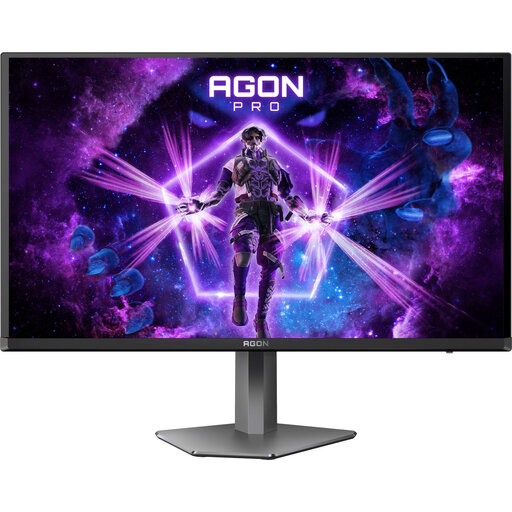
Why it suits this profile: This model is aimed at gamers looking for an exceptionally high refresh rate and OLED panel technology for competitive PC games.
The specifications list QD-OLED, 240Hz and 0.03ms. However, check whether your PC can drive this refresh rate at QHD and pay attention to the manufacturer’s warranty terms.
QD-OLED panel, 2560 x 1440, 240Hz, 0.03ms and support for FreeSync and G-Sync Compatible.
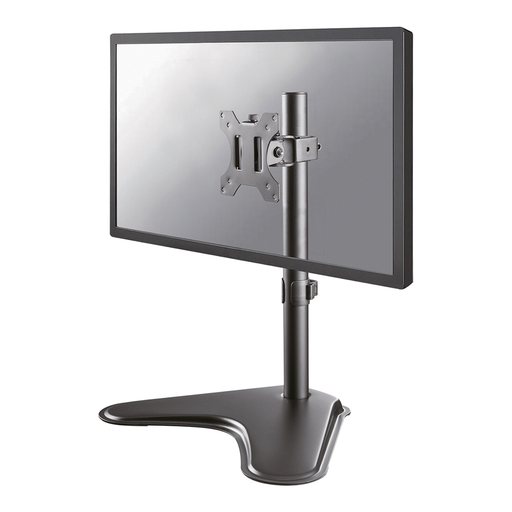
Why it suits this profile: For an intensive gaming setup, a separate monitor arm can be practical when you want flexibility in arranging the height, viewing angle and cables.
The arm supports VESA 75 x 75 and 100 x 100 mm and has a load capacity of 8 kg. Before mounting, check your monitor’s weight and the strength of your desk.
Suitable for one monitor up to 32 inches, height adjustment from 5.6 to 41.9 cm, cable management and an 8 kg load capacity.
We have put together a complete, up-to-date list of products that fully meet these strict selection criteria and the applicable European safety regulations.
Place the screen on a stable desk and attach the stand according to the supplied instructions. If you are using a monitor arm, check the VESA size and maximum load. Leave approximately 100 mm of clearance around the ventilation openings at the back, as stated in the product information.
After connecting the monitor, check the following:
According to the product information, the monitor comes with DisplayPort, HDMI, USB and power cables. The LG 27GS85Q-B also has two USB 3.2 ports for peripherals.
Yes, this combination offers a practical balance between sharpness and screen size. QHD does demand more from your graphics card than Full HD. For esports, a high frame rate is more important than maximum graphical quality.
According to the product specifications, 180Hz is the stated refresh rate, and the screen can be overclocked to 200Hz. After installation, check the correct setting and use a suitable connection.
Power consumption depends on brightness, HDR use, USB devices and how long the screen is active. A higher refresh rate may make the system render more, but total consumption is mainly determined by the monitor, PC and duration of use. Enable energy saving and automatic standby when you are not gaming.
