Who is this choice relevant to?

Photographers looking for specific lens correction

First, check that your software recognises your camera and lens and supports the correction you want. Adobe explains lens profiles in the Lightroom Classic documentation, while DxO PhotoLab uses data from the camera and lens in use.

People sharing a desk

If you share a workspace, remember to factor in the separate monitor, input devices and how files are organised. HP, Lenovo and Apple specifications describe different compact computer configurations, while Adobe explains where a Lightroom Classic catalogue can be stored.

Photographers who edit regularly

Compare the memory and storage in the exact configuration with your software requirements and the size of your photo files. A specification on its own doesn’t tell you how quickly a particular collection of photos will be processed.

What should you look for when choosing?

Compact Windows desktop

Best for: a shared workspace where users prefer Windows and want to use a separate monitor.

Bear in mind: peripherals vary by configuration. With the Lenovo configuration mentioned, the monitor, keyboard and mouse are optional and sold separately.

Mac mini with a separate monitor

Best for: users who prefer macOS and can set up their own monitor, keyboard and mouse.

Bear in mind: Mac mini configurations vary in chip, memory and storage, so check the specific configuration you’re choosing rather than relying on the model name alone.

What to consider What should you check? Who should pay extra attention?
Lens correction support Check that your software supports the exact camera and lens combination, and distinguish lens distortion correction from perspective correction. If I want to correct a specific lens, I’ll first check whether the software I’ve chosen supports it. Around 33% of consumers prioritise software and lens compatibility.
Shared workspace Check the monitor connections, available desk space and monitor adjustability. Also decide where each person’s files and catalogues will be stored. If we share a desk, I want to be able to plan the monitor setup and file organisation for everyone. Around 27% of consumers prioritise workspace layout.
Memory and storage Compare the configuration with the current software requirements and the space your photo files need. The HP and Lenovo configurations mentioned each have a 512 GB SSD. For regular editing sessions, I want to match the memory and storage to my software and files, not just the processor name. Around 20% of consumers prioritise editing capacity.
Complete setup Compare like for like: computer, monitor, keyboard, mouse, required software and storage for files or backups. If I want a workspace that’s ready to use, I need to know which components I’ll still need. Around 20% of consumers prioritise the cost of the complete setup.

Common buying pitfalls

  • Assuming a fast computer supports every lens

    Profile-based correction depends on the software and the camera and lens in use. A desktop can’t replace a missing lens profile.

    Before choosing a computer, check the exact camera and lens combination and the correction feature in the software you plan to use.

  • Comparing the computer alone

    A monitor and input devices aren’t included with every configuration. Lenovo states that the monitor, keyboard and mouse are optional and sold separately for the ThinkCentre configuration mentioned.

    Compare complete setups and check what’s included with the configuration you’re considering.

    Depending on the configuration, you may need a separate monitor, keyboard or mouse.

  • Saving a Lightroom Classic catalogue to a network drive without checking first

    Adobe states that a Lightroom Classic catalogue can’t be stored on a network.

    Decide in advance where the catalogue will be stored and how files will be managed in your shared workspace.

    You may need to choose a different storage option and adjust the way you work.

Brands to consider

HP

The HP Pro Mini 400 G9 configuration 6D494EA#ABH is a compact Windows desktop for a workspace with a separate monitor.

  • HP Store Netherlands lists Windows 11 Pro, 16 GB RAM, a 512 GB SSD and a wired mouse for this configuration.
  • The specifications don’t prove that a specific lens profile is supported or show how quickly a particular photo-editing task will run. Check the monitor and software too.

Lenovo

The ThinkCentre Neo 50q Gen 5, part number 13B9CTO1WWNL2, is a compact Windows configuration to compare with other workspaces.

  • Lenovo Netherlands lists Windows 11 Pro, 16 GB memory and a 512 GB SSD for this configuration.
  • Lenovo says the monitor, keyboard and mouse are optional and sold separately. Performance claims aren’t an independent test of photo-editing software.

Apple

The Mac mini is a compact macOS option for a shared workspace with a separate monitor.

  • Apple’s Dutch specifications list Mac mini configurations with 16 GB of unified memory.
  • Configurations vary in chip, memory and storage. The model name alone doesn’t tell you which configuration you’ll get or how it will perform with specific correction software.

Joybuy products for this workspace

This selection includes compact Windows desktops and Mac mini configurations for a shared workspace. Check software compatibility and the peripherals you’ll need for each configuration.
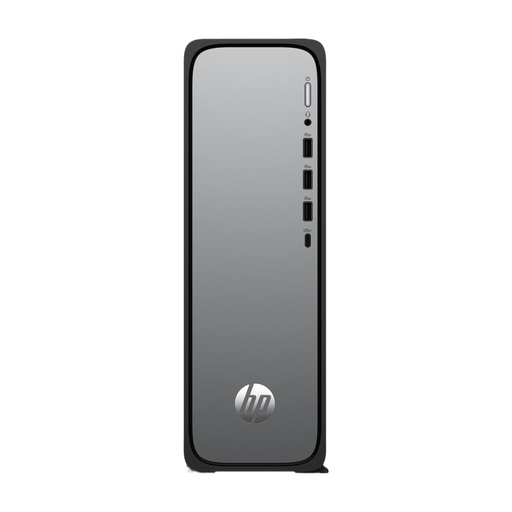
HP OmniDesk Slim S03-0006nd desktop computer

HP OmniDesk Slim S03-0006nd D49HREA#ABH

A compact Windows desktop for anyone looking for a shallow setup on a shared desk. Check that the configuration suits your editing software.

Windows 11 Home; 8 GB DDR5 memory; 512 GB SSD; stated depth of 10 cm.

View at Joybuy

SOYO Y5Pro Mini PC with Intel Core i5 processor

SOYO Y5Pro Mini PC

A small Windows mini PC for a workspace where desk space is a consideration. Check the exact processor variant and software requirements.

Intel Core i5-8250U/8350U; Windows 11; 8 GB DDR4 memory; 256 GB SATA SSD; 105 × 113 × 45 mm; Bluetooth 5.2 and Wi-Fi 5.

View at Joybuy

Apple Mac mini M6 with 16 GB memory and 256 GB SSD

Apple Mac mini M6, 16 GB, 256 GB SSD

A macOS configuration to consider if your shared workspace is set up for Mac. Check that the software supports your camera and lens combination.

Apple M6 chip with 12-core CPU and 12-core GPU; 16 GB memory; 256 GB SSD.

View at Joybuy
Apple Mac mini M6 with 16 GB memory and 512 GB SSD

Apple Mac mini M6, 16 GB, 512 GB SSD

This Mac mini configuration combines macOS with 16 GB memory. Compare its storage capacity with the space your software, catalogues and photo files require.

Apple M6 chip with 12-core CPU and 12-core GPU; 16 GB memory; 512 GB SSD.

View at Joybuy
Apple Mac mini M6 with 24 GB memory and 512 GB SSD

Apple Mac mini M6, 24 GB, 512 GB SSD

A Mac mini configuration with more memory than the listed 16 GB versions. Compare it with the requirements of your own software and files.

Apple M6 chip with 12-core CPU and 12-core GPU; 24 GB memory; 512 GB SSD.

View at Joybuy

Frequently asked questions

Will a more powerful desktop automatically correct lens distortion better?

No. First check that your correction software supports your camera and lens combination. Adobe describes lens profiles as a software feature, while DxO PhotoLab describes corrections based on camera and lens data. Lens distortion and converging perspective are different correction issues.

Can a Lightroom Classic catalogue be stored on a shared network drive?

Adobe says a Lightroom Classic catalogue can’t be stored on a network. So decide in advance where to store the catalogue, either locally or on an external drive, and how you’ll manage your files together.

What should I include in the setup of a shared workspace besides the computer?

Check whether the monitor, keyboard and mouse are included with your chosen configuration. Lenovo says these items are optional and sold separately with the configuration mentioned. Also factor in your chosen software and the storage you need for files.

What Dutch requirements apply to employees who work at a screen for long periods?

According to Arboportaal, for an employee who works at a screen for more than two hours a day, the monitor and keyboard must not be attached to each other. This requirement applies to the work situation described and isn’t a general product specification for every private buyer.

What rights do I have as a Dutch consumer when buying online?

According to the Dutch government, distance purchases are often covered by a 14-day cooling-off period, with some exceptions. ACM ConsuWijzer also says that if a product breaks sooner than you could reasonably expect under normal use, the seller must resolve the issue free of charge—for example, by repairing or replacing the product, or refunding you. A manufacturer’s warranty doesn’t replace this legal right.
