
Vandaag of morgen in huis

Kwaliteit gegarandeerd

Welkomstaanbiedingen ontgrendelen: GRATIS bezorging | Tot 80% korting | Gratis 30 dagen JoyPlus-proefperiode
Download de app
A compact desktop computer can save a lot of space on your desk, but not every mini PC is suited to a working day involving multiple programmes, screens and video calls. With a Lenovo Yoga Mini mini PC in particular, it’s important to look beyond terms such as AI PC, Copilot+ PC and Wi-Fi 7.
Marketing copy often highlights modern features but leaves out details that can make a real difference in practice. These include non-upgradeable memory, limited connectivity or a power adapter that isn’t included as standard. Use these checks to avoid buying a computer that no longer suits your needs after a few months.
A mini PC with 16GB RAM is suitable for many office tasks, browsing and multitasking. However, check whether the memory can be replaced. The Lenovo Yoga Mini 01IPH11 uses 16GB of soldered LPDDR5X-8533 memory. This supports the stated configuration, but upgrade options are limited: according to the product specifications, up to 32GB of internal memory is available.
For someone working from home and mainly using documents, email and video calls, 16GB is generally a practical starting point. If you use local AI applications, large spreadsheets or lots of virtual workspaces, make sure you account for the memory limit before buying.
A mini PC may support multiple screens, but the number of ports and the cables you need determine how easy it is to set up. According to the product information, the Lenovo Yoga Mini supports up to four independent screens. Its connections include HDMI 2.1, two Thunderbolt 4 ports and two 10Gbps USB-C ports.
Check in advance:
A separate adapter or dock may add to the cost. So don’t just count the USB ports; check what each one does.
Wi-Fi 7 sounds appealing for a modern workspace. The Lenovo Yoga Mini 01IPH11 supports Wi-Fi 7, Bluetooth 6.0 and 2.5 Gigabit Ethernet. However, actual speeds also depend on your router, broadband plan, cabling and distance from the access point.
If you have an older router, the mini PC will still work using a compatible Wi-Fi standard, but you won’t get the full benefit of Wi-Fi 7. For a fixed office setup, a 2.5GbE network cable may be a more stable choice than a wireless connection.
According to the product specifications, the Intel Core Ultra 5 325 in the Lenovo Yoga Mini has 8 cores and 8 threads. It also has an NPU with a stated AI performance of up to 47 TOPS. The integrated Intel Graphics are listed as delivering up to 40 TOPS for AI performance.
These figures are technical specifications, not a guarantee that every AI feature will be available in every application. Check whether the software you use actually supports Copilot+ PC features or local NPU acceleration. This configuration is designed for everyday desktop use, including office work, watching content and multitasking. For demanding 3D rendering or modern games, a dedicated graphics card is a better choice.
A mini PC with a 512GB SSD will generally start up more quickly than a system with a traditional hard drive. The Yoga Mini uses a 512GB PCIe 4.0 NVMe SSD. This gives you space for Windows 11 Home, programmes and work files, but the available storage will be lower once the operating system is installed.
The PC has one M.2 SSD slot. If you store lots of video files, photo libraries or large project folders, you may need an external SSD or network storage. Also check that you have a backup plan in place: an SSD is no substitute for a backup system.
The case has a stated volume of 0.65 litres and weighs around 0.6 kilograms. This makes the Lenovo Yoga Mini suitable for a small desk or meeting room, or for mounting behind a screen if the right bracket is available.
Always place your compact desktop computer on a stable, well-ventilated surface. Don’t block the ventilation openings, and only use the Lenovo power adapter supplied or approved accessories. Refer to the product manual for mounting and maintenance instructions.
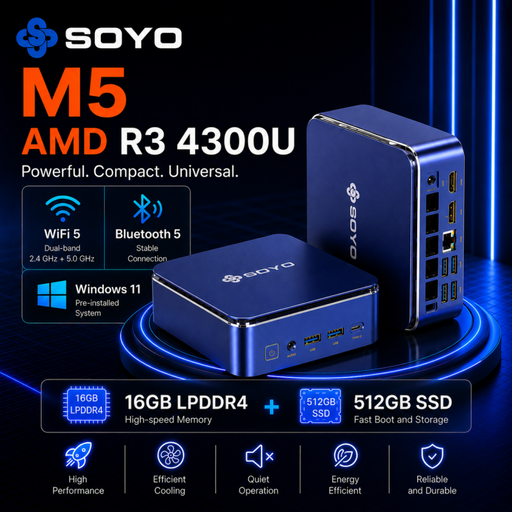
Why it suits this profile: This mini PC offers 16GB of LPDDR4 memory, 512GB of SSD storage and connections for up to three screens. It’s a good fit for basic office work, education and multimedia, without having to move straight to a more advanced Copilot+ PC model.
The connections are clearly specified: HDMI 2.0, DisplayPort 1.4 and USB-C. Check, though, that Windows 11 Pro and Wi-Fi 5 meet your expectations.
16GB RAM, 512GB SATA SSD and three video outputs in a compact case.
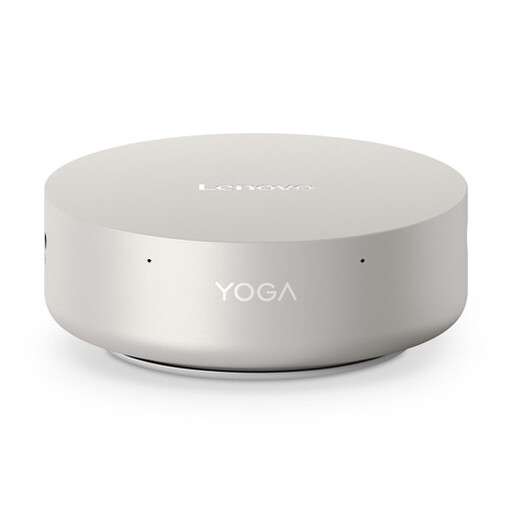
Why it suits this profile: The combination of an Intel Core Ultra 5 325, 16GB LPDDR5X, a 512GB PCIe 4.0 SSD, Wi-Fi 7 and Windows 11 Home is a good fit for professionals looking for a compact AI PC with modern connections.
Screen support and ports are clearly specified. Bear in mind that the LPDDR5X memory is soldered, so it can’t be freely replaced.
0.65 litres, two Thunderbolt 4 ports, 2.5GbE and a stated NPU performance of up to 47 TOPS.
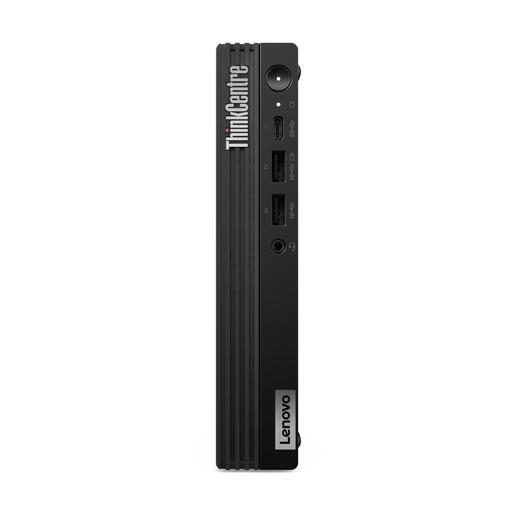
Why it suits this profile: For a small business or office workspace, the Intel Core i7-14700T with 20 cores and 28 threads could be a good choice for multitasking. Windows 11 Pro, VESA mounting and upgradeable DDR5 memory are well suited to a business setup.
The memory uses two DIMM slots and can be upgraded to 64GB, according to the product specifications. Note: the product information says the power adapter must be purchased separately.
Intel Core i7-14700T, Windows 11 Pro, VESA support and two M.2 storage slots.
We’ve put together a complete, up-to-date list of products that meet these strict selection criteria and the applicable European safety regulations.
According to the product information, the Lenovo Yoga Mini 01IPH11 supports up to four independent screens. Check the available HDMI, USB-C and Thunderbolt connections on your monitors. You may need a suitable adapter or dock for some setups.
For browsing, Microsoft 365, video calls and everyday multitasking, 16GB is a capable configuration. If you regularly run local AI programmes, large datasets or lots of virtual machines, the memory limit is important. The Yoga Mini’s LPDDR5X memory is soldered, so it’s not as flexible to upgrade as a desktop with DIMM slots.
A mini PC usually has a smaller case and a processor designed for efficient everyday use. Actual power consumption varies depending on the processor, screen, workload and Windows 11 power settings. So check the processor’s stated power consumption, and use the energy-saving settings if you leave the computer on for long periods.
