Who is an LED panel for online lessons suitable for?

Student who appears on camera

You want to avoid backlighting that leaves your face looking dark, so you’re mainly looking for adjustable light in front of you. Logitech describes this backlighting effect in video calls, while Elgato says the Key Light Neo can be mounted on a screen.

Student with a crowded desk

If books, a laptop and a keyboard are taking up your desk, first check whether a screen mount or desk clamp will fit. Elgato and NEEWER describe different mounting options for their models.

Student who needs to show their work

If you show notes or objects during lessons, you may need a light that can also be aimed beyond the area around your face. A ceiling panel is a separate option if your aim is to light the whole room; NEEWER and LEDVANCE describe examples for these different uses.

What should you look for in an LED panel for online lessons?

Compact panel mounted on your screen

Choose this if: you’re mainly on camera and have little space for a lamp base.

Consider: the screen mount needs to fit your screen; the stated maximum light output of the Elgato Key Light Neo depends on the power supply.

Panel with a desk clamp

Choose this if: you have a dedicated study space and want to position the light separately from your screen.

Consider: measure the edge of your desk and check the adjustment range; a clamp will only work if it fits your desk.

Adjustable panel for demonstrations

Choose this if: you regularly show your hands or lesson materials beyond the area around your face.

Consider: panels on separate stands need more room to set up; also check the stated battery life against the length of your lessons.

Ceiling panel for the whole room

Choose this if: general room lighting is your main priority and your ceiling and electrical connection are suitable for the fitting.

Consider: the LEDVANCE panel reviewed is designed for a 600 × 600 mm ceiling grid and operates at 220–240 V.

What to consider What should you check? Who is this important for?
How your face looks on camera Positioning in front of or beside the camera, dimming and a test image from your webcam. If I’m on camera during lessons, I want my face to be clearly visible without the image looking too bright. Around 33% of consumers make lighting for their face their top priority.
Desk space Desk thickness, clamp range or whether the screen mount is suitable. With books and a laptop on my desk, I want to know whether the mount will fit without taking up unnecessary workspace. Around 27% of consumers prioritise a suitable, space-saving mount.
Power during lessons Required input power, included power supply and battery life at the setting you want. If my lesson runs for longer, I want to know in advance whether the panel will keep working with my chosen power supply or whether the battery will last long enough. Around 20% of consumers make reliable power their top priority.
Lighting your desk Whether the panel and its support can be aimed at your work surface, and whether there’s enough room for the setup. When I show my hands or lesson materials, the light needs to reach beyond the area around my face. Around 13% of consumers prioritise lighting for demonstrations.
Lighting the whole room Whether general room lighting is your main aim and, for a ceiling panel, whether the size, mounting and electrical connection are suitable. If I want to light the whole room rather than just the view from my webcam, I first check whether my ceiling is suitable. Around 7% of consumers make general room lighting their top priority.

Common mistakes when buying LED panels

  • Comparing only the highest lumen figure

    The stated maximum light output of the Elgato Key Light Neo varies depending on the power supply. So the highest figure alone doesn’t tell you what to expect with the power supply you’re using.

    Compare the figures for your power source and check what’s included with the exact version you’re buying.

  • Assuming a ceiling panel is the obvious fix for a dark webcam image

    A ceiling panel for general room lighting isn’t the same as a light aimed at your face from the front. The LEDVANCE model reviewed is also designed for a 600 × 600 mm ceiling grid. Logitech warns that strong light behind someone on a video call can make their face look dark on screen.

    First decide whether you want to light your face or the whole room. Then check that the mounting suits your aim and your ceiling.

  • Assuming a stand or battery is always included

    The panels and kits reviewed vary in the mounts and power supplies included. For example, NEEWER lists two stands with the NL-192AI kit, while accessories and power requirements can vary between models.

    Check the contents of the exact version on offer, and make sure the mount and power supply suit the length of your lessons and the space you have available.

  • Treating a claim about flicker-free light as a guarantee of how it will look on camera

    Canon says that banding can occur when filming under LED lights, and that both the light source and camera settings play a part.

    Before using it for a long session, make a short test recording with the brightness and camera settings you’ll use during your lesson.

Brands to consider for different setups

Elgato

Worth considering if you want to mount a panel on your screen or attach it to your desk; the Key Light Neo and Key Light Air MK.2 use different mounts.

  • Elgato lists 400 lm via USB-A, 700 lm via USB-C and 1000 lm with a 3A power supply for the Neo.
  • For the Air MK.2, Elgato describes a clamp for desktops up to 6 cm thick; the recommended power supply for the full stated brightness isn’t included.

NEEWER

The L220 is an example of a panel with a desk clamp, while the NL-192AI kit is designed for a setup with separate stands.

  • NEEWER lists ten brightness levels and three colour temperature settings for the L220.
  • The NL-192AI kit needs more room to set up; NEEWER states that the panel has a battery life of up to around 90 minutes.

Godox

The P260C Pro is a larger, separately adjustable panel to consider if you also need to show things beyond the area around your face.

  • Godox specifies an adjustable colour temperature of 2800–6500 K and several power options for this model.
  • The description of softer light is a manufacturer’s claim; check which stand and power supply are included with the version on offer.

SmallRig

The RM75 is a small battery-powered panel to consider as a portable or supplementary light, rather than assuming it will work as a permanent desk setup.

  • SmallRig lists a diffuser, USB-C charging cable and built-in battery.
  • A desk clamp isn’t listed among the stated box contents; its small size doesn’t mean it will light your entire work surface.

LEDVANCE

The PANEL COMFORT model is an example of a fixed recessed panel for general room lighting, not a video panel that can be aimed directly.

  • LEDVANCE specifies a 600 × 600 mm ceiling grid and a 220–240 V connection for this version.
  • Those dimensions and that connection apply to this version; check that your ceiling and room installation are compatible.

Ceiling panels for general room lighting

These Joybuy products are ceiling panels for general room lighting. They aren’t a substitute for light aimed at your face; check the mounting and the relevant product safety information before buying.
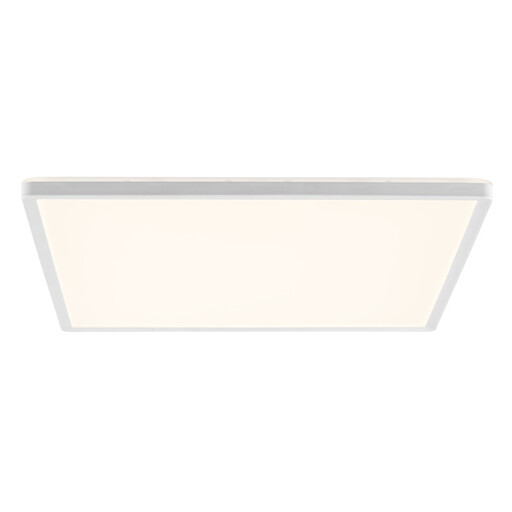
Brilliant white square LED ceiling panel, 42 × 42 cm

Brilliant LED ceiling panel 42 × 42 cm, 3000 lm, 4000 K, white

An option if your aim is general room lighting. Stated specifications: 42 × 42 cm, 3000 lm and 4000 K. The product description says it’s for indoor use and should be installed by a qualified electrician; check the relevant product safety rules and CE marking where required.

Joybuy
Brilliant white ultra-slim LED ceiling panel, 29 cm in diameter

Brilliant LED ceiling panel Ø 29 cm, 2400 lm, 4000 K, white

This ceiling panel is described as suitable for general lighting in living and working spaces. The stated specifications are Ø 29 cm, 2400 lm and 4000 K. The product description recommends professional electrical installation; check the relevant product safety rules and CE marking where required.

Joybuy

Frequently asked questions about LED panels for online lessons

Should I buy a light straight away if a window makes me look dark on camera?

Not necessarily. First, try positioning the window in front of or beside you, and use any existing light in front of your face. Logitech warns that strong light behind someone on a video call can create a silhouette. Then use a test image to see whether you need extra, more targeted light.

Will a USB video panel run at full power from every laptop port?

No, it depends on the panel and the power available. Elgato gives different maximum light output figures for the Key Light Neo via USB-A, USB-C and a suitable external power supply. Check the specifications for the exact model and the power supply you’ll use.

What should I look for when mounting a light in a small student room?

For a desk clamp, measure the thickness of the edge and check that the panel and cable won’t get in the way of your workspace. For the LEDVANCE recessed panel reviewed, the important details are instead the 600 × 600 mm ceiling grid and the 220–240 V connection; it uses a different type of mount.

When is a CE marking required for an LED panel?

A CE marking is required when the applicable product rules say it is. The Netherlands Food and Consumer Product Safety Authority sets out the requirements for electrical products; check which rules apply to the product in question and whether it has the required marking.

What if the panel breaks too soon or the mount doesn’t fit?

If a product is faulty, you have statutory rights against the seller. ACM ConsuWijzer says that if a product breaks too soon during normal use, the seller must put it right free of charge. For online purchases, you generally have up to 14 days after delivery to change your mind, subject to statutory exceptions. Before buying, check that the clamp or mount will fit your desk or screen.
