
Teacher with a cluttered desk
You want to light your face without giving up space for a lamp base. So first check whether a monitor mount or desk clamp will suit your workspace. Elgato and Logitech describe monitor mounts for their compact panels.


First, choose a mount that suits your screen or desk edge: a compact monitor light keeps your work surface clear, while a larger panel with a desk clamp takes up more space. Then check whether your available USB port or power supply can deliver the brightness you want, and whether the required mount is included.
You want to light your face without giving up space for a lamp base. So first check whether a monitor mount or desk clamp will suit your workspace. Elgato and Logitech describe monitor mounts for their compact panels.
You want to adjust brightness and colour temperature as the light from the window changes during lessons. Elgato and Logitech list adjustable colour temperatures for the models mentioned.
You want to move a panel around, so check which mount and power source are available at each teaching location. SmallRig lists USB-C and NP-F power options for the P200.
| What to consider | What should you check? | Who does this matter most to? |
|---|---|---|
| Mounting and space | Check the shape of your screen, the available desk edge and the mount supplied. Elgato lists a desk clamp for desks up to 6 cm thick with the Key Light Air MK.2. | If my desk is already cluttered, I want to mount the light rather than put down a lamp base. Around 33% of consumers prioritise a suitable mount and a clear work surface. |
| Adjustable light on your face | Check whether brightness and colour temperature are adjustable, and whether you can aim the lamp towards you. Philips Hue recommends placing a light source in front of your face, angled towards you rather than positioned behind you. | When daylight changes during my lesson, I want to adjust the light and point it towards my face. Around 27% of consumers prioritise adjustable lighting for their face. |
| Power and brightness | Check the power requirements of the port or adapter you plan to use. Elgato lists the Key Light Neo at 400 lm with 4.5 W USB-A, 700 lm with 7.5 W USB-C and 1000 lm with a 3 A power supply. | I want to know in advance whether the power source at my teaching space can provide the lighting I want. Around 20% of consumers focus on power and brightness. |
| Portability and what's included | Check the connections, mount and power source needed for each teaching location. SmallRig lists 1/4"-20 mounting points and USB-C or NP-F power for the P200; the stated box contents do not include a stand. | If I teach in different locations, I want to know whether I can mount and power the light there too. Around 20% of consumers prioritise portability and a complete set-up. |
For the Elgato Key Light Neo and Key Light Air MK.2, the stated light output depends on the power source. So a higher maximum figure alone won’t tell you how much light you’ll get from your connection.
Compare the specifications for the power supply you’ll actually use during lessons. You may need a suitable separate power supply to reach the Key Light Neo’s highest stated light output.
A panel with mounting points doesn’t automatically come with a stand or monitor clip. What’s included can also vary between versions.
Check what’s included with the version you choose, and decide in advance where you’ll place or mount the light.
A larger panel with a desk clamp needs a suitable desk edge and more space; a monitor panel, by contrast, largely follows the position of your screen.
First choose a mount that suits your desk and screen. Then compare the light output.
The Key Light Neo is a compact panel that mounts on a screen; the larger Key Light Air MK.2 comes with a desk clamp.
Litra Glow is a compact panel that mounts on a desktop or laptop screen.
The P200, product number 4066, is a portable panel for which you can put together a suitable mounting set-up yourself.
The NL660 is a larger bi-colour video panel suited to a dedicated teaching set-up.
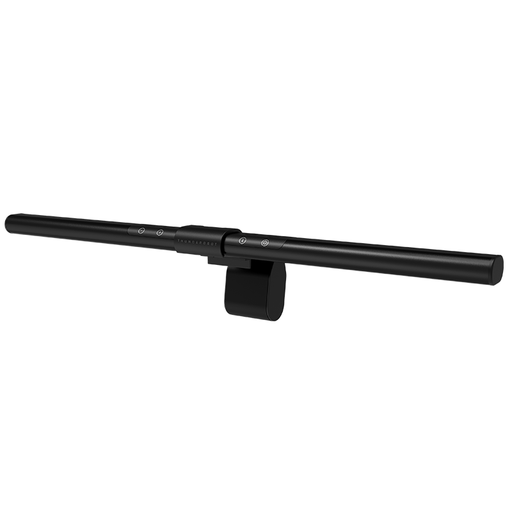
This Joybuy product selection features monitor lighting for a compact workspace. The light bar shown is not an LED panel light; check that its mounting and type of lighting suit your set-up.
 No image available
A monitor light bar can suit a workspace where you don’t want a separate lamp base; this model is not a panel light.
The product name lists Ra95 and ten dimming levels. Check that your monitor’s thickness is compatible with the mount.
Place the light source in front of you and angle it towards your face, rather than having it behind you. Check the image using your own camera and dim the light if it looks too bright; this is set-up advice, not a guaranteed result.
No, it depends on the power supply. Elgato lists the Key Light Neo at 400 lm with 4.5 W USB-A, 700 lm with 7.5 W USB-C and 1000 lm with a suitable 3 A power supply. The stated brightness of the Key Light Air MK.2 also varies with the available input power.
Check that the clamp or screen mount is still secure, and store the cable and any separate mount together. Follow the instructions for the model you bought when cleaning and using it.
According to ACM ConsuWijzer, most online purchases by consumers come with a statutory 14-day cooling-off period after delivery, subject to exceptions. A product must also meet the expectations you could reasonably have of it under normal use; if it’s faulty, the seller is responsible for providing an appropriate solution.
According to the Dutch government, electronic devices covered by the relevant EU rules must carry a CE marking. Check the panel’s marking and instructions, and make sure its connection is suitable for the power supply you’re using; a CE marking doesn’t tell you whether the light will suit your desk or USB port.