
Maker filming reflective jewellery
You film close-ups of metal or gemstones and want to move or soften the light without your hands and tools going out of shot.


Start with a compact panel that you can position outside your work area and soften with a diffuser. Judge the angle by looking at the shiniest piece of jewellery in shot. Nikon gives this advice about reflections in flash jewellery photography; it is not a test of these LED panels. A larger panel or second light source may be suitable if you need to keep both your hands and tools in view, provided there is room for the light and its mount.
You film close-ups of metal or gemstones and want to move or soften the light without your hands and tools going out of shot.
You have little room beside your workpiece and want a light that can be positioned precisely with a suitable mount.
You want consistent, true-to-life material colours, a suitable power supply and footage without visible bands throughout a full assembly video.
First, decide where the light can go without getting in the way of your hands or tools. Then assess reflections, colour settings, video performance and power using the setup you actually plan to use.
| Key consideration | What should you check? | Who is this important for? |
|---|---|---|
| Reflections and soft light | Check whether a diffuser is included or can be fitted, and whether you can position the light from different angles. | If you film shiny metal or gemstones, you’ll want to minimise distracting hotspots. Around 33% of consumers give controlling reflections top priority. |
| Space and work area | Measure the space around your table and camera; check the panel dimensions and mounting options, and whether a stand is included. | If you keep your hands and tools in shot, it matters whether the light gets in the way of your work. Around 25% of consumers prioritise positioning and coverage of the work area. |
| Colour and video quality | Compare the colour temperature and CRI for the exact version, then make a test recording using your intended dimming level and camera settings. | If material colours need to look true to life and your footage must be free of visible bands, test the light with your camera. Around 25% of consumers prioritise consistent image quality. |
| Power and what’s included | Check which battery, cable, adapter and mount are included, and how long the light lasts at your chosen brightness. | If you want to film a full assembly, you’ll want to know in advance what power supply and accessories you need. Around 17% of consumers choose mainly based on power, recording time and what’s included. |
CRI and visible light bands are separate considerations. A stated CRI doesn’t predict how the light, dimming level and camera shutter speed will work together on screen.
Check the details for the exact version and make a test recording with the settings you intend to use.
According to its manual, the Godox LEDP260C measures 360 × 240 × 27 mm and is designed to be used with a light stand. The space it requires could therefore be a significant constraint on a small worktable.
You may need to buy a suitable stand or batteries separately; the manual states that NP-F970 batteries are sold separately.
Measure the available space and check what’s included with the version you’ve chosen before making a decision.
Ulanzi states that the white VL49 has fixed 5500 K white light; the VL49 RGB is a different version with adjustable white light and colour effects.
Check the full model name and specifications, not just the VL49 label.
Ulanzi offers compact panel lights for portable setups.
The P96 is a small bi-colour panel for anyone who wants to adjust the white colour and brightness.
The LEDP260C is a larger bi-colour option for setups with room for a light stand.
The NL-60AI is a compact option with a phone clip and alternative mounting points.
The Ace 25c is a compact full-colour light for makers who want to use colour accents as well as white light.
These Joybuy products are options to consider for portable lighting in product videos and recordings at a small worktable.
 No image available
Consider this light if you want to adjust the colour and brightness, and position the light source outside your work area using a mount.
The product description lists 2500–9000 K, brightness from 0–100%, a 3100 mAh battery and 1/4-inch screw mounts. It also mentions a cold shoe adapter.
 No image available
Consider this option if you’re looking for a portable panel with adjustable white colour and RGB controls.
The product description lists 60 W, a range of 2700–6500 K and a weight of 345 g.
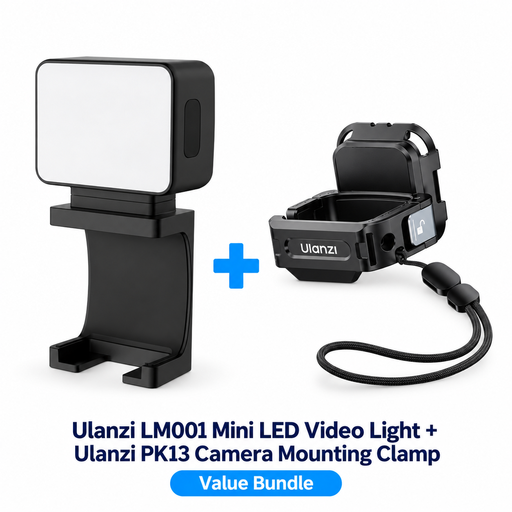 No image available
Consider this bundle if you want to move a small light around while filming indoors.
The product description lists a built-in 500 mAh battery and a 1/4-inch thread on the supplied PK13 clamp. The clamp is designed for the DJI Osmo Pocket 3.
 No image available
Consider this compact light if you want to adjust the white colour and brightness, and need a mount for your camera or tripod.
The product description lists 3200–5600 K, stepless brightness control, USB-C charging and a built-in battery. Keep the connections dry and don’t look directly into the LED panel at close range.
 No image available
Consider this compact RGB version if you want to dim the brightness and position the light using its magnetic back.
The product title lists a 2000 mAh battery and a range of 2500–9500 K. Ulanzi lists 2500–9000 K for the VL49 RGB version reviewed here, so check the range for the specific version. Use a standard 5V adapter to charge it, keep the light dry and don’t look directly into the LED panel at close range.
First, position the panel to the side of your work area and move it around while looking through your camera. Try using a diffuser if the panel appears as a bright spot on metal or gemstones. Nikon describes this lighting principle for flash jewellery photography; it isn’t a test of an LED video setup.
Make a test recording at your intended dimming level and adjust the shutter speed if needed. The setting that helps will depend on your camera and light source; Sony lists adjusting the shutter speed as one possible way to reduce flicker effects.
Yes, but check which batteries are needed and whether they’re included with the version you’ve chosen. The official Godox manual lists power via a suitable adapter or two NP-F970 batteries, which are sold separately.
Check the product information and relevant documentation for the specific version. Business.gov.nl outlines the requirements for electrical and electronic products. According to the NVWA, the Low Voltage Directive applies within the stated voltage ranges of 50–1000 V AC and 75–1500 V DC. Business.gov.nl also states that a CE mark is not a quality mark.
For eligible online consumer purchases, you generally have a 14-day cooling-off period, with exceptions explained by the Dutch Government. You’re also entitled to a product that meets statutory quality requirements, regardless of any additional manufacturer’s warranty. Different rules apply to business purchases.