
Detail filming at a desk
You film your fingers and a small clay piece, and want to soften shadows by carefully positioning the light and any diffuser.


If you mainly film clay and your hands close up, a compact panel can be practical. For a wider view of your table, a larger, adjustable panel may be worth comparing. Don’t just look at the size: consider light coverage, colour settings, power, mounting and exactly what’s included with the version you choose.
You film your fingers and a small clay piece, and want to soften shadows by carefully positioning the light and any diffuser.
You also film tools and larger movements, and want to know how much space a panel needs and how it can be mounted.
You move your filming area or sometimes film without a nearby socket, so power, portability and adjustable lighting are all worth considering.
A good fit if: you mainly film one piece of clay and your hands close up, and want to put the light away after use.
Bear in mind: a compact size doesn’t guarantee even lighting across your whole work surface; check the power supply and mounting options too.
A good fit if: your hands and tools move further across the table, and you have room to position the panel at an angle.
Bear in mind: the panel needs more space to set up; some versions don’t include a stand or battery.
For close-ups, diffusion can help soften harsh shadows. Adobe explains that direct light can create sharp shadows and bright highlights, so check how the panel looks in your own frame too.
| What to consider | What should you look for? | Who should consider this? |
|---|---|---|
| Detail and hand shadows | Check the diffusion and adjustment options, and test a recording with your hands in their usual working position. | When I film close up, I want to see small shapes clearly without distracting shadows from my hands. Around 36% of consumers say detail and shadows are their top buying concern. |
| Coverage and positioning | Compare panel dimensions and mounting options; assess the whole frame from the distance you film at. | If I also film tools and movement across a larger part of the table, I want to know whether the light will cover the shot without getting in the way of my workspace. For around 29% of consumers, coverage and positioning are their main buying concern. |
| Clay colour | Check the adjustable colour temperature range and stated CRI; take a test shot with a fixed white balance. | If clay colours need to look consistent between recordings, I want to keep the lighting and my camera settings consistent. Around 21% of consumers give colour consistency top priority. |
| Power and storage | Check what’s included with the exact version, including the power supply, any required battery and mounting accessories. | If there’s no socket near my table or I want to put the light away after filming, a suitable power source and easy set-up matter. Around 14% of consumers say power and storage are their main buying concern. |
Manufacturers state light output under specific measurement conditions. A higher figure on its own doesn’t prove that your whole work surface will be better lit.
Only compare figures taken at the same distance and with relevant settings. Most importantly, check whether the light covers your entire shot.
The NEEWER NL660 is available with different stand options, and NP-F batteries are not included.
Check what’s included with the exact version and think about how you’ll mount the panel while filming.
You may need to buy a separate part for a set-up with a battery or stand, so check before you choose.
According to Ulanzi, the VL120 Bi-Color has a colour temperature range of 3200–6500 K. The VL120RGB is a different version with a different stated range.
Compare the full model name and specifications; don’t rely on a shared part of the name.
The P200 is a compact panel for anyone who wants to position a light close to a small work surface and is considering USB-C or NP-F power.
The NL660 is a larger bi-colour panel for a permanent table set-up; versions are available with and without a stand.
In its manual, Godox describes the LEDP260C as suitable for uses including macro and product photography.
The VIJIM VL120 Bi-Color is a small, rechargeable panel for a portable close-up set-up.
The P60c is designed for makers who want RGBWW colour control as well as adjustable white light.
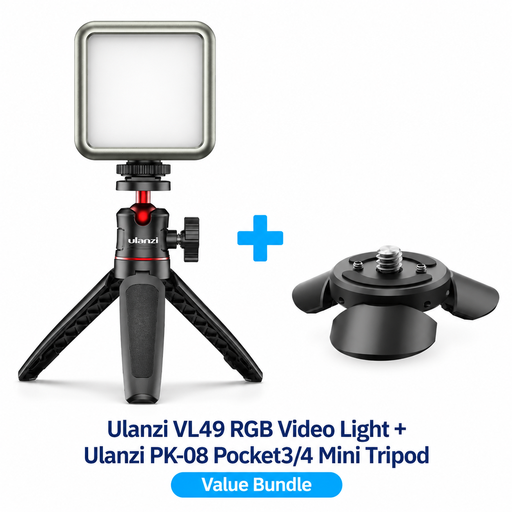
This selection focuses on compact RGB lighting for portable video shoots. Check that the bundle and mounting options suit your camera and workspace.
 No image available
A good choice if you want RGB lighting control for video shoots and a compact light you can move around.
The product title lists a VL49 RGB LED video light and a PK-08 Mini Tripod Kit for DJI Osmo Pocket 3/4. Before buying, check whether the applicable CE marking is stated. According to the Netherlands Food and Consumer Product Safety Authority, this means the manufacturer declares that the product complies with the relevant European rules, but the marking alone is not proof of independent testing.
Move an adjustable panel and review a test recording while working as you normally would. Diffusion can soften the edges of shadows, but one fixed angle won’t work for every table.
According to Nikon, flicker can be caused by a mismatch between the shutter speed, frame rate and the refresh rate of certain light sources. Test the light with your own camera and recording settings; use your camera’s anti-flicker feature if available.
It depends on the model and version. For example, NEEWER offers NL660 versions with and without a stand, and states that the compatible NP-F battery isn’t included. So check what’s in the box for the exact version.
For a standard online purchase in the Netherlands, you generally have a statutory 14-day cooling-off period from delivery, with some exceptions. Your statutory guarantee is separate from any manufacturer’s warranty: with normal use, a product must meet the standard you could reasonably expect.
No. According to the Netherlands Food and Consumer Product Safety Authority, the applicable CE marking is mandatory for electrical consumer products, but independent testing isn’t normally required for this product group. By using the marking, the manufacturer declares that the product complies with the relevant European rules.