
Crochet creator with limited desk space
You want to film your hands and stitches from above without a large light stand taking up your work surface. Pay particular attention to the size and the mounting you’ll need.


Start with a compact, dimmable panel that you can position clear of your hands and camera movements. Record a test clip to check that the stitches remain visible without distracting shadows or stripes. If the ambient light changes, adjustable colour temperature gives you more control: Canon Europe explains that the colour temperature of light affects the colours recorded by your camera. A larger panel such as the amaran P60x needs more space; amaran lists a softbox and mains power supply among the items included.
You want to film your hands and stitches from above without a large light stand taking up your work surface. Pay particular attention to the size and the mounting you’ll need.
You want to adjust the lighting and white balance when daylight or room lighting affects how the yarn colour looks on camera.
You’re weighing up whether a battery will last long enough to film, or whether mains power and space for a separate panel matter more.
Start by considering where the light will go on your small work surface, then assess the image, colour adjustment and power options for the recording time you need.
| What to consider | What should you check? | Who is this important for? |
|---|---|---|
| Space and positioning | Elgato lists the Key Light Mini’s dimensions as 147 × 100 × 17 mm; Ulanzi’s standard VL49 has a 1/4-inch mount. Check which holder you need and whether it will fit your desk. | I want to keep my work surface clear and position the light outside the path of my hands and camera; around 33% of consumers say space and positioning are their main purchasing concern. |
| Visible stitches | Record a test video while crocheting and check for shadows and any stripes using the camera settings and dimming level you plan to use. Sony Support explains that LED lighting can cause flicker or banding in video. | When I film stitch details, I want to see whether my hands obscure the stitches or stripes appear in the image; around 27% of consumers prioritise clearly visible stitch detail. |
| Yarn colour | Compare the ranges: Elgato lists 2900–7000 K for the Key Light Mini; Ulanzi lists 5500 K for the standard VL49. Adjust the white balance to suit your final lighting, as Canon Europe advises. | I want the yarn to look recognisable in changing daylight or room light; around 20% of consumers put colour reproduction first. |
| Power and recording time | Check the runtime at your intended brightness and find out what power supply is needed. NEEWER gives the NL-60AI a runtime of around two hours at 100% brightness; amaran lists mains power for the P60x. | When I record a longer tutorial, I want to know whether the battery or mains power will suit my recording; around 20% of consumers say having power for the entire recording is their main concern. |
A screw mount or tilt mount doesn’t automatically give you a complete, stable setup for filming from above.
Before choosing a panel, check what’s included in the box, the connections and the space available next to or above your desk.
Ulanzi lists a fixed colour temperature of 5500 K for the standard VL49; the VL49 RGB is a different version with adjustable colour temperature.
Check the full model name and the specifications of the version you’re considering.
NEEWER’s stated runtime of around two hours for the NL-60AI is based on 100% brightness. You can’t directly compare this runtime with another light unless it was measured under the same conditions.
Make sure the stated runtime and power supply suit your whole tutorial, including any retakes.
The Key Light Mini is a compact panel to consider if space is limited and you want to adjust the colour temperature.
The standard VL49 is a small, rechargeable light to compare if size and a suitable mount are important to you.
The NL-60AI is a phone light with a clip for anyone filming on a phone who can make the mount work with their own setup.
The P60x is a larger panel to consider if you have room for a separate setup and mains power.
These Joybuy products are video lights for compact camera setups. Check that the mount is suitable for filming from above at a small desk.
 No image available
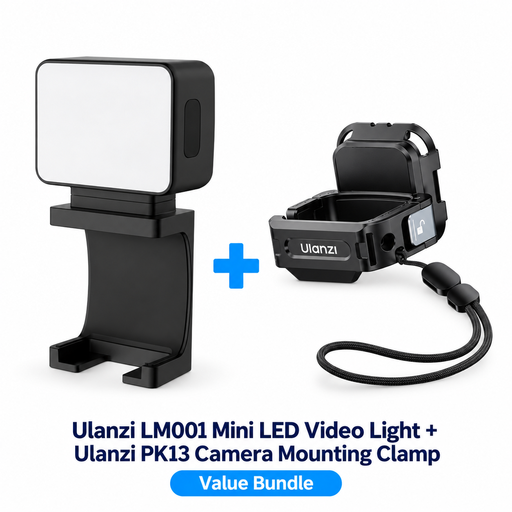
This bundle is designed for the DJI Osmo Pocket 3; check that the included PK13 clamp suits your camera and the overhead view you want.
The description lists a rechargeable light and a PK13 clamp with a 1/4-inch thread.
 No image available
An option for video recording if you want to adjust the brightness and colour temperature; check that the mount suits your camera setup.
The description lists stepless brightness control, adjustable colour temperature from 3200–5600 K, USB-C and an integrated cold shoe mount.
If the light in your room or from outside changes, an adjustable panel gives you more options for matching the lighting. Either way, record a test clip of your yarn and adjust the white balance to suit the light. Canon Europe explains that the colour temperature of light affects the colours recorded.
First, check that the included holder, or one you need to buy separately, suits the way your camera and desk are set up. Position the light outside the path of your hands and record a clip while crocheting. A 1/4-inch mount on a light doesn’t, by itself, mean that a stand is included.
Record a test video using the light, dimming level and camera settings you plan to use. Sony Support explains that LED light can cause flicker or banding in video; a stated CRI or colour temperature doesn’t prove that your particular setup will be free of stripes.
Before you buy, check whether the required holder, adapter or power cable is included in the box. For an online consumer purchase in the Netherlands, you generally have 14 days from delivery to change your mind, subject to legal exceptions; ACM ConsuWijzer explains the cooling-off period. You’re also entitled to a product that meets legal quality requirements. According to the Dutch government, there is no fixed statutory warranty period in the Netherlands.
CE marking is compulsory when a product falls under the relevant European product rules. The Dutch government explains that the requirements depend on the product group and applicable regulations, so check which rules apply to the specific panel and any mains adapter. A CE logo is not an independent test of image quality.