Who is this relevant to?

Photographing a sheet with shadows

If you work next to a window, you may want to brighten the darker side of a calligraphy sheet without creating a distracting bright spot. The Canadian Conservation Institute describes placing lights on either side as a way to illuminate objects evenly.

Capturing paper and ink colours

If you work with coloured ink or paper, you’ll want to assess the colours consistently as the light from the window changes. Nikon explains how metering from a white surface can help you set the white balance.

Working in a small space

If space is limited, the light’s dimensions, mounting options and power supply matter, as does whether it can illuminate the whole sheet. Also check whether a stand, adapter or battery is included with the version you’re considering.

What should you look for when choosing?

Take a test shot by the window before choosing a panel, and check the whole sheet, including the corners. If you’re choosing an electric LED panel, also check the CE marking on the specific product. The Netherlands Food and Consumer Product Safety Authority and the Netherlands Enterprise Agency list lighting as a product category that requires CE marking.

What to consider What to look for For these consumers
Even illumination Check the whole sheet at the actual working distance and look for differences in brightness between the corners. If I’m photographing a large sheet, I don’t want to brighten only the darker side while the rest remains unevenly lit. Around 36% of consumers prioritise filling in the darker side of the sheet.
Paper and ink colour Check whether you can adjust the white light and colour temperature. If needed, take a white balance reading from a neutral reference surface. If I’m capturing coloured paper or ink, I want to assess the colours carefully under a mix of window and lamp light. Around 29% of consumers prioritise colour consistency.
Glare and reflections Check the ink from the final camera angle and try moving the light to a different position. If my ink or paper reflects light, I want to avoid reflections obscuring details. Around 21% of consumers prioritise avoiding distracting glare.
Positioning and power Check the dimensions, mounting point, and which power supply and accessories are included with the exact version. If I’m photographing in a small workspace or want to move the light around, the setup needs to fit without me overlooking any missing parts. Around 14% of consumers prioritise positioning and power.

Common buying mistakes

  • Assuming the highest lux rating is best

    A lux rating applies at a specific measuring distance and, on its own, doesn’t tell you whether the whole calligraphy sheet will be illuminated evenly. For example, the manufacturer’s specifications for the NEEWER NL-116AI and the SmallRig P200 Universal 4066 use different distances.

    Only compare ratings measured on the same basis, and assess a test shot of the whole sheet.

  • Assuming every version comes with the same accessories

    The NEEWER NL660 is available with or without a stand. For the SmallRig P200 Universal 4066, the manufacturer lists a USB-C cable but no adapter in the box.

    Before buying, check the full model name and what’s included with the version you’ve chosen. You may need to buy a stand, adapter or battery separately.

  • Looking only at the matt paper

    Glossy ink or a coating can reflect light back towards the camera, even if the paper itself looks matt.

    Check the ink from the final camera angle and move the light if reflections are hiding details.

Brands to compare

NEEWER

NEEWER offers the compact NL-116AI and the larger NL660 bi-colour panel.

  • NEEWER states that the NL-116AI has adjustable white light and a maximum rating of 600 lux at 0.5 m. According to the manufacturer, the NL660 comes with an adapter and diffuser.
  • Check whether the NL-116AI version includes a mini tripod. NP-F batteries for the NL660 are not included. Light ratings measured at different distances aren’t directly comparable in real-world tests.

Godox

The P260C Pro is a larger bi-colour panel with several power options.

  • Godox specifies a colour temperature of 2800–6500 K, an average CRI of at least 98, and DC, battery or USB-C power for the P260C Pro.
  • These specifications apply to the P260C Pro. A declaration of conformity for this model doesn’t automatically confirm the marking on every unit being sold.

SmallRig

The P200 Universal 4066 is a slim 10-inch panel for a compact tabletop setup.

  • SmallRig specifies USB-C and NP-F power, a colour temperature of 2500–6500 K, and 2000 lux at 0.3 m.
  • The manufacturer lists a USB-C cable in the box, but no adapter. Don’t assume the US 4065 version comes with the same bundle.

Ulanzi

The VL49 RGB is a small rechargeable light for adding light to a specific area. Other VL49 and VL120 versions aren’t necessarily the same product.

  • Ulanzi specifies adjustable white light, a 2000 mAh battery and 800 lux at 0.5 m for the VL49 RGB.
  • Test whether its small size is enough to illuminate the whole sheet. A listing for the other VL120 RGB isn’t a substitute for the VL49 RGB.

amaran

The P60c offers white-light and RGBWW control for anyone who also wants to use the light for other effects.

  • amaran specifies a colour temperature of 2500–7500 K and 5900 lux at 1 m at 5600 K for the P60c, with a 45° beam angle.
  • This stated light output doesn’t prove that a calligraphy sheet will be illuminated evenly at every working distance. Extensive colour control isn’t essential for a white document.

Joybuy products

This Joybuy pick is a compact mini fill light for portable, targeted lighting; it isn’t an LED panel designed to cover a whole sheet.
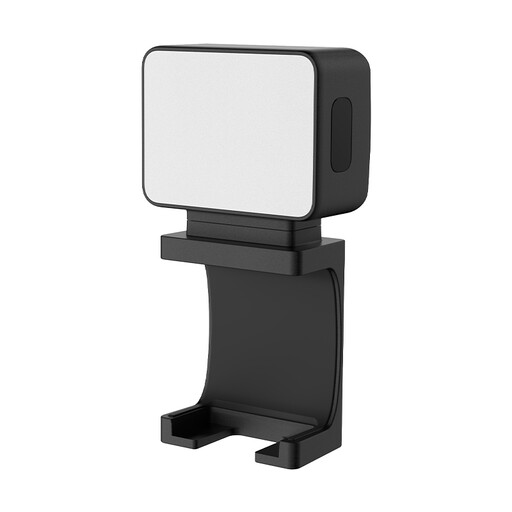
Ulanzi LM001 portable mini fill light

Ulanzi LM001 mini fill light, 500 mAh

A compact fill light for anyone looking for portable extra lighting; the product name specifies a 500 mAh battery.

The product description lists a magnetic base and a 1/4-inch thread for mounting. This is a mini fill light, not an LED panel, so check whether it can illuminate the whole sheet. Also check the CE marking on the specific product.

Joybuy

Frequently asked questions

How should I position lights for a flat calligraphy sheet?

Start by taking a test shot of the whole sheet. The Canadian Conservation Institute describes using two light sources on either side, at a 45-degree angle, as a way to illuminate objects evenly. By a window, an extra panel can brighten the darker side. Assess the result with your paper, ink and camera angle rather than treating that angle as a fixed requirement.

Is automatic white balance enough when mixing window and LED light?

Not always. Nikon explains that metering from a white surface in mixed lighting can give a different result from automatic white balance. For colour-critical shots, include a neutral reference surface under the same lighting as the sheet, then check the image.

Which accessories and power options should I check?

Check the exact version and what’s included in the box. NEEWER lists the NL660 with and without a stand; compatible NP-F batteries are not included. For the P200 Universal 4066, SmallRig lists a USB-C cable but no adapter.

What should I know about CE marking, returns and guarantees in the Netherlands?

CE marking is required for electrical and electronic products such as lights. Check the marking on the specific product, as the model name alone doesn’t confirm it. According to ACM ConsuWijzer, online purchases usually come with a 14-day cancellation period after delivery, subject to exceptions. The Dutch government states that there is no general, fixed statutory guarantee period; if a product is faulty, contact the seller.
