
Sellers of books with glossy covers
If you want to show the cover, title and signs of wear clearly, consider where you position the light and whether you can soften it.


Start with a test shot in window light, using a white reflector if needed. An LED panel is most useful when you want more control over the light or don’t have suitable daylight. Choose one based on how you’ll position it, whether its white light is adjustable and whether you can soften the light. A stated lux rating or colour-rendering figure won’t, on its own, tell you how an entire book cover will look on your table.
If you want to show the cover, title and signs of wear clearly, consider where you position the light and whether you can soften it.
If there’s little room beside the book, the panel’s dimensions and how it’s mounted matter. A setup you can put away afterwards can also be practical.
If you’re photographing several books, try to keep the lighting setup as consistent as possible and set your camera’s white balance accordingly.
Choose this when: you can get a clear test shot by a window during the day and don’t need a fixed lighting setup.
Trade-off: you won’t need a panel or power supply, but changing daylight can make it harder to keep the exposure and colour consistent across later photos.
Choose this when: you have little room on your table or mainly want to brighten the shadowed side.
Trade-off: a small light is easier to position, but a lux rating measured at one distance doesn’t prove that it will light an entire cover evenly.
Choose this when: you regularly photograph complete books under artificial light and have room for the panel, stand and, if needed, a diffuser.
Trade-off: you’ll need more space, so check the dimensions and what’s included with the exact version you’re buying.
When photographing a glossy cover, a test shot is essential. Move the light source and camera, and try diffusion if reflections fall across the title or signs of wear. Nikon explains that a diffuser can increase the apparent size of the light source; the result on your book will depend on your setup.
| What to consider | What to look for when buying | Who should prioritise this? |
|---|---|---|
| Readable covers without glare | Check whether you can dim and direct the panel, and whether it comes with a diffuser. Take a test shot of a glossy cover. | When photographing glossy covers, I want the title and signs of wear to stay readable without distracting reflections; around 36% of consumers put this first. |
| Consistent colour | Compare the adjustable white-light range of the exact model. Keep the white balance the same for test shots and compare the result with the book itself. | For a series of book photos, I want the colours to look as similar as possible and the white balance to be set correctly; around 29% of consumers give colour consistency top priority. |
| Positioning on a small table | Check the panel’s dimensions, mounting options and what’s included. Plan where the book, camera, light and any diffuser will go. | When I have little spare space on my table, I want to position the light without getting in the way of the book setup; around 21% of consumers put this space limitation first. |
| Power and storage | Check whether a battery, charging cable or suitable stand is included, and how long the manufacturer says it will run at your chosen settings. | If I want to pack my setup away quickly after use, I consider cables, charging and loose parts; around 14% of consumers make portability and storage their top priority. |
Colour can look different as the light changes. Canon recommends setting the white balance to match the lighting conditions; an adjustable colour temperature on a panel doesn’t replace this camera setting.
A light output figure applies to a stated measuring distance and doesn’t tell you how evenly the light will cover your entire book.
Only compare figures when the measuring distance and basis are the same. Also assess the light at the distance and with the book size you’ll be using.
Versions and package contents can vary, and you’ll need a suitable way to mount the light on a small table.
Check the exact version and what’s in the box, not just the product range or photo. You may need to arrange a suitable stand, power supply or battery separately.
The standard Ulanzi VL49 has fixed white light; the VL49 RGB is a different version with different lighting settings.
Compare the full model name and specifications before applying information about the standard VL49 to an RGB listing. The Joybuy product selection below is for a VL49 RGB bundle.
The NL-116AI is an example of a panel with adjustable white light for a tabletop setup.
The P96 is a compact, rechargeable panel that can be positioned close to the table.
The LDP8Bi offers adjustable white light and a choice of a suitable external power supply or an NP-F battery.
The standard VL49 is a compact option for fill light in a temporary setup.
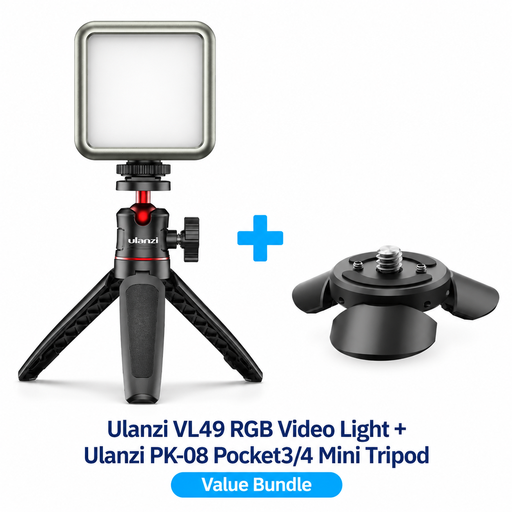
This product selection features a Ulanzi VL49 RGB bundle for product photography; check whether the included kit suits your tabletop setup.
 No image available
This compact, lightweight RGB video light is described as suitable for product photography and has adjustable lighting settings.
The bundle name lists a PK-08 mini tripod kit for DJI Osmo Pocket 3/4. Check that the kit suits the way you want to position the light beside your book.
No. Start with a simple setup in window light and check the cover, spine and visible wear in a test shot. A panel with adjustable settings is worth considering if you can’t control shadows or get consistent results with window light.
Move the light source and camera in relation to the cover, and try diffusion. Then check that the title and signs of wear are still readable. The effect depends on the positioning, so take a test shot.
Keep the lighting setup as consistent as possible and set the white balance accordingly. Canon explains that changing light sources can affect colour reproduction; a stated CRI or adjustable colour temperature won’t automatically give you accurate colours in your photos.
For electrical and electronic equipment sold in the Netherlands, Business.gov.nl outlines suppliers’ obligations regarding applicable EU requirements and CE marking. CE is not a quality mark. ACM ConsuWijzer states that consumers buying online generally have 14 days to change their mind, starting the day after delivery, with some exceptions. Your statutory guarantee depends on what you can reasonably expect from the product and isn’t automatically limited to a stated manufacturer’s warranty period.