Start by considering where you’ll record and where you’ll position the microphone: clip the capsule on so it won’t rub against your clothes, make a test recording and listen for echo. For seated solo recordings, a wired mic can be practical if the connection is compatible. Choose wireless if you’ll be moving around or recording a guest, and check the receiver, recording app and what’s included in the set. Noise cancellation doesn’t guarantee that reflections will disappear in an untreated room.
Who is this choice for?
Solo reviewer in an echoey room
If you usually speak while seated, you’ll want to capture your voice clearly without assuming that noise cancellation will fix the echo. Shure points out that reflective surfaces can reduce speech intelligibility, and that good microphone placement matters.
Reviewer filming on a phone
You’ll need a compatible combination of microphone, phone connection and recording app. A plug that fits doesn’t necessarily mean the app will use the external microphone; RØDE, for example, warns about certain default camera apps on Motorola phones.
Book reviewer recording guests
If you regularly record a guest, check the number of microphones, the connections and the recording-monitoring options. A two-channel set may be suitable, but could be more than you need for a solo review.
What should you look for when buying?
Wired lavalier microphone
A good fit if: you mostly speak while seated on your own, and your recording device supports the connection. The RØDE smartLav+ has a 3.5 mm TRRS plug.
The trade-off: you don’t need a wireless transmitter, but the cable limits your movement and may rub against your clothes. TRRS isn’t directly interchangeable with a TRS camera input.
Wireless clip-on microphone for one speaker
A good fit if: you move around during your review or don’t want a cable running to your recording device. Choose a receiver version that’s compatible with your phone or camera.
The trade-off: you’ll need to pair and charge the transmitter and receiver. Noise cancellation doesn’t guarantee that echo will disappear.
Two-channel set for conversations
A good fit if: you’re recording a guest and the set includes two microphones and a compatible receiver. According to Sennheiser, the Profile Wireless 2-Channel Set also has internal recording as a backup if the wireless connection is weak.
The trade-off: the extra equipment and setup may be unnecessary for a seated solo recording; check which features are included with the exact version.
| What to consider |
What should you check? |
Who is this important for? |
| Speech intelligibility in an echoey room |
Make a test recording in the actual recording space and listen for echo and handling noise. Clip the capsule where it won’t rub against your clothes. |
If I want to record my voice clearly without expecting noise cancellation to fix the room, I prioritise speech intelligibility. This is the main concern for around 36% of consumers. |
| Connection and recording app |
Check the exact plug or receiver against your device and test which microphone the app actually records from. |
I want to know in advance whether my phone or camera and recording app will work together. A compatible connection and app are top priorities for around 29% of consumers. |
| Freedom of movement |
Weigh up a cable against a wireless set, and check how many transmitters and which receiver are included. |
If I move around while filming, I don’t want to be tethered to my recording device by a cable. Freedom of movement is the main concern for around 21% of consumers. |
| Two voices or backup recording |
Check whether the set includes two microphones and whether internal recording is available on the exact version. |
If I’m recording a guest or want a backup option for the connection, I look at the set’s features. A conversation or backup recording is the main priority for around 14% of consumers. |
Common pitfalls
-
Assuming noise cancellation guarantees an echo-free room
Reflections can reduce speech intelligibility, even in a quiet room. A noise-cancellation feature is no substitute for making a test recording in your space.
Start with the microphone placement and recording space. Compare a test recording with and without processing, and listen to check that your voice still sounds natural.
-
Checking only the plug
A microphone or receiver may physically fit even if the recording app doesn’t use an external microphone. Some combinations may also need a compatible adapter or a different recording app.
Before recording a full review, make a short test video and check which microphone was actually used. Also make sure the cable or adapter is compatible with your connection.
An adapter or different recording app may mean extra setup; what you need depends on your device and chosen setup.
-
Confusing a one-microphone set with a set for two people
The number of microphones and type of receiver can vary between versions. A set for solo recording doesn’t automatically include the microphones you need for a conversation.
Check the exact model and everything included in the set before recording a guest. Also make sure the receiver is compatible with your phone or camera.
You may need a different set or an extra transmitter for another speaker; check in advance which components are included with the version you’re considering.
Brands to consider
RØDE
RØDE offers both the wired smartLav+ and the wireless Wireless Micro, with different connections and receivers.
- The official product specifications list a TRRS connection for the smartLav+; the Wireless Micro is available with a USB-C or Lightning receiver.
- Check the exact version and recording app. A compatible plug alone doesn’t guarantee that the app will record external audio.
DJI
The DJI Mic Mini is a range of wireless clip-on microphones available in different versions.
- DJI lists two levels of noise cancellation, including a mode for quiet indoor spaces.
- This is a claim made by DJI, not proof that reflections will disappear in an untreated room.
Sennheiser
The Profile Wireless 2-Channel Set is designed for recording with two clip-on microphones and offers various connection options.
- Sennheiser lists internal recording and a backup mode for when the wireless connection becomes weak.
- Check the features of the exact set; a two-channel set may offer more than you need for a seated solo recording.
Hollyland
The LARK M2 is available in versions with different receivers for phones or cameras.
- The European distributor lists different receivers and noise cancellation.
- Hollyland says that the current LARK M2 version no longer includes a magnetic rear clip. Check which attachment options come with the version you choose.
BOYA
The BY-V range offers wireless sets with USB-C or Lightning receivers, and a choice of one or two microphones.
- BOYA lists a one-button noise-cancellation function for the BY-V.
- USB-C and Lightning receivers are different versions. The product description isn’t an independent test of echo reduction.
Joybuy products
This selection includes wireless clip-on microphones for solo recordings and conversations with a guest. Check that the receiver is compatible with your recording device for each set.
 No image available
RØDE Wireless Micro Camera Kit, USB-C, black
An option for a review with a guest when you’re using a camera or a USB-C phone.
The set name lists two microphones, a camera receiver, a smartphone receiver and a charging case.
Joybuy
 No image available
Verbex K31Pro-Black, wireless set with two microphones
An option for a book review with a guest, provided the connections are compatible with your recording device.
The product name lists two microphones and iOS and Type-C interfaces.
Joybuy
 No image available
Verbex K9-Black, wireless microphone with iOS interface
An option for a solo review with a wireless clip-on microphone and an iOS setup.
The product name lists one microphone and noise cancellation.
Joybuy
 No image available
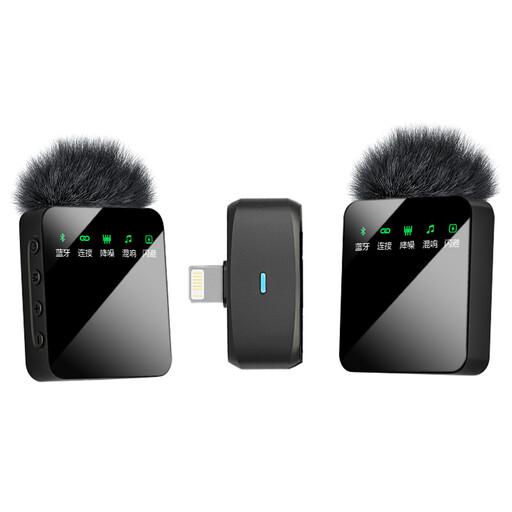
Verbex ST5, wireless set with two microphones, iOS
An option for a review with a guest if you’re using an iOS setup.
The product name lists two microphones and an iOS interface.
Joybuy
 No image available
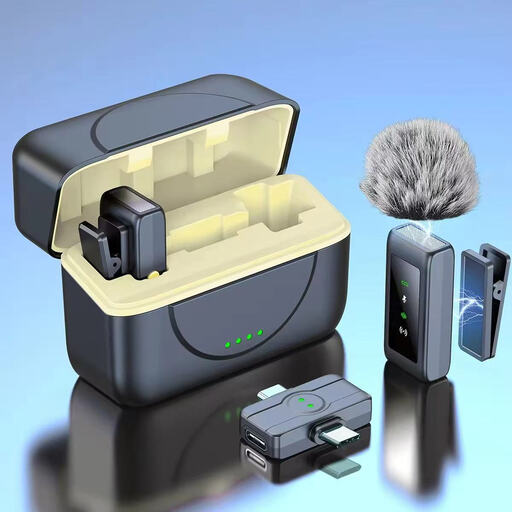
Verbex K80, wireless set with two microphones
An option for a review with a guest if the listed interface is compatible with your phone setup.
The product name lists two microphones and a universal interface for Android and Apple devices.
Joybuy
Frequently asked questions
How should I clip on a lavalier microphone when reviewing a book?
Clip the capsule on where it won’t rub against your clothes, then listen to a test recording as you move your head or turn pages. For the specific MVL model, Shure recommends a distance of 15–25 cm from your mouth; this isn’t a universal distance for every model.
Do I need a licence for a wireless lavalier microphone in the Netherlands?
Not always: according to the Dutch Authority for Digital Infrastructure (RDI), wireless microphones generally don’t require a licence if you use the correct frequency band and meet the relevant conditions. Some bands do require a licence, and available UHF spectrum varies by location. Check the frequency of the exact set and the latest RDI information.
What should I look for in terms of product safety?
The RDI says that equipment must carry the CE mark. Check the marking and follow the instructions; a CE mark doesn’t determine whether a particular wireless frequency can be used at your location.
Do I need an extended warranty?
First, compare the terms and what the extended warranty adds. According to the Dutch government, consumer purchases are covered by a legal guarantee, and the seller must provide a solution if a product is faulty. An extended warranty is most relevant if it genuinely gives you additional rights.


