Who is this buying guide for?

Solo commentator at a table

You’re recording commentary while seated and want to position the microphone close to your voice without an unnecessarily complicated set-up. RØDE describes the benefit of placing a lavalier microphone close to the speaker.

Commentator using a phone

You want to record directly on a phone and need to check that the connection, receiver (if needed) and recording app all work together. RØDE and Shure describe different connection requirements for their microphones.

Two speakers at one table

You want to record each voice with its own microphone and be able to monitor the wireless connection during the session. RØDE describes a phone set with two clip-on transmitters; Sennheiser describes internal recording and a back-up mode for the Profile Wireless 2-Channel Set.

What should you look for?

Wired for one speaker

Suitable if: you’ll stay seated at the table and can route the cable safely.

Consider: you won’t need to monitor a wireless connection, but the cable could rub against your clothes or get in the way. The RØDE Lavalier GO has a 3.5 mm TRS plug; the Shure MVL is designed for compatible 3.5 mm TRRS phone sockets.

Compact wireless phone set

Suitable if: you want to avoid running a cable across the table and have a compatible phone.

Consider: you’ll have more freedom to move, but you’ll need to charge the equipment and allow for possible radio interference. RØDE lists two clip-on transmitters for the Wireless Micro; this doesn’t prove that it suppresses other people’s voices at the table.

Wireless set with monitoring or back-up options

Suitable if: you’re recording two speakers or want to check for extra recording options.

Consider: you’ll have more components and features to manage. Sennheiser describes internal recording and a back-up mode for when the radio signal is weak on the Profile Wireless 2-Channel Set; check the specific version and how it works before buying.

What to consider What should you check? Who is this important for?
Clear speech with others at the table Check the clip and how you’ll wear the microphone, then make a test recording in the intended location while others are talking. If I’m recording at a shared table, I want to keep my voice close to the microphone and hear whether other people are also picked up. Around 36% of consumers put clear speech first.
Connection to a phone or recorder Compare your device’s input and recording app with the exact plug or receiver; check whether you’ll need an adapter. If I want to make sure the microphone works with my device and app first, I’ll check the entire connection before choosing. Around 29% of consumers give device compatibility the highest priority.
Simple solo set-up Check the cable route, clip and connection requirements for the exact model. If I’m staying seated at the table on my own, I want as few components as possible and a cable that won’t run over my clothes or workspace. Around 21% of consumers prioritise a simple solo set-up.
Two voices and recording security Check the number of transmitters, channel set-up, battery life for each component and whether there’s internal recording. If two people are speaking, I want to know whether each person has a microphone and what happens if the wireless connection drops out. Around 14% of consumers prioritise two-speaker recording and recording security.

Common pitfalls

  • Assuming all 3.5 mm lavalier microphones are interchangeable

    A 3.5 mm plug doesn’t tell you everything about the connection: the RØDE Lavalier GO uses TRS, while the Shure MVL is designed for compatible TRRS phone sockets.

    Before buying, check both the connector type and your device’s microphone input. Some phone combinations may need a compatible adapter.

  • Confusing noise reduction with filtering out other people at the table

    A lavalier microphone picks up the speaker from close range, but that doesn’t mean nearby conversations will disappear.

    Make a test recording in the shared workspace and listen back while others are talking. If possible, choose a quieter time to record and check for unwanted voices before publishing.

    If other voices are picked up in the recording, you may need to record it again.

  • Treating a battery-life or range figure as a guarantee for the whole session

    The stated battery life of wireless equipment applies under specific test conditions. The Dutch Authority for Digital Infrastructure says that interference-free use on shared licence-exempt frequencies isn’t guaranteed.

    Check the battery life of each transmitter and receiver, charge all the components and test the connection where you’ll be recording.

Brands to compare

BOYA

BOYA describes the wired BY-M1 as a clip-on microphone for phones, cameras, PCs and audio recorders, among other devices.

  • Could suit a simple set-up for one speaker.
  • Check the connection and the right BY-M1 version for your device; the broad device description doesn’t confirm that every combination will work without an adapter.

Shure

Shure describes the MVL as a wired, omnidirectional phone microphone with a 3.5 mm TRRS connection.

  • Shure lists a clip and windscreen.
  • Direct compatibility is intended for compatible TRRS phones or a suitable CTIA adapter; don’t assume it will work with every recorder.

RØDE

RØDE offers both the wired Lavalier GO with a 3.5 mm TRS connection and the separate Wireless Micro product range for phones.

  • RØDE lists two clip-on transmitters and a USB-C or Lightning version for the Wireless Micro.
  • The different product ranges have different connections. Automatic level control doesn’t prove that voices at the same table will be suppressed.

DJI

DJI describes the Mic Mini as a wireless product range, including a version with two transmitters.

  • A version with two transmitters could suit a recording with two speakers.
  • DJI’s stated battery life applies under specified test conditions without interference and doesn’t predict how long a set will last at a shared table.

Sennheiser

Sennheiser describes the Profile Wireless 2-Channel Set as a set with two clip-on microphones, a receiver and internal recording.

  • The back-up mode described by Sennheiser can start internal recording if the radio signal becomes weak.
  • Check the version and how it works beforehand; the extra components may not be necessary for one speaker sitting still.

Wireless microphones at Joybuy

These products are wireless microphone systems for recording with a phone or camera, with options for one or two speakers. Check the connection and included receiver for each version.

DJI Mic Mini 2S with two transmitters, one receiver and charging case

DJI Mic Mini 2S (2 TX + 1 RX + Charging Case)

The version with two transmitters could suit a recording with two speakers.

The product information lists internal 32-bit float recording and compatibility with smartphones, cameras and PCs; check the connection for the exact version.

View at Joybuy

DJI Mic 3 with one transmitter and one receiver

DJI Mic 3 (1 TX + 1 RX)

The version with one transmitter could suit a solo commentator looking for a wireless set.

The product title lists use with iPhone, camera and Android; the product information mentions internal recording as a back-up. Check which connection is right for your device.

View at Joybuy

RØDE Wireless Micro Camera Kit with two microphones and receivers

RØDE Wireless Micro Camera Kit, Two Microphones, USB-C

The set with two microphones could suit a recording with two speakers.

The product title lists a camera and smartphone receiver; the product information mentions a USB-C receiver. Check which receiver is right for your recording device.

View at Joybuy
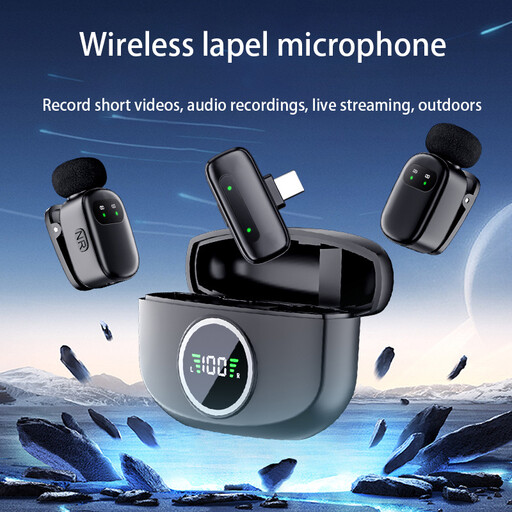
Verbex K21 dual wireless lavalier microphone with iOS connection

Verbex K21 Dual-Mic Wireless Lavalier Microphone, iOS

The dual microphones and iOS connection could suit a recording with two speakers on a compatible iOS device.

The product information lists a charging case and a battery life of 3–6 hours; check that the connection is suitable for your device.

View at Joybuy

Frequently asked questions

Can a lavalier microphone completely filter out conversations from other people at the table?

Don’t assume it can. Position the microphone close to the intended speaker and listen to a test recording in the workspace while others are talking. RØDE explains how positioning a microphone close to the speaker can help improve the balance between their voice and background noise, but that doesn’t mean nearby voices will disappear.

How can I avoid rustling and stop my phone from using the wrong audio source?

Secure the clip and cable so they don’t keep rubbing against your clothes. Then make a short recording with your chosen app and listen back to check that it has actually used the external microphone.

Should I check for an adapter and the returns policy when buying online?

Before placing your order, compare the plug or receiver with your device; some phone combinations need a compatible adapter. According to the Dutch government, many online purchases from a business come with a 14-day cooling-off period, subject to legal exceptions. Check the seller’s terms and conditions; these apply alongside your statutory rights.

Can I record other people in a museum or publish their voices?

Ask the museum about its recording rules. If you process or publicly share information that identifies other people, whether the GDPR applies depends, among other things, on the purpose and audience. The Dutch Data Protection Authority describes a limited exemption for purely personal or household use; don’t assume you have general permission to record other people at the table or publish their voices.

Do I need a licence for a wireless microphone in the Netherlands?

Not for every wireless system. The Dutch Authority for Digital Infrastructure lists frequencies on which wireless microphones can be used without a licence, and notes that some other frequency bands do require one. Check the frequency and conditions for the exact version; interference-free use on shared licence-exempt bands isn’t guaranteed.
