If you’ll be sitting still while recording, start with a wired lavalier that’s confirmed to work with your recorder or phone; going wireless won’t automatically improve your recording in this situation. Choose a wireless set if you need freedom to move, or a lavalier with its own recorder if you want to create a recording file independently. Whichever option you choose, test the attachment, clothing noise and booth acoustics.
Who is this buying guide for?
Voice-over artist recording in one place
You want to record clear, consistent speech and can connect a cable to your recording device. In that case, start by checking the attachment and acoustics: the Acoustical Society of America identifies reflections, mechanical noises and ambient noise as potential recording problems.
Voice-over artist using a phone
You use a phone as a recorder and want to know whether its microphone input or adapter is compatible with the lavalier. Shure Netherlands describes the MVL as suitable for compatible mobile devices with a 3.5mm TRRS connection or a suitable CTIA adapter.
Creator who needs to record independently
You want to be able to move around or create a separate recording file, and are weighing up a wireless set against a lavalier with a pocket recorder. Zoom describes the F2 as offering a standalone recording workflow; SYNCO describes the G4 as a wireless set with different receivers.
What should you look for?
For documentary voice-over work in a small booth, a secure attachment that won’t cause interference, a connection that suits your device and a reliable recording workflow are particularly important. First, work out what your recording device needs and whether you’ll need to move while speaking.
| What to consider |
What should you check? |
Who is this important for? |
| Clear voice recording |
Make a test recording wearing the clothes you plan to use, then listen for ventilation, reflections and rustling. |
When I record speech in one place, I want to hear any interference before starting a long take. Around 36% of consumers put clear voice recording first. |
| Connection |
Check the plug type, microphone input, power requirements and whether your device needs an adapter. |
When I use my phone, camera or recorder, the lavalier needs to be electrically and physically compatible with that input. Around 29% of consumers put device compatibility at the top of their list. |
| Capturing a complete take |
Check the power supply and available storage; make a short test recording and play it back. |
For a long narration session, I want to know in advance how to check the recording and transfer the files afterwards. Around 21% of consumers give recording reliability top priority. |
| Freedom to move |
Check which receiver is included with the model and whether it works with your recording device. |
If I need to move while recording, I don’t want to rely on a cable running to the recorder. Around 14% of consumers put freedom to move first. |
How to avoid common buying mistakes
-
Assuming every 3.5mm lavalier works with every device
A plug of the same diameter doesn’t guarantee electrical compatibility. The Shure MVL is designed for the TRRS phone connection described; the RØDE Lavalier GO uses TRS and requires plug-in power.
Before buying, check the exact input and power requirements of both the microphone and your recording device.
Depending on the combination, you may need a suitable adapter or a different microphone.
-
Expecting wireless or noise cancellation to fix booth echo
Room reflections and mechanical noise are different recording problems from the restriction caused by a cable. The specifications of a wireless set won’t tell you how your booth sounds.
First, make a voice test in the booth and choose wireless only if the extra freedom to move solves a problem with your setup.
-
Hiding a lavalier without testing for clothing noise
Friction between clothing and the capsule or cable can cause handling noise. Shure describes this as a possible source of unwanted noise.
Test with the clothes you’ll actually be wearing, keep fabric away from the capsule and, if needed, carefully secure a hidden cable to the fabric.
Brands to compare
RØDE
RØDE offers wired lavaliers for different recording connections, including the Lavalier GO and Lavalier II.
- RØDE specifies a 3.5mm TRS connection and plug-in power for the Lavalier GO. The Lavalier II also has TRS and a flat capsule for discreet positioning.
- This information doesn’t confirm that the microphones connect directly to a phone with a TRRS input. You should also test the attachment and clothing noise.
Shure
The Shure MVL is a wired lavalier for recording speech on a compatible mobile device.
- Shure describes the MVL as having an omnidirectional capsule and supporting most mobile devices with a 3.5mm TRRS connection or a suitable CTIA adapter.
- If your phone doesn’t have that input, you’ll need a compatible adapter. The specifications don’t confirm a direct connection to every camera or recorder.
Zoom
According to Zoom, the Zoom F2 is a pocket recorder supplied with an LMF-2 lavalier, for a standalone recording workflow.
- Zoom specifies 32-bit float recording and WAV files for the microSD variants.
- These manufacturer specifications aren’t a comparative listening test. You’ll also need to manage power, storage and file transfers.
Deity
Deity’s W.Lav Pro has a lockable 3.5mm TRS plug and is designed for equipment with a compatible connection.
- For this version, Deity lists a compact omnidirectional capsule, a lockable connection and included mounting accessories.
- The plug and pin configuration need to match your device; the 3.5mm label alone isn’t enough to establish compatibility.
SYNCO
The SYNCO G4 is a wireless clip-on option for anyone considering receivers for different recording devices.
- SYNCO describes the G4 model as having two transmitters and different receivers, with a stated transmitter battery life of 8 hours.
- Check which components are included with the model you choose and whether the receiver and radio frequency conditions are suitable for use in the Netherlands.
Joybuy products
These products are wireless clip-on sets for anyone who wants freedom to move while speaking, or connection options for a phone and camera. Check which receiver is included with each model and whether it’s compatible with your device.
 Image unavailable
RØDE Wireless Micro Camera Kit, USB-C
A wireless option if you want to record with a camera or USB-C device and need freedom to move.
According to the product details, this kit includes two microphones, a camera receiver, a smartphone receiver and a charging case. The smartphone receiver is USB-C; the description says you’ll need a separate Wireless Micro Lightning version for older iPhones with Lightning.
View at Joybuy
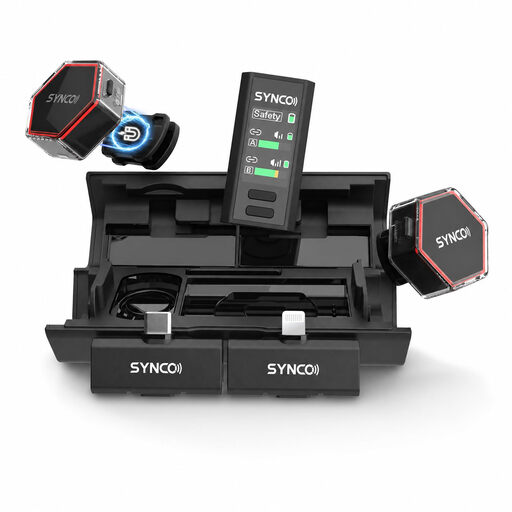 Image unavailable
SYNCO G4 Wireless Lavalier Microphone
A wireless lavalier option if you switch between a phone and camera and your model includes the receivers you need.
The product details list USB-C, Lightning and camera receivers. Before using it in the Netherlands, check that the frequency of your chosen model meets the applicable requirements.
View at Joybuy
 Image unavailable
Moman MA6 Lavalier Microphone, 6 m
A wired option for a fixed setup, provided your recording device supports the connection.
The product details list a 3.5mm connection, a 6 m cable and an omnidirectional clip-on microphone for smartphones. Check the plug type and the microphone input your device requires.
View at Joybuy
Frequently asked questions
Do I need a wireless microphone for voice-over work in a small booth?
No, not if you’ll be staying in one place and have a compatible wired input. Choose wireless for freedom to move, and check the receiver, power supply and applicable frequency requirements.
Where should I attach a lavalier, and how can I reduce rustling?
Start high on your chest and make a test recording in the clothes you’ll actually be wearing. Keep the capsule and cable away from rubbing fabric; for hidden mounting, Shure recommends securing the cable to the fabric to reduce handling noise.
Will a lavalier automatically improve the acoustics in a small booth?
No. Reflections and mechanical background noise may still be audible. Assess the room with a test recording and deal with any sources of interference you hear separately.
Can I plug any lavalier with a 3.5mm plug straight into my phone?
No. Shure specifies the MVL for most compatible mobile devices with a 3.5mm TRRS connection or a suitable CTIA adapter; the RØDE Lavalier GO uses TRS and requires a compatible input with plug-in power. Check that your phone, adapter and microphone work together.
Can I use a wireless microphone in the Netherlands without a licence?
That depends on the frequency used and the conditions that apply. The Dutch Authority for Digital Infrastructure says that wireless microphones usually don’t require a licence, but you must use the correct frequency band. Check the frequency of your chosen model against the latest RDI information.


