What should you look for?
Start with the recording set-up and where the narrator will be, then decide how much freedom of movement and backup you need.
| What to consider |
What should you check? |
Who is this important for? |
| Clear speech |
Position the microphone close to the speaker and make a test recording in the clothes you’ll wear during filming. Listen for quiet speech, echo and movement. |
I want the narration to be easy to follow in this room, even with the room noise in the background. Around 36% of consumers put clear speech first. |
| Connection |
Check the exact input, plug and any power requirements of your camera, recorder or phone. Compare these with the complete microphone set. |
I want to use my existing camera, recorder or phone and know in advance whether the microphone will connect to it. Around 29% of consumers prioritise a compatible connection. |
| Freedom of movement |
Walk the planned route in the actual clothes you’ll wear and check the attachment, receiver and wireless connection. |
I want the narrator to move without a cable running to the camera, and I want to check whether the clip or clothing makes any noise. Around 21% of consumers put freedom of movement first. |
| Backup recording |
Check whether the exact set can record locally, switch on the feature and play back a test file. |
I want an extra file in case a narration is difficult to record again, and I can check the files afterwards. Around 14% of consumers prioritise this kind of backup recording. |
Joybuy products
These products focus on wireless clip-on microphones for a moving narrator, with connections for different recording devices and, depending on the set, extra recording or monitoring features.
 Image unavailable
DJI Mic Mini 2S (2 TX + 1 RX + Charging Case)
This set, with two transmitters and one receiver, is an option if you want to record wirelessly with multiple microphone transmitters.
View at Joybuy
 Image unavailable
RØDE Wireless Micro Camera Kit
This kit suits a set-up where you want to connect both a camera and a USB-C phone.
The set description lists two transmitters with built-in microphones, plus a camera receiver and a USB-C receiver. The transmitters are not standalone lavalier microphones.
View at Joybuy
 Image unavailable
SYNCO P2XT USB-C Wireless Microphone
This version is designed for a compatible USB-C device if you want to monitor audio while recording.
The product description mentions real-time monitoring via the Type-C connection and support for Android devices, recent iPhones, DJI Pocket and Insta360, among others. Check whether your exact device is compatible.
View at Joybuy
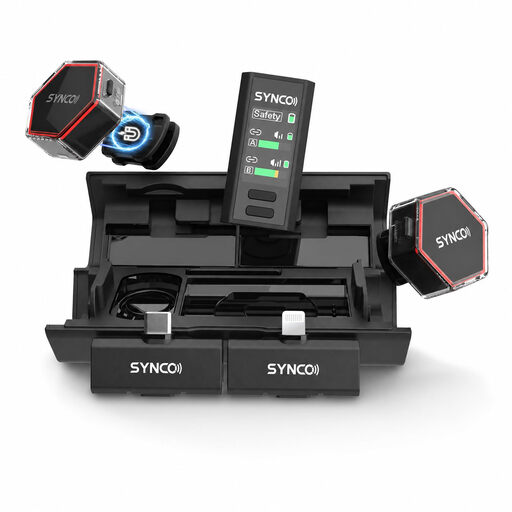 Image unavailable
SYNCO G4 Wireless Lavalier Microphone
This wireless lavalier is an option if you want to record using either a phone or camera. Check which receiver is right for your device before you buy.
The product description lists USB-C, Lightning and 3.5 mm camera receivers, and use with iPhone, Android and cameras.
View at Joybuy
 Image unavailable
Moman M1CXT Wireless Lavalier Microphone (USB-C, 2TX+1RX)
This set may suit interviews or recordings with two transmitters on a compatible USB-C device.
The set includes two transmitters, one receiver and real-time audio monitoring. Check that the USB-C connection is suitable for your recording device.
View at Joybuy
Frequently asked questions
Does noise reduction help with echo in a rehearsal room?
Don’t count on it. Place the microphone close to the narrator and listen to a short recording in the room where you’ll be filming. Placing the microphone nearby doesn’t guarantee that the echo will disappear.
Where should I attach a lavalier, and how can I prevent rustling?
Attach the microphone close to the speaker and make sure the capsule or cable doesn’t rub against clothing. Shure recommends positioning it high on the chest, among other options. Test the attachment while wearing the actual clothes and moving around.
Which connection should I check before buying a lavalier?
Compare the exact input and any power requirements of your camera, recorder or phone with the complete microphone set. A matching plug shape, such as 3.5 mm or USB-C, doesn’t by itself prove that the microphone and device will work together.
Do I need a licence to use a wireless microphone in the Netherlands?
That depends on the frequency used and the conditions that apply. The Dutch Authority for Digital Infrastructure publishes an overview of licence-exempt frequencies for wireless microphones and notes that a licence is required for some other frequency bands. Check the frequency version of the exact set.
Can I film and publish recognisable people in a documentary without asking?
First check which privacy rules apply to your production. The Dutch Data Protection Authority says that the GDPR applies to photographs and videos made on behalf of a business or organisation for professional or commercial purposes; a legal basis under the GDPR is required. The rules or exceptions that apply to a particular production depend on the circumstances.


