Who is this guide for?

Solo voice actor at a desk

If you record different roles one after another and stay in one place, the right connection and a consistent microphone position are important considerations. Shure, Deity and RØDE describe different wired connections and recording setups.

Two people recording dialogue at the same time

If you want to edit a separate channel for each speaker, check that the set and recorder both capture both channels. RØDE describes a split mode for the Wireless GO II; separate channels alone don’t prevent crosstalk.

Voice actor who moves around a lot

If you move between positions or locations while recording, weigh the freedom of a wireless connection against a wired setup. Shure describes these differences as practical considerations; cable and clothing noise are still factors to bear in mind.

What should you consider when choosing?

One wired lavalier

Choose this if: you usually record one voice at a time, stay in one place and have a compatible microphone input.

Trade-off: the cable and TRS or TRRS connection determine how you connect your recording setup.

Two wireless transmitters with separate channels

Choose this if: two people speak at the same time and you want to be able to adjust their levels separately afterwards.

Trade-off: check how many transmitters are included and whether your recorder captures both channels; separate channels don’t rule out crosstalk.

Lavalier for a compatible bodypack

Choose this if: you already use a compatible wireless bodypack and are looking for a clip-on microphone to go with it.

Trade-off: a 3.5mm plug alone doesn’t confirm that the microphone will work with a different recorder or transmitter.

What to consider What to check Who will find this more important
Two voices at once Check the number of transmitters, the channel mode and whether your recording device captures both channels. Make a test recording while both speakers are talking. If I’m speaking at the same time as someone else, I want to be able to adjust the two voices separately afterwards, without expecting the microphones not to pick each other up. Around 36% of consumers give separately editable voices top priority.
Connection to your device Check the microphone input, the TRS or TRRS wiring, and whether an adapter is suitable for your exact recording device. For my phone, computer or recorder, I want to know whether the microphone actually works with the input, not just whether the plug fits. Around 29% of consumers put device compatibility at the top of their list.
Freedom to move Decide whether you’ll move from your spot during a scene. For a wireless set, check the included transmitters and the connections you’ll need. When I change position during a scene, being free to move matters more than having a fixed cable running to the recorder. Around 21% of consumers prioritise freedom of movement.
Clothing noise and placement Make sure clothing doesn’t rub against the capsule or cable. Test the fastening while moving and speaking both softly and loudly. If clothing noise could disrupt my recording, I want to know first whether the microphone stays securely in place while I move. Around 14% of consumers give placement and handling noise top priority.

Common pitfalls

  • Assuming a 3.5mm plug guarantees compatibility

    TRS and TRRS plugs are wired differently, and the input you need varies by microphone and device. So a plug that fits doesn’t guarantee that your recording setup will work.

    Before buying, check the microphone connection, your recorder’s input and whether any adapter is compatible with your exact device.

    You may need a suitable adapter or a different recording interface.

  • Assuming split recording fully separates two voices

    Split mode can record transmitters on separate channels, but it won’t stop one microphone picking up the other person’s voice.

    Make a test recording from the seats you plan to use while both people speak at the same time.

    Allow time for test recordings and adjusting the tracks separately.

  • Assuming a standalone clip-on microphone is a complete wireless set

    A standalone lavalier doesn’t automatically include the transmitter and receiver needed for wireless recording. The Sennheiser ME 2, for example, is designed for compatible evolution Wireless SK bodypacks.

    Check each product to see whether you’re buying one microphone or a complete set, and how many transmitters are included.

    You may also need a compatible transmitter, receiver or second microphone.

  • Assuming discreet mounting means noise-free recording

    Clothing rubbing against the capsule or cable can create handling noise. Shure highlights this as something to consider when using lavalier microphones.

    Test the fastening while moving and speaking both softly and loudly; make sure clothing doesn’t rub against the capsule or cable.

Relevant brands to compare

Shure

The MVL is a wired lavalier for use with a compatible mobile TRRS connection or suitable CTIA adapter.

  • Shure specifies an omnidirectional capsule, clip and windscreen for the MVL.
  • The connection doesn’t confirm that the microphone will work directly with every USB-C port or laptop.

Deity

The V.Lav is a wired option if you need extra cable length and want to use it with a range of 3.5mm microphone inputs.

  • Deity lists a 5-metre cable for the V.Lav and a connection that adapts to many 3.5mm microphone inputs.
  • Still check compatibility with your specific recording device; the cable remains part of your desk setup.

RØDE

The Lavalier II is a standalone lavalier for a compatible TRS recording setup; the Wireless GO II is a separate system option.

  • RØDE specifies a locking 3.5mm TRS plug and mounting accessories for the Lavalier II. For the Wireless GO II, RØDE describes a split mode with separate left and right channels.
  • A standalone Lavalier II isn’t a complete wireless set, and separate channels don’t prevent acoustic crosstalk.

Sennheiser

The ME 2 is designed for use with a compatible evolution Wireless SK bodypack.

  • Sennheiser describes the ME 2 as an omnidirectional lavalier for speech.
  • Check the exact transmitter system; a 3.5mm plug on its own doesn’t confirm compatibility with other recorders.

SYNCO

The G2 Pro range includes versions with one or two transmitters; check which version and set contents apply to the product.

  • SYNCO distinguishes between a version with one transmitter and one with two.
  • The product variant and included equipment determine whether a set is suitable for recording one or two speakers.

Lavalier microphones on Joybuy

This Joybuy selection includes wired and wireless lavalier microphones, including models with two transmitters. Check each model to make sure its connection, set contents and recording channels suit your needs.

SYNCO S8 lavalier microphone for smartphone, PC, laptop and camera

SYNCO S8 Lavalier Microphone

A wired option if the 3.5mm connection is compatible with your recording device. The product title lists smartphones, PCs, laptops and cameras as intended devices; check your device’s input.

View on Joybuy
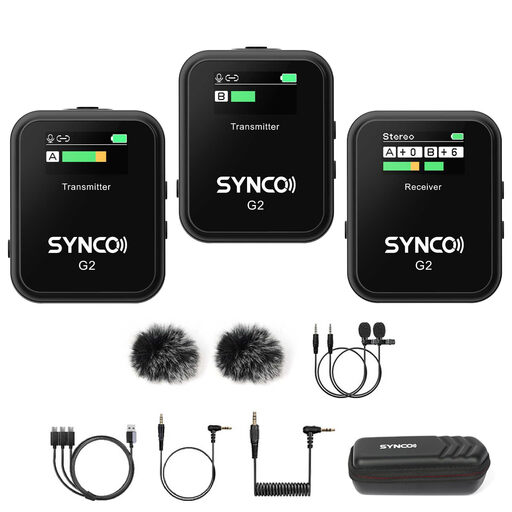
SYNCO G2(A2) wireless two-channel lavalier microphone

SYNCO G2(A2) Wireless Lavalier Microphone

A wireless lavalier for recording dialogue between two people; the product description lists two transmitters and one receiver. Check whether your recording device can capture the channels you need.

View on Joybuy

Moman M1CXT wireless lavalier microphone with USB-C and two transmitters

Moman M1CXT Wireless Lavalier Microphone

The product title lists USB-C and a configuration with two transmitters and one receiver. Check whether your recording device supports the required USB-C connection.

View on Joybuy

SYNCO G3PRO wireless lavalier microphone system with two microphones

SYNCO G3PRO Wireless Lavalier Microphone System

A wireless system for recording two speakers; the product description lists two transmitters and one receiver. Check that the outputs are compatible with your recorder and that both channels are recorded.

View on Joybuy
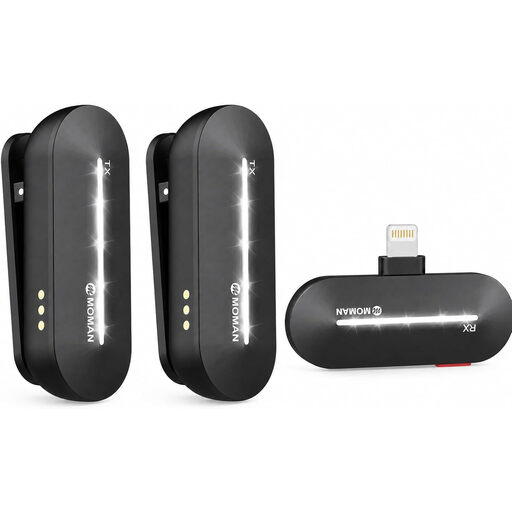
Moman M1CXL wireless lavalier microphone for the listed iPhone models

Moman M1CXL Wireless Lavalier Microphone

The product title lists iPhone 14, 13, 12, 11 and X, with two transmitters and one receiver. Check that the connection on this version is compatible with your device.

View on Joybuy

Frequently asked questions

Can one lavalier record two people at the same desk on separate channels?

Not as two independent microphone channels. If you want to edit each speaker separately, check whether the set has two transmitters or microphone inputs and whether your recording device captures both channels. RØDE describes a split mode for the Wireless GO II; also test for crosstalk.

Why won’t my 3.5mm lavalier work directly with my phone or laptop?

TRS and TRRS connections can use the same plug size, but they’re wired differently. Compare the output of your exact microphone with your device’s microphone input and, if needed, check for a suitable adapter. Shure specifies a compatible TRRS input or CTIA adapter for the MVL.

How can I reduce rustling during a voice recording?

Start with a movement test and position the capsule and cable so that clothing doesn’t rub against them. Shure identifies friction against the capsule or cable as a cause of handling noise.

Can I record and share someone’s recognisable voice if they’re sitting next to me?

A recognisable audio recording can contain personal data. Collecting and using personal data requires a lawful basis under the GDPR; the Dutch Data Protection Authority lists consent as one option and describes a limited exception for exclusively personal or household use. Whether a particular recording or publication falls under that exception depends on the circumstances.

Does every wireless lavalier in the Netherlands need a licence?

Not all frequency use requires a licence. The Dutch Authority for Digital Infrastructure describes frequencies that can be used licence-free under certain conditions. Check the frequency and version of the set you choose; the word ‘wireless’ alone doesn’t confirm whether a specific model is suitable.
